Note
Access to this page requires authorization. You can try signing in or changing directories.
Access to this page requires authorization. You can try changing directories.
Congratulations on being a Microsoft Credentials AI Challenge Sweepstakes winner and receiving a 50% discount certification exam voucher! You will have received an email from ‘MindHub Pro by Pearson VUE’ that contains your voucher code and expiration date.
Note that you must schedule and take your chosen exam by June 30, 2026. You can review the Microsoft Credentials AI Challenge Sweepstakes official rules for the full set terms and conditions.
The discount certification exam voucher is eligible for the following Microsoft Certification exams:
- Microsoft Certified: AI Business Professional (Exam AB-730)
- Microsoft Certified: AI Transformation Leader (Exam AB-731)
- Microsoft 365 Certified: Copilot and Agent Administration Fundamentals (Exam AB-900)
If you have not received an email from ‘MindHub Pro by Pearson Vue’, validate you’ve completed these steps.
- Review the sweepstakes terms and conditions on this page.
- Register for and start one of six Microsoft Credentials AI Challenges by March 2, 2026.
- Earn one of three AI-focused Microsoft Applied Skills between January 20, 2026 and March 2, 2026:
- Microsoft Applied Skill: Streamline business workflows with AI chat
- Microsoft Applied Skill: Generate reports with AI research agents
- Microsoft Applied Skill: Create agents in Microsoft Copilot Studio
- Complete the sweepstakes entry form by March 2, 2026
If you have completed the above steps, you may not have been randomly selected as a winner. Review the Microsoft Credentials AI Challenge sweepstakes official rules and FAQ for more information.
Steps to redeem
Select one of the eligible Microsoft Certification exams after they are released as general availability (GA) in late January:
- Microsoft Certified: AI Business Professional (Exam AB-730)
- Microsoft Certified: AI Transformation Leader (Exam AB-731)
- Microsoft 365 Certified: Copilot and Agent Administration Fundamentals (Exam AB-900)
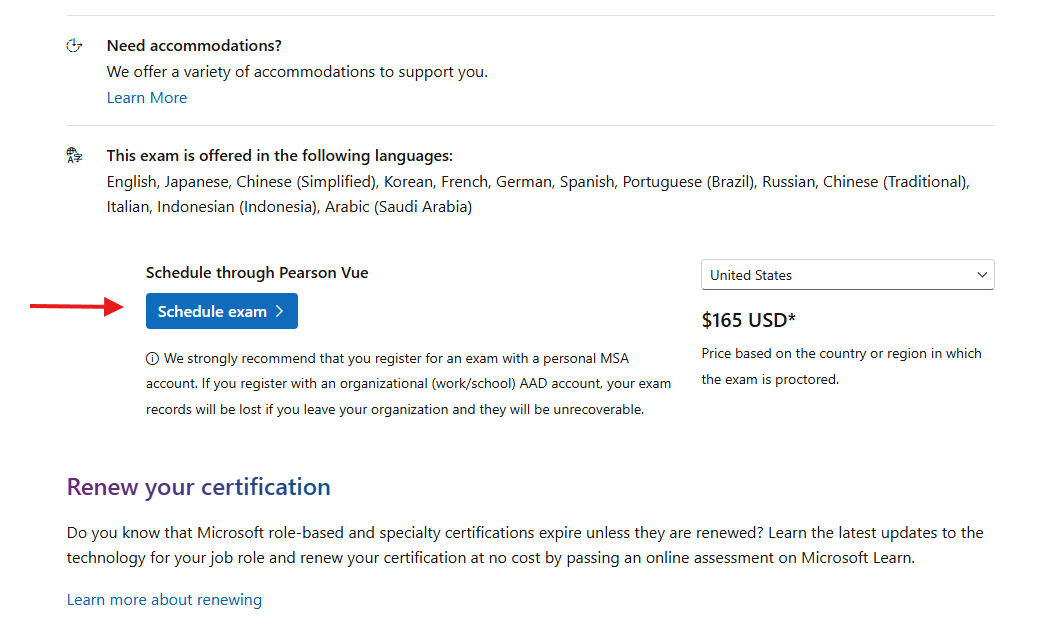
Review the exam details, scroll down and click the “Schedule through Pearson Vue” schedule exam button. Some exams may have two options, make sure to select the Pearson Vue option.
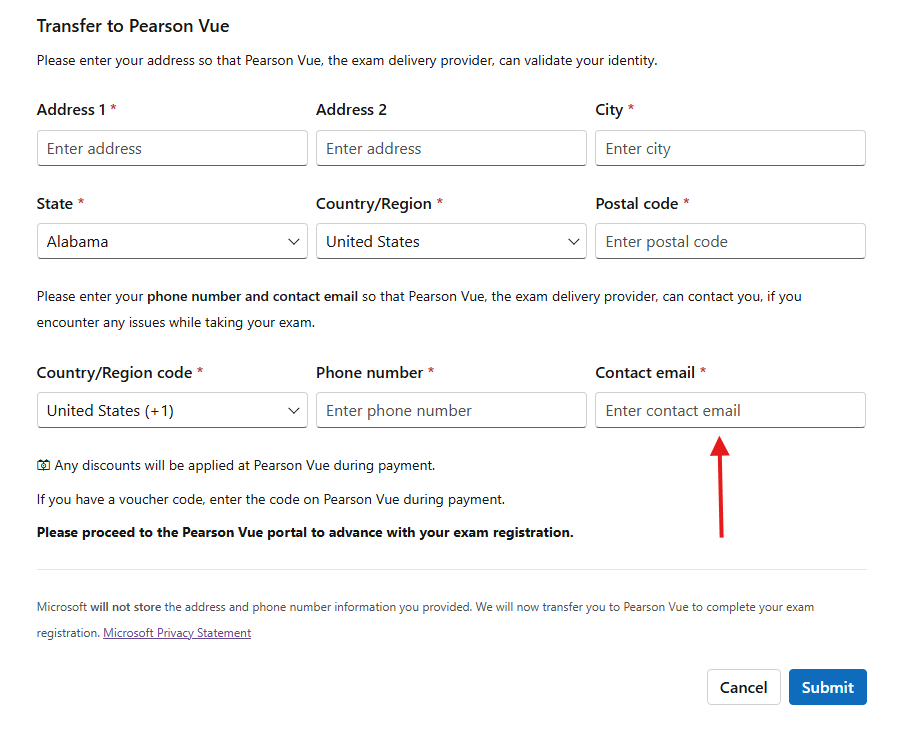
If you are not logged in to your Microsoft Learn profile, you will be asked to do so at this point. After doing so, you will be asked to provide additional information for transfer to Pearson Vue. Complete the form and be sure to provide the same contact email address in which you received your voucher code.
You will be directed to Pearson Vue and prompted to select how you want to take your exam. Options may vary depending on which exam you have selected. Choose your preference and continue, noting that the voucher code you received is not a “Private Access Code”.
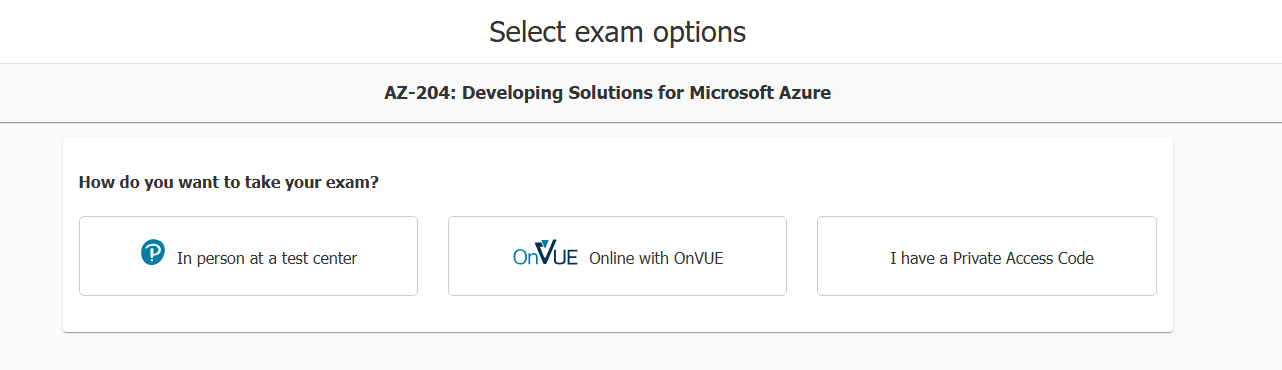
If you select “In person at a test center”, proceed to step 5.
If you select “OnVUE online with OnVUE”, proceed to step 6.
If you have selected to take the exam in person, you will next be prompted to:
a. Select your preferred exam language. Languages provided vary based on exam selected.
b. Agree to Pearson VUE exam terms and Microsoft Certification terms.
c. Select your preferred testing center.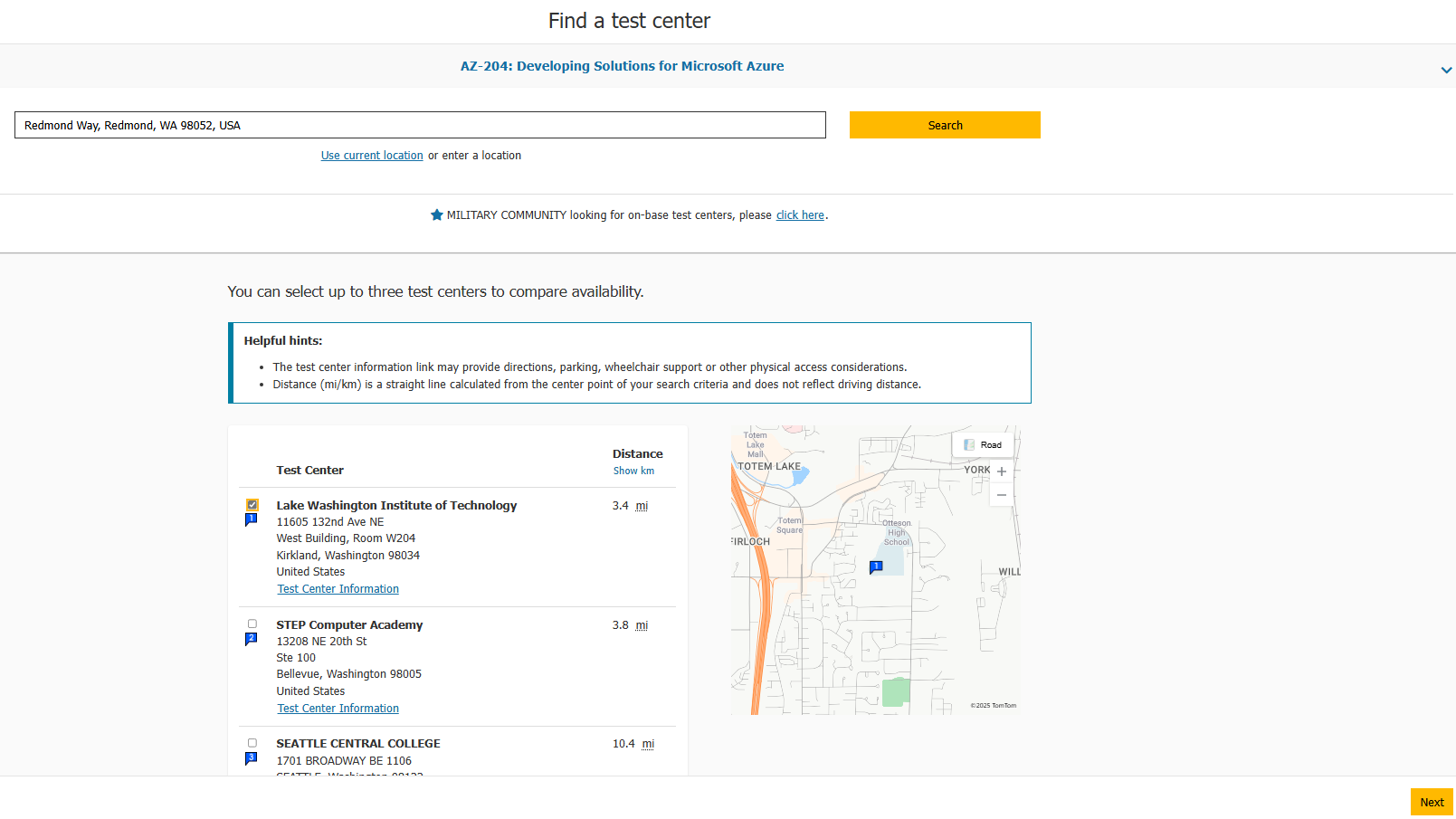
Testing center options will vary based on your location.
d. Select your preferred exam date and time.
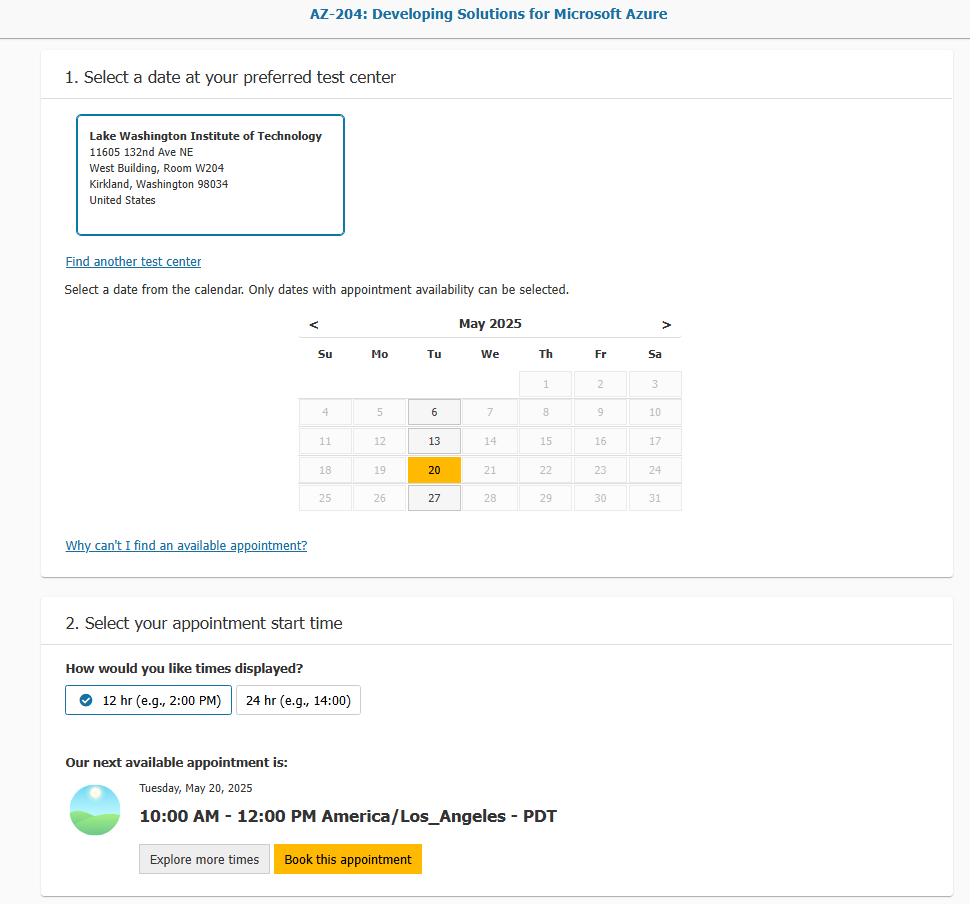
Date and time selected must be before June 30, 2026, to use your voucher. If an exam date beyond June 30, 2026 is selected, you will not be able to apply, the voucher to the cost of the exam.
e. Next you will be asked to confirm your exam scheduled date and contact information. Review and proceed to checkout. It will still display the cost of the exam—this is expected, continue to proceed to checkout.
f. In the next screen, you will see an option for Add Voucher or Promo Code. Enter the voucher code you received via email from ‘MindPro Hub by Pearson VUE’.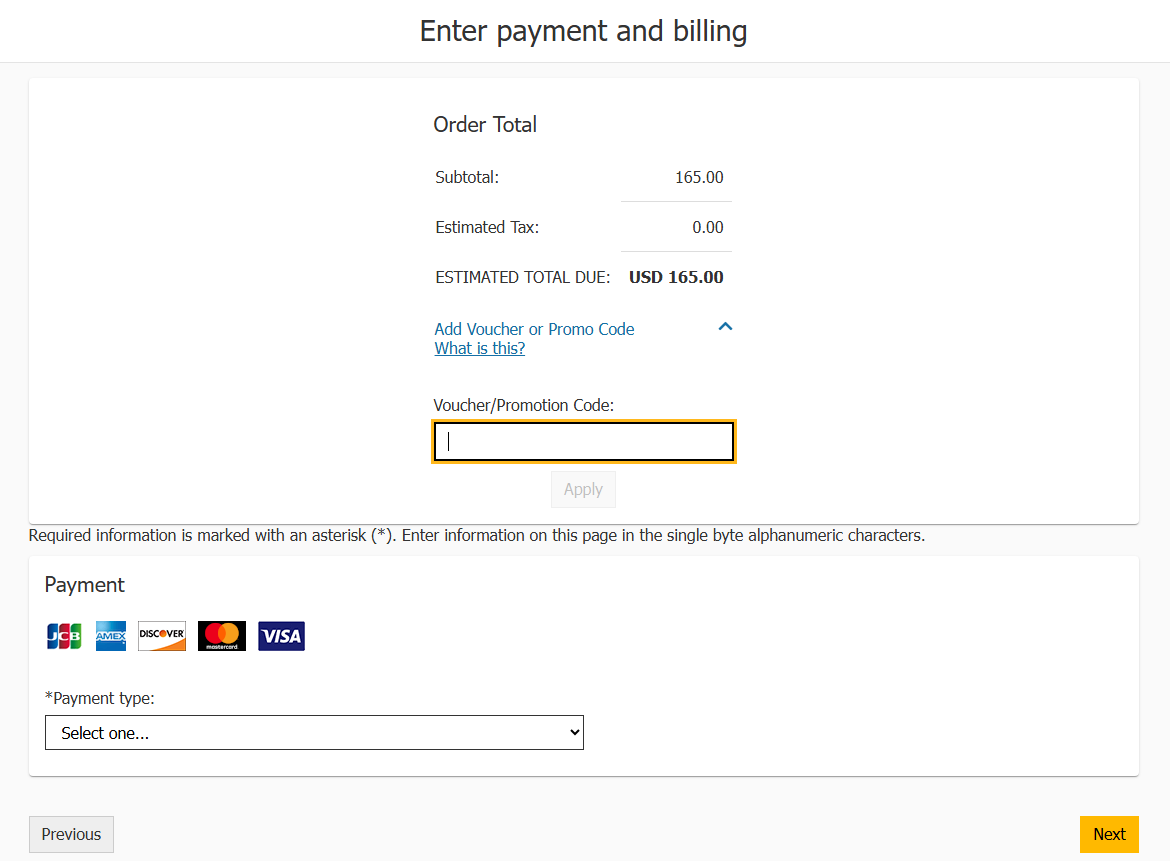
After entering the code, click ‘Apply’ to have it applied to the order, then select ‘Next’ to complete your transaction and schedule your exam!
If you experience any issues attempting to redeem your voucher, please contact mindhubprohelp@pearson.com.
If you have selected to take the exam online, you will next be prompted to:
a. Select your preferred exam language. Languages provided vary based on the exam selected.
b. Agree to Pearson VUE exam terms and Microsoft Certification terms.
c. Select your preferred proctor language. Language availability will vary based on exam selection.
d. Confirm your preferred time zone (will default to browser setting), exam date and time.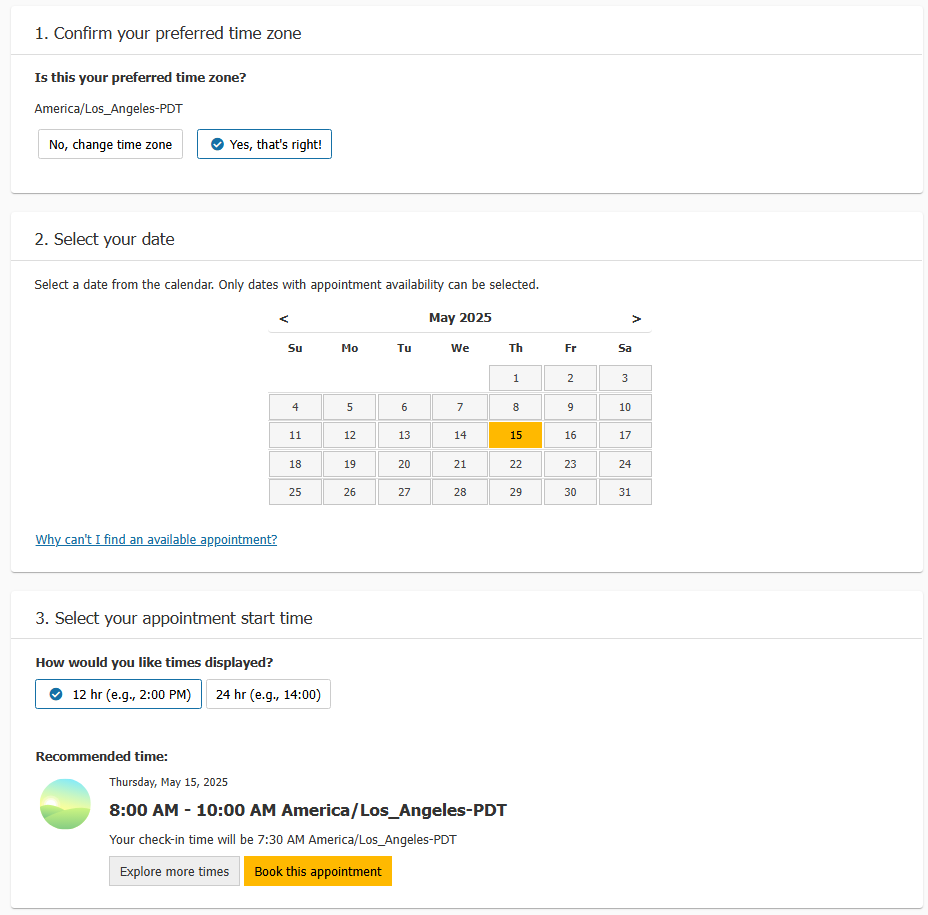
Date and time selected must be before June 30, 2026 to use your voucher. If an exam date beyond June 30, 2026 is selected, you will not be able to apply the voucher to the cost of the exam.
e. Next you will be asked to confirm your exam scheduled date and contact information. Review and proceed to checkout. It will still display the cost of the exam—this is expected, continue to proceed to checkout.
f. In the next screen, you will see an option for Add Voucher or Promo Code. Enter the voucher code you received via email from ‘MindPro Hub by Pearson VUE’.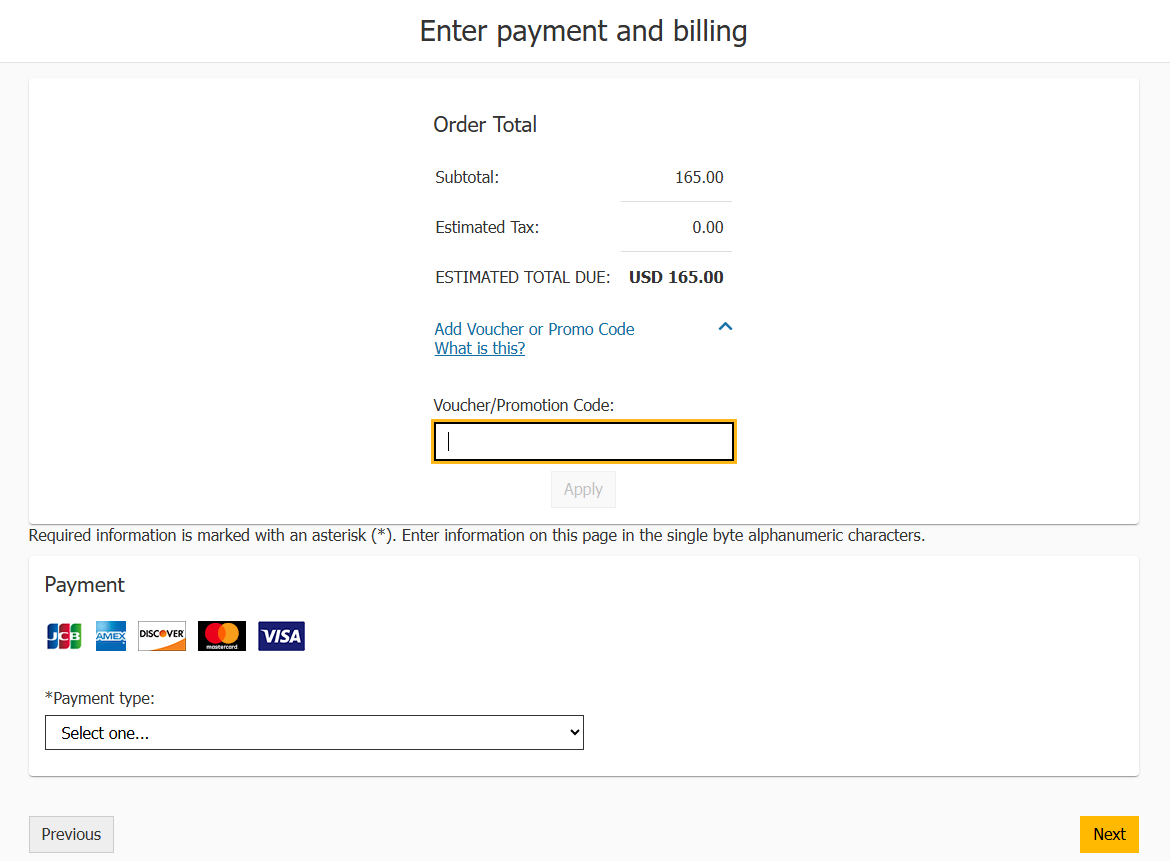
After entering the code, click ‘Apply’ to have it applied to the order, then select ‘Next’ to complete your transaction and schedule your exam!
If you experience any issues attempting to redeem your voucher, please contact mindhubprohelp@pearson.com.