Note
Access to this page requires authorization. You can try signing in or changing directories.
Access to this page requires authorization. You can try changing directories.
Although Copilot in Business Central is available in all geographic areas where Business Central online is available, it requires Microsoft Azure OpenAI Service, which is available only in specific regions.
Depending on where your environment is hosted, you might need to allow data to move outside of your primary data residency to an Azure OpenAI endpoint located in another geography. You provide consent in the Copilot & agent capabilities page. If you don't provide consent, Copilot won't be available to your organization. Learn how to provide consent in Allow data movement across geographies.
Individual Copilot features might not be available in all geographies. Learn more about geographic and language availability at Copilot international availability. Copilot and generative AI features from non-Microsoft publishers, such as those originating from customizations or Marketplace apps you install, each define their own specific Azure OpenAI Service regions. Consult with the extension publisher to understand which regional Azure services are used by the extension.
How data movement across geographies works
When you use Copilot, your inputs (prompts) and outputs (results), including any personal data, might move outside of your geography to the location where the Azure OpenAI Service endpoint is hosted. We might store prompt and output data for up to 24 hours to monitor for abuse, but we don't look at it unless our automated systems flag it for review. We don't use your data to train, retrain, or improve Azure OpenAI Service foundation models. Learn more at Abuse Monitoring.
Important
If your Business Central environment is hosted in the EU Data Boundary, we use an Azure OpenAI endpoint in the same boundary. Learn more in EU Data Boundary countries and datacenter locations.
The following table shows which Azure OpenAI geography is used for Copilot based on where your Business Central environment is hosted, and whether consent is required.
| Azure geography/regions where your Business Central environment is hosted | Azure geography where Azure OpenAI Service is hosted | Consent required for data movement across geographies? | What you need to do |
|---|---|---|---|
|
United States | No | No action required. Data doesn't move across geographies in this scenario. |
|
Within EU Data Boundary (covers multiple geographies) | Yes | Processing can occur across geographies within the EU boundary. By default, the Allow data movement toggle on the Copilot & agent capabilities page is on. If you don't want to provide consent to data movement, turn off the toggle. In this case, Copilot features won't be available to your organization. |
|
Copilot features within the same geographic area as the Business Central environment. Agent features within EU Data Boundary (covers multiple geographies) |
Yes | Agent processing can occur across geographies within the EU boundary. By default, the Allow data movement toggle on the Copilot & agent capabilities page is on. If you don't want to provide consent to data movement for agents, turn off the toggle. In this case, neither Copilot or agent features will be available to your organization. Alternatively, turn on the toggle to allow using Copilot features, but turn off all agent features. |
|
Copilot features within the same geographic area as the Business Central environment. Agent features within United States |
Yes | Agent processing can occur across geographies within the EU boundary. By default, the Allow data movement toggle on the Copilot & agent capabilities page is on. If you don't want to provide consent to data movement for agents, turn off the toggle. In this case, neither Copilot or agent features will be available to your organization. Alternatively, turn on the toggle to allow using Copilot features, but deactivate all agent features. |
|
United States | Yes | By default, the Allow data movement toggle on the Copilot & agent capabilities page is on. If you don't want to provide consent to data movement, turn off the toggle. In this case, Copilot features won't be available to your organization. |
How to find the Azure region of a Business Central environment (data residency)
To find the Azure region where a Business Central environment is hosted, sign in to the Business Central admin center, choose the environment to display details, and then find the Azure Region field. Learn more: Managing production and sandbox environments in the admin center
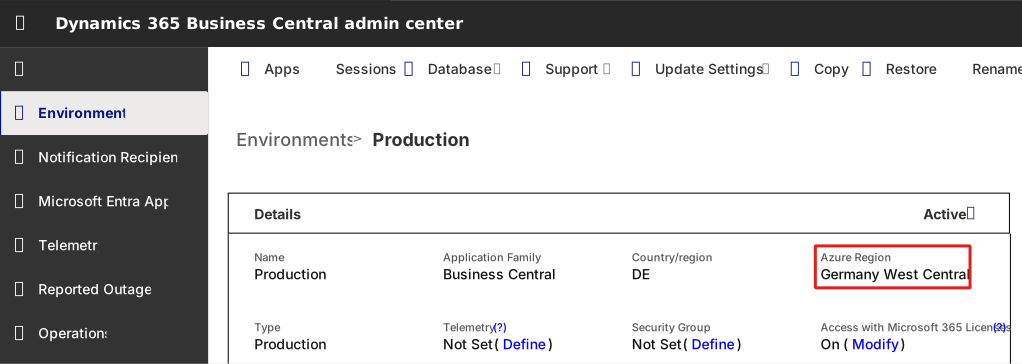
Understanding Azure OpenAI Service geography and data residency
This section provides detailed information about the geographic factors that affect Copilot data movement and availability.
Business Central country/region version
What it is: The localized version of Business Central used on an environment specified by an admin when the environment was created.
Why it matters:
- Controls which regulatory features, tax calculations, and reporting formats are available
- Determines which localization-specific functionality you have access to
- Automatically determines the Azure region where Business Central data is stored
- Can't be changed after environment creation
Key point: It's about localization and regulatory compliance, not the physical data location or language.
Example: A Denmark (DK) environment includes Danish VAT rules, tax reporting, and regulatory requirements, regardless of where the environment is physically hosted.
Azure region for Business Central data residency
What it is: The Azure region where your Business Central environment database is physically hosted and stored, like Europe (West) or United States (East)
Why it matters:
- Determines physical location of your business data
- Automatically determined by environment's country/region setting chosen by admin when environment created.
- Affects data residency compliance and regulations
- Can result in cross-geography data movement if Azure OpenAI Service operates in a different geography
Key point: It's about where your business data lives.
Example: A Danish (DK) environment is hosted in Azure's Europe North region, keeping your customer data, transactions, and business records.
Azure OpenAI Service geography
What it is: The physical Azure data center regions where the AI model processes your prompts and generates responses. An Azure geography can consist of one or more data center regions.
Why it matters:
- Determines where AI processing occurs for compliance and data sovereignty
- Affects latency and performance of AI responses
Key point: It's about where the AI thinks, not where your business data lives.
Example: When you use analysis assist in Business Central, your prompt is sent to an Azure OpenAI endpoint in a specific geography (such as Europe, United States, or Asia Pacific) for processing.
How geography and data residency factors work together
These two geographic factors are independent but work together with environment configuration and language settings to determine Copilot availability:
┌─────────────────────────────────────────────────────────────────┐
│ User in US                                                      │
│                                                                 │
│ [1] Uses Business Central in language: Spanish (United States)  │
│         ↓                                                       │
│ [2] Environment country/region is: United States                │
│         ↓                                                       │
│ [3] Environment data stored in Azure region: United States      │
│         ↓                                                       │
│ [4] Copilot response returned in: Spanish (United States)       │
└─────────────────────────────────────────────────────────────────┘

   ✓ Copilot processing stays in the United States geography
Cross-geography scenario:
┌─────────────────────────────────────────────────────────────────┐
│ User in Japan                                                   │
│                                                                 │
│ [1] Uses Business Central in language: Japanese (Japan)         │
│         ↓                                                       │
│ [2] Environment country/region is: Japan (JP)                   │
│         ↓                                                       │
│ [3] Environment data stored in Azure region: Japan West         │
│         ↓                                                       │
│         ↓  ! DATA CROSSES GEOGRAPHY BOUNDARY                    │
│         ↓                                                       │
│ [4] Copilot prompt sent to AZURE OPENAI in: United States West  │
│     (Feature not yet available in Asia geography)               │
│         ↓                                                       │
│         ↓  ! RESPONSE CROSSES GEOGRAPHY BOUNDARY                │
│         ↓                                                       │
│ [5] Response returned in: Japanese (supported language)         │
└─────────────────────────────────────────────────────────────────┘

   !  Cross-geography data movement occurs
   → Check your organization's data residency policies
Learn more about all factors affecting Copilot availability in Copilot country/region availability and supported languages.
Related information
What is the EU Data Boundary?
Business Central country/regional availability and supported languages