Note
Access to this page requires authorization. You can try signing in or changing directories.
Access to this page requires authorization. You can try changing directories.
Learn how to keep member profile and verification data up-to-date using polling or push notifications.
Note
This guide focuses on refresh strategies for keeping data current and is only available for Plus tier. For initial data retrieval, call /verificationReport and /identityMe directly when the member authorizes your app.
Choose Your Refresh Method
| Method | Best For | When to Use |
|---|---|---|
| Validation Status API | Bulk checks | Daily background jobs to check many members |
| Push Notifications | Real-time updates | Event-driven notifications |
Important
Critical: Regardless of how you detect data changes (polling via /validationStatus or push notifications), you must call the actual endpoints (/verificationReport and /identityMe) with the member's 3-legged OAuth access token to retrieve updated data. Status checks and notifications only indicate that changes exist—they don't contain the actual data.
Method 1: Validation Status API (Polling)
When to Use
- Performing bulk validation checks (up to 500 members)
- Running scheduled background jobs
- Checking if member data has been updated without member interaction
- Monitoring validation status across your entire user base
How It Works
Check status (2-legged OAuth, no member consent needed):
- Call
/validationStatuswith up to 500 memberids - Get status:
VALID,INVALID, orVALID_WITH_UPDATES
- Call
Refresh data (3-legged OAuth, member consent required):
- For members with
VALID_WITH_UPDATESorINVALIDstatus - Call
/verificationReportand/identityMewith member's access token - Store updated data
- For members with
Tip
Make sure you've stored the required fields listed in Critical Fields to Persist before implementing this method.
Recommended Polling Interval
Poll once per day (every 24 hours)
- Run during off-peak hours to minimize impact
- Batch requests (up to 500 members per call) to stay within rate limits
- Only call actual endpoints
/verificationReportand/identityMefor members with status changes
Best Practices
- ✅ Run polling during off-peak hours
- ✅ Batch requests (up to 500 members per call)
- ✅ Only call actual endpoints for members with
VALID_WITH_UPDATESorINVALID - ✅ Implement exponential backoff for rate limit errors
Method 2: Push Notifications
Push notifications provide real-time updates when member data changes, eliminating the need for constant polling.
Note
To set up webhooks and enable push notifications for your application, please work with the Verified on LinkedIn Support team (voli-support@linkedin.com).
When to Use
- You need immediate notification when member data changes
- Event-driven architecture where you want to react to changes as they occur
- Reducing API calls compared to frequent polling
How It Works
- Register a webhook to receive push notifications
- Receive notifications when member verification or profile data changes
- Refresh data by calling
/verificationReportand/identityMewith the member's 3-legged OAuth access token
Important
Push notifications indicate that changes exist—they do not contain the actual updated data. You must call the actual endpoints to retrieve the new data.
How to Register a Webhook?
Webhooks allow your application to receive real-time HTTP notifications when subscribed events occur. Only applications with approved webhook use cases can register and receive these notifications. LinkedIn sends notifications only to webhook endpoints that are properly registered and successfully validated.
1. Register Your Webhook URL
- Open your application in the LinkedIn Developer Portal.
- Navigate to the Webhooks tab.
- Click Create Webhook.
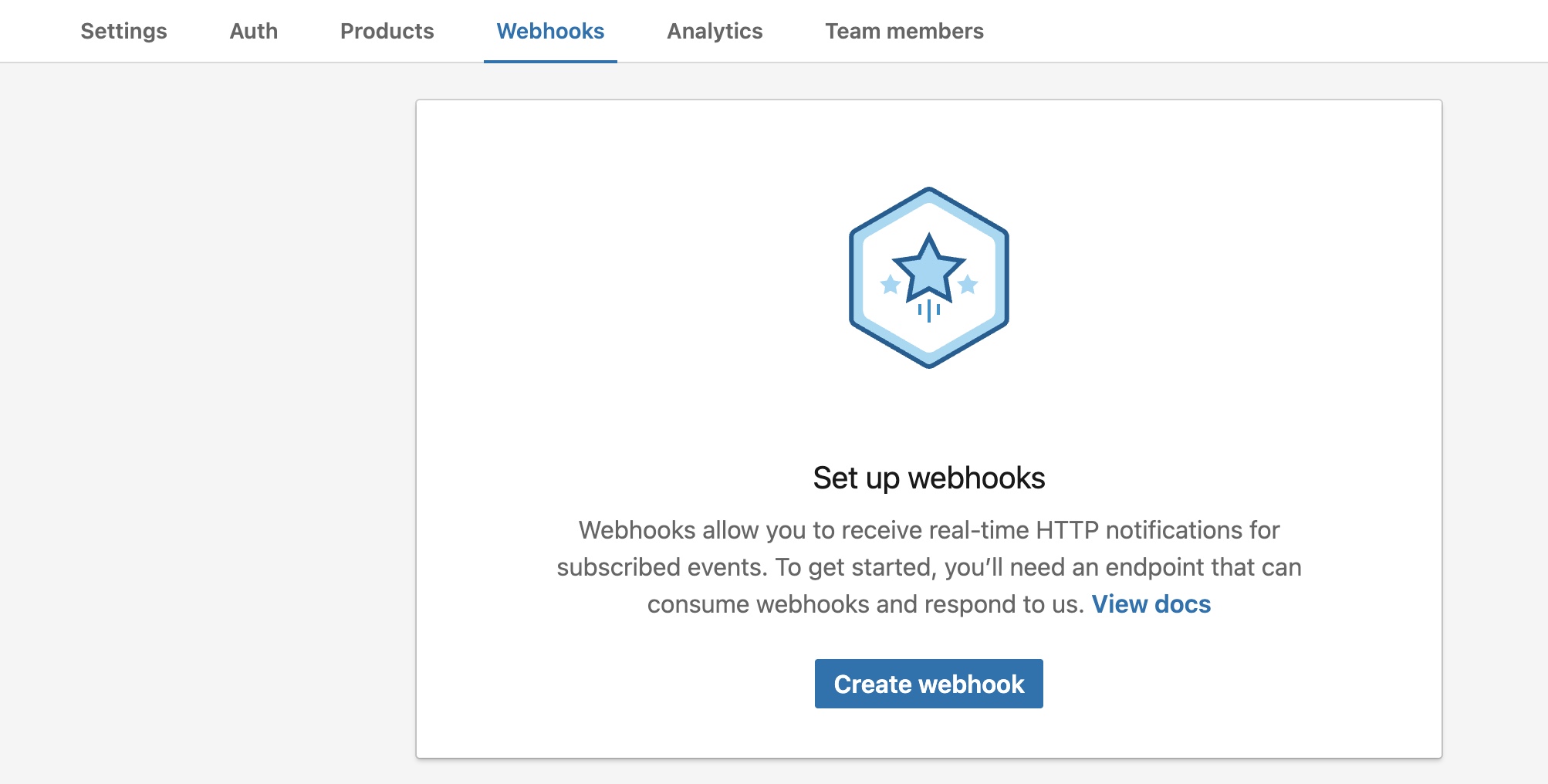
Note
The Webhooks tab is visible only for applications that have been approved for webhook usage. Applications with the Verified on LinkedIn product will see the Webhooks tab in the Developer Portal. To learn more, refer to our LinkedIn Webhooks Setup guide.
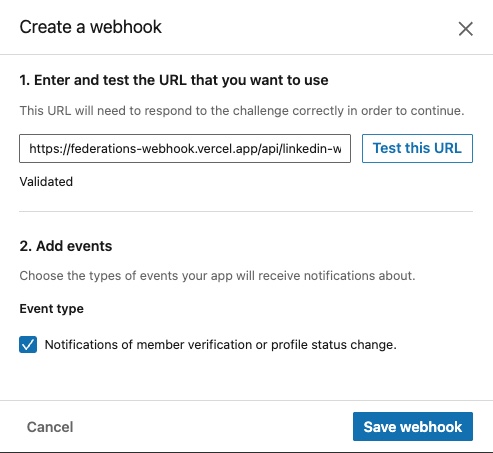
2. Enter and Test Your Webhook Endpoint
When configuring your webhook in the LinkedIn Developer Portal, enter the HTTPS endpoint where your application will receive LinkedIn push notifications.
Click Test to validate the webhook URL.
3. Choose Event Types
Select the events your application should be notified about. For Verified on LinkedIn integrations, choose:
- Notifications of member verification or profile status change.
This ensures your webhook receives updates whenever a member’s verification or profile data changes.
4. Validating the Webhook Endpoint
LinkedIn validates the ownership of a webhook URL before it can be registered by an application. The validation flow leverages the application's clientSecret as the secret key along with the universally-known HMACSHA256 algorithm to generate and validate the application's response to a challenge code.
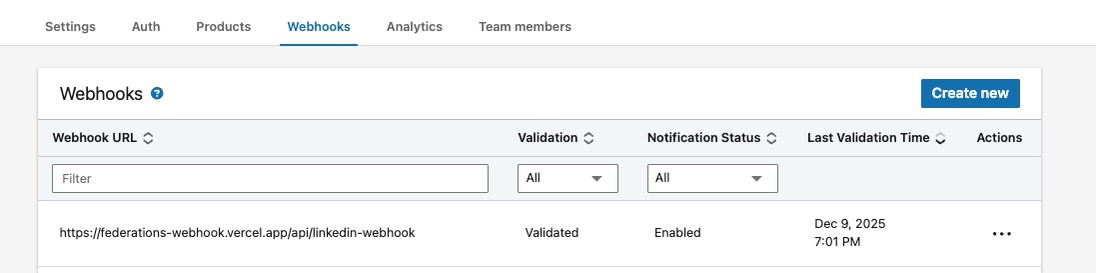
Once you save the URL and events, the webhook will appear with validation status and notification status along with last validation time.
Event Payload
When member data changes, you'll receive a FEDERATED_MEMBER_DATA_STATUS_CHANGE event with the following structure:
Example: Access Revoked
When a member revokes your application's access, verification and profile status fields are not included:
{
  "id": "H6slYd_dso",
  "type": "FEDERATED_MEMBER_DATA_STATUS_CHANGE",
  "developerApplicationId": 220828831,
  "eventTimestamp": 1762378846790,
  "statusUpdate": {
    "isAccessRevoked": true
  }
}
Example: Data Status Change
When member data changes but access is not revoked, the payload includes current status values:
{
  "id": "K9mtZe_ftq",
  "type": "FEDERATED_MEMBER_DATA_STATUS_CHANGE",
  "developerApplicationId": 220828832,
  "eventTimestamp": 1762378856790,
  "statusUpdate": {
    "isAccessRevoked": false,
    "verificationStatus": {
      "identity": "INVALID",
      "workplace": "VALID_WITH_UPDATES"
    },
    "profileInformationStatus": "VALID"
  }
}
Payload Fields
| Field | Type | Description |
|---|---|---|
id |
string | The member's unique identifier for your application |
type |
string | Event type: FEDERATED_MEMBER_DATA_STATUS_CHANGE |
developerApplicationId |
number | Your application's ID |
eventTimestamp |
number | Unix timestamp (milliseconds) when the change occurred |
statusUpdate |
object | Contains the status change details |
Status Update Fields
| Field | Type | Description |
|---|---|---|
isAccessRevoked |
boolean | true if the member revoked access to your application |
verificationStatus |
object | Contains identity and/or workplace status (only present when isAccessRevoked is false) |
profileInformationStatus |
string | Status of profile data: VALID or INVALID (only present when isAccessRevoked is false) |
Status Values
For verificationStatus.identity and verificationStatus.workplace:
| Status | Meaning | Action Required |
|---|---|---|
VALID |
Data is current and accurate | No action needed |
INVALID |
Data should be removed | Call /verificationReport to refresh |
VALID_WITH_UPDATES |
Data is valid but has newer verification timestamp (Member re-verified) | Optionally call /verificationReport to get latest |
For profileInformationStatus:
| Status | Meaning | Action Required |
|---|---|---|
VALID |
Profile data is current | No action needed |
INVALID |
Profile data should be refreshed | Call /identityMe to refresh |
Note
- If the member has no identity verification,
verificationStatus.identitywill not be present - If the member has no workplace verification,
verificationStatus.workplacewill not be present - If neither verification type exists, the entire
verificationStatusobject will not be present - Similarly,
profileInformationStatusis only included when profile data status is known
Handling Notifications
- Receive notification
- Check
isAccessRevoked:- If
true→ Remove member's data from your system - If
false→ Continue to step 3
- If
- Check each status field present in the payload:
INVALID→ Must refresh dataVALID_WITH_UPDATES→ Consider refreshing dataVALID→ No action needed
- Call
/verificationReportand/or/identityMewith member's access token - Update your stored data
Best Practices
- ✅ Validate the
developerApplicationIdmatches your application - ✅ Use
eventTimestampto ignore out-of-order or duplicate notifications - ✅ Compare
eventTimestampwith your storedlastRefreshedAtto avoid processing stale notifications - ✅ Implement idempotent processing to handle potential duplicate deliveries
- ✅ When
isAccessRevokedistrue, delete or invalidate the member's stored data and tokens
Critical Fields to Persist
To effectively manage data freshness, you must persist these fields from the API response:
| Field | Source | Why It's Critical |
|---|---|---|
id |
/verificationReport, /identityMe |
Required for /validationStatus checks and push notifications. Uniquely identifies the member for your application. |
refresh_token |
OAuth token response | Required to obtain new access tokens without member re-authorization. Essential for refreshing data when member is not actively using your app. |
lastRefreshedAt |
/verificationReport, /identityMe |
Timestamp of when data was last updated. Use to ignore stale push notifications and avoid unnecessary API calls. |
Warning
The userId field will be deprecated in future API versions. Use the id field as the standard identifier (available since version 202510). Only persist userId if you are migrating from an older API version and need temporary backward compatibility.
Storage Best Practices
- ✅ Encrypt and store tokens
- ✅ Store in secure backend database with proper access controls
- ✅ Index the
idfield for fast lookups - ✅ Implement token rotation and secure deletion policies
- ✅ Never store tokens in client-side storage (cookies, localStorage)
Related Resources
- /identityMe API – Profile details endpoint
- /verificationReport API – Verification details endpoint
- /validationStatus API – Bulk validation endpoint
- Webhooks Guide – Learn how to register and validate webhook endpoints for receiving real-time notifications
- Quickstart Guide – Get started in 5 minutes
- FAQ – Troubleshooting and answers