Note
Access to this page requires authorization. You can try signing in or changing directories.
Access to this page requires authorization. You can try changing directories.
There are six states supported by the Pairing Service State Machine:
- Unpaired – This is the initial state of a fresh-new touchscreen console or Front of Room; no device ID, IP, or public key information is stored on a device.
- Unpairing – This is the transitioning state between Unpaired and Connected states.
- Connected – This is the state representing that the touchscreen console has established a connection with front of room successfully; both device’s Pairing Service client can get peer device information in this state, such as peer device name, IP, etc.
- Disconnected – This state represents there was a network issue in Connected state; after network issue occurred, the state changed from Connected to Disconnected.
- Connecting – When network becomes available in Disconnected state, Pairing Service will try to reestablish the connection again, in this case, state changes from Disconnected to Connecting. If it re-establishes connection successfully, the state changes from Connecting to Connected again.
- Unpairing – When client app invokes unpair command to Pairing Service in Connected state, the state changed from Connected to Unpairing. Once the unpairing procedure is completed successfully, the state changes from Unpairing to Unpaired again.
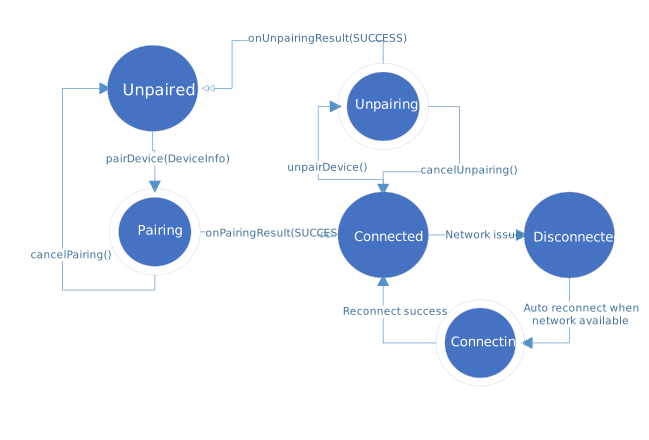
Touch console Pair/Unpair State Diagram
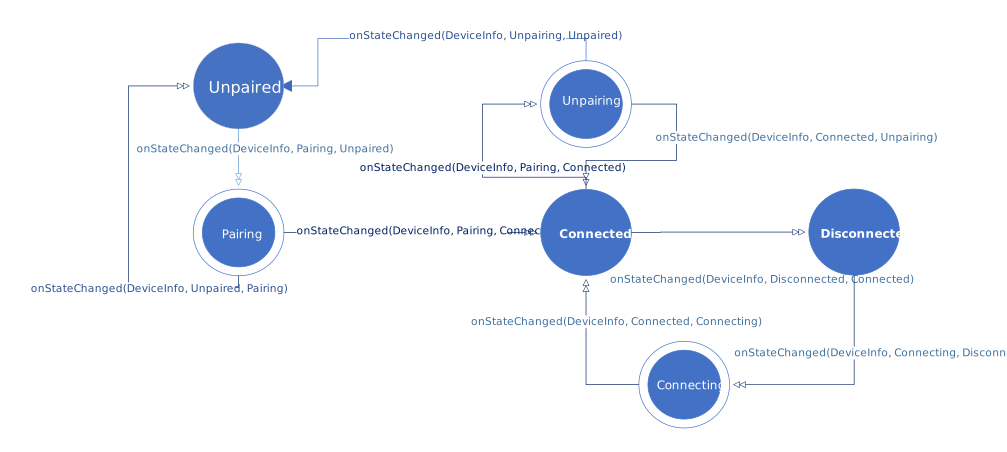
Touch console and front of room Monitor State Diagram