Note
Access to this page requires authorization. You can try signing in or changing directories.
Access to this page requires authorization. You can try changing directories.
Copilot Cowork ships with several models so you can match the model to the work. Most of the time, leave the picker on Auto so Cowork can choose the model for your task.
Where you pick a model
The default selection is Auto. The available model list reflects the models that your organization makes available to you.
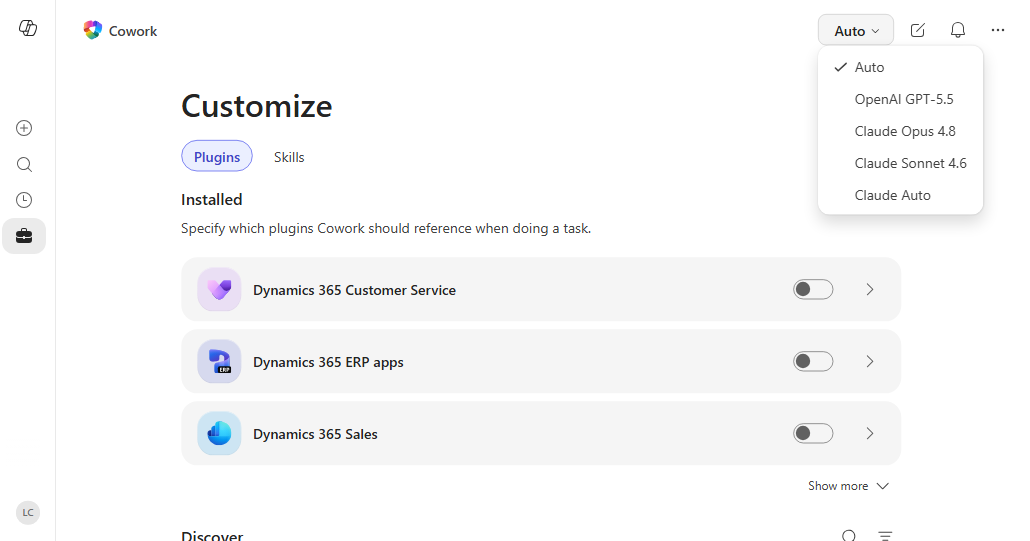
When you choose a model, Cowork keeps that selection on the device you're using until you change it. If you switch back to Auto, Cowork returns to the default model selection behavior, which includes surfacing your most recent models at the top.
When to use Auto
Use Auto for most work. Auto picks the model best suited to the task you describe, so you don't need to choose a model before every request.
Available models
The model picker can include the following models and model modes, depending on what your organization allows.
| Model | Best for | Notes |
|---|---|---|
| Auto | Most day-to-day work. | The default. Cowork picks the model best suited to the task you describe. |
| Claude Opus 4.8 | For complex, high-stakes work like deep reasoning, multi-step analysis, complex research, and writing. | Use for work that needs careful reasoning across several sources or steps. See Anthropic subprocessor info for data handling. |
| Claude Sonnet 4.6 | Efficient for everyday tasks and fast responses such as drafting, quick lookups, and day-to-day work. | Use when you want a shorter response cycle for common tasks. See Anthropic subprocessor info for data handling. |
| Sonnet + Opus Advisor | For everyday tasks with expert-level guidance. A paired mode where Sonnet handles the main turn and Opus reviews the result for accuracy and completeness. | Use for important deliverables where you want a second pass without managing two conversations. See Anthropic subprocessor info for data handling. |
| GPT 5.5 (Frontier) | Versatile across task types and great for verbose writing and citations. | Hosted in Azure AI Foundry |
How model choice affects responses
Changing the model can affect response speed, response depth, and output style. Some models are optimized for faster drafting, while others spend more time on reasoning and review.
Cowork shows a model badge in the conversation so you can see which model produced a response. If you use Sonnet + Opus Advisor, the conversation also shows when the advisor review is active and when it finishes.
Models hosted by Microsoft
We may deploy other AI models for Microsoft 365 Copilot to use that are hosted and operated by Microsoft. These models are governed by the same contractual and data protection commitments already in place, including that no data leaves Microsoft. For more information about models that may be used by Copilot, see Understanding AI functionality and models in Microsoft Online Services.
Admin controls
If you're an admin, you can turn off individual models in the Microsoft 365 admin center under Copilot settings.
For more information about organization-wide Cowork settings, see Manage Cowork for your organization.