Note
Access to this page requires authorization. You can try signing in or changing directories.
Access to this page requires authorization. You can try changing directories.
This article is not available for the selected development language.
What is an A2A Server?
An A2A server is an agent that exposes its capabilities to other agents using the A2A protocol. With this package, you can make your Teams app accessible to A2A clients.
Adding the A2APlugin
To enable A2A server functionality, add the A2APlugin to your Teams app and provide an agentCard:
import { AgentCard } from '@a2a-js/sdk';
import { A2APlugin } from '@microsoft/teams.a2a';
import { App } from '@microsoft/teams.apps';

const agentCard: AgentCard = {
  name: 'Weather Agent',
  description: 'An agent that can tell you the weather',
  url: `http://localhost:${PORT}/a2a`,
  version: '0.0.1',
  protocolVersion: '0.3.0',
  capabilities: {},
  defaultInputModes: [],
  defaultOutputModes: [],
  skills: [
    {
      id: 'get_weather',
      name: 'Get Weather',
      description: 'Get the weather for a given location',
      tags: ['weather', 'get', 'location'],
      examples: [
        'Get the weather for London',
        'What is the weather',
        "What's the weather in Tokyo?",
        'How is the current temperature in San Francisco?',
      ],
    },
  ],
};

const app = new App({
  plugins: [
    new A2APlugin({
      agentCard,
    }),
  ],
});
Agent Card Exposure
The plugin automatically exposes your agent card at the path /a2a/.well-known/agent-card.json.
Handling A2A Requests
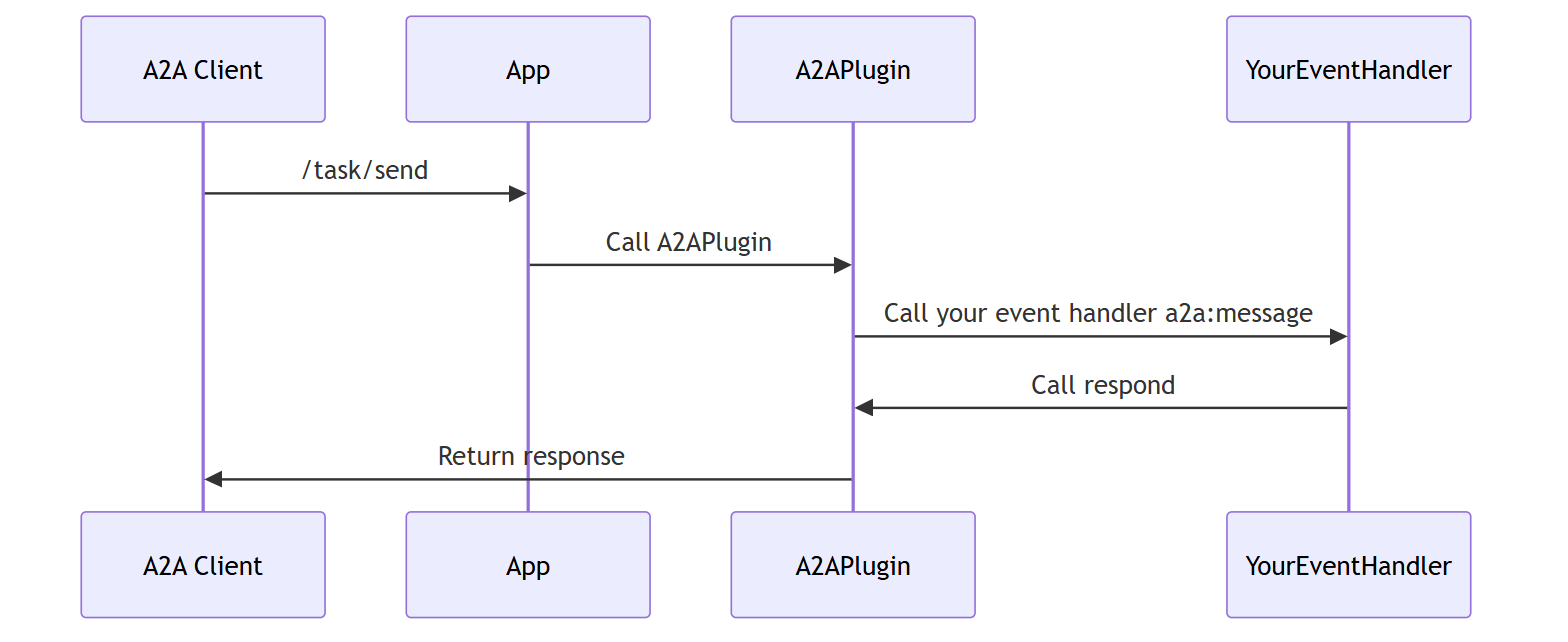
Handle incoming A2A requests by adding an event handler for the a2a:message event. You may use accumulateArtifacts to iteratively accumulate artifacts for the task, or simply respond with the final result.
app.event('a2a:message', async ({ respond, requestContext }) => {
  logger.info(`Received message: ${requestContext.userMessage}`);
  const textInput = requestContext.userMessage.parts
    .filter((p): p is TextPart => p.kind === 'text')
    .at(0)?.text;
  if (!textInput) {
    await respond('My agent currently only supports text input');
    return;
  }
  const result = await myEventHandler(textInput);
  await respond(result);
});
Note
- You must have only a single handler that calls
respond. - You must call
respondas the last step in your handler. This resolves the open request to the caller.
Sequence Diagram