Note
Access to this page requires authorization. You can try signing in or changing directories.
Access to this page requires authorization. You can try changing directories.
In partnership with Amazon, Microsoft has created this guide to help Microsoft Monetize publishers and curators communicate with their buyers about accessing and targeting Monetize’s publisher inventory using Amazon as their DSP. This information has been created in collaboration with and approved by the Amazon team.
Note
The platforms can and will change regularly. We will do our best to update this guide as needed.
Overview
Amazon DSP's integration with Microsoft Monetize enables advertisers to access premium inventory while maintaining Amazon DSP's robust measurement and optimization capabilities. This guide addresses common questions about Amazon DSP's integration with Microsoft Monetize, ensuring efficient deal activation and preventing potential setup delays that could impact campaign performance.
Terminology mapping
To help navigate terminology differences between platforms, here's a mapping of equivalent terms used in Amazon DSP and Microsoft Monetize:
| Amazon DSP | Microsoft Monetize |
|---|---|
| Deal Creation ID | Buyer Seat ID. |
| Catalogue Deals | Bidder Level Deals |
| Inventory Hub | Media Marketplace |
| Preferred Deal | Fixed Price Deal. |
| Private Auction Deal | Private Marketplace (PMP) Deal |
| Publisher ID | Seller Member ID |
| Entity | Buyer Seat |
| Order | Campaign |
| Ad Group | Line Item |
Supported formats and deal types
Microsoft Monetize’s integration with Amazon DSP supports a comprehensive range of formats across multiple channels:
| Environment | Format |
|---|---|
| Web | - Display - Video |
| Mobile App | - Display - Video |
| CTV | Video (only bought via deals) |
Deal types and trading methods
In addition to standard open auction transactions, advertisers can access Microsoft Monetize’s supply through two distinct trading methods, each designed to meet specific campaign objectives and commitment levels:
- Private Auction Deals: Creates an invitation-only marketplace where select buyers compete for premium inventory. These deals typically command higher CPMs than open auction inventory while providing enhanced transparency and brand safety measures. Private auctions enable publishers to maintain inventory value while giving trusted buyers competitive access to quality impressions through a controlled bidding environment.
- Preferred Deals: Offers a flexible premium buying option that combines fixed pricing with first-look access to quality inventory. While maintaining pre-negotiated rates, these deals don't require volume commitments, allowing advertisers to evaluate and purchase inventory on an impression-by-impression basis. This model provides enhanced inventory access while maintaining buying flexibility, positioning it between guaranteed deals and auction dynamics.
Open auction activation workflows
To access Microsoft Monetize's open auction inventory on a line item, a buyer should:
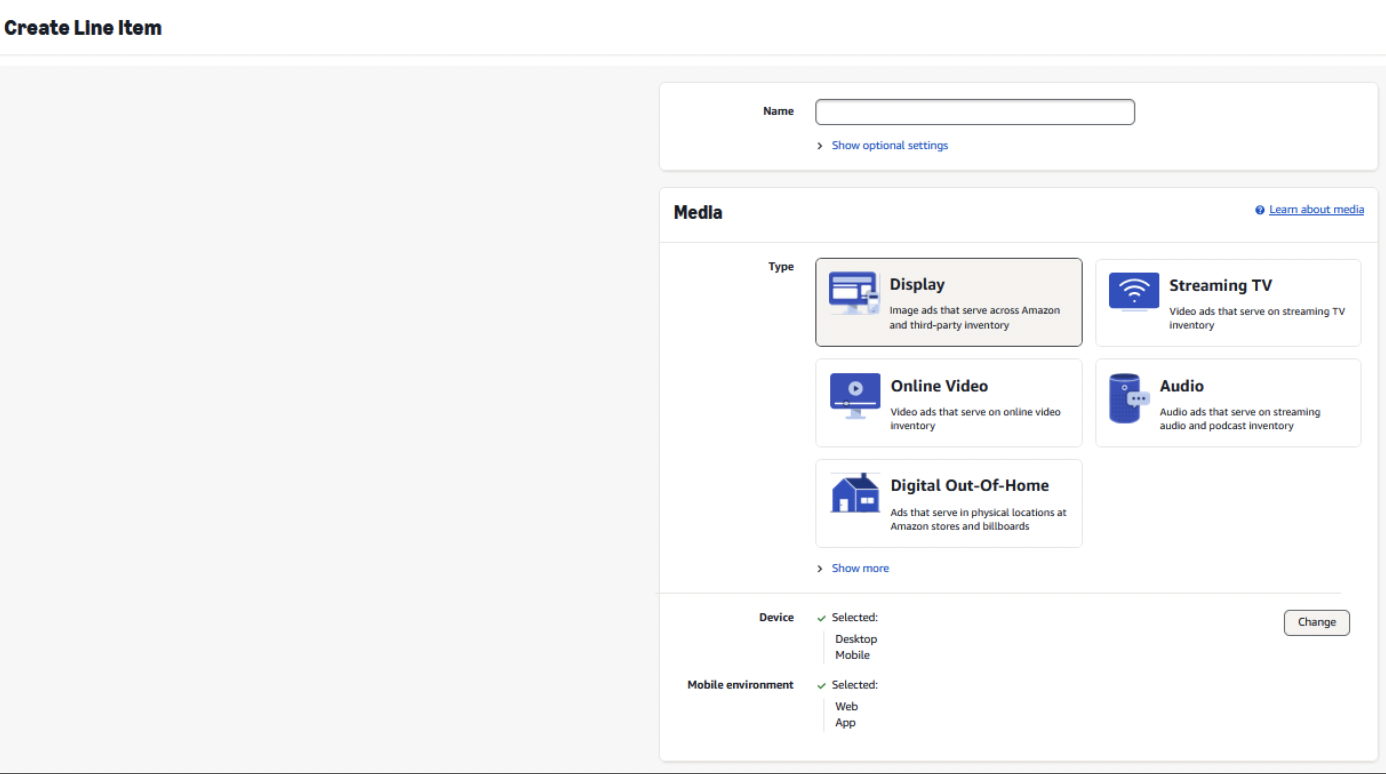
- Select your Order or Campaign in the DSP UI. From there, navigate to the line-item section where you'll select "Create Line Item."
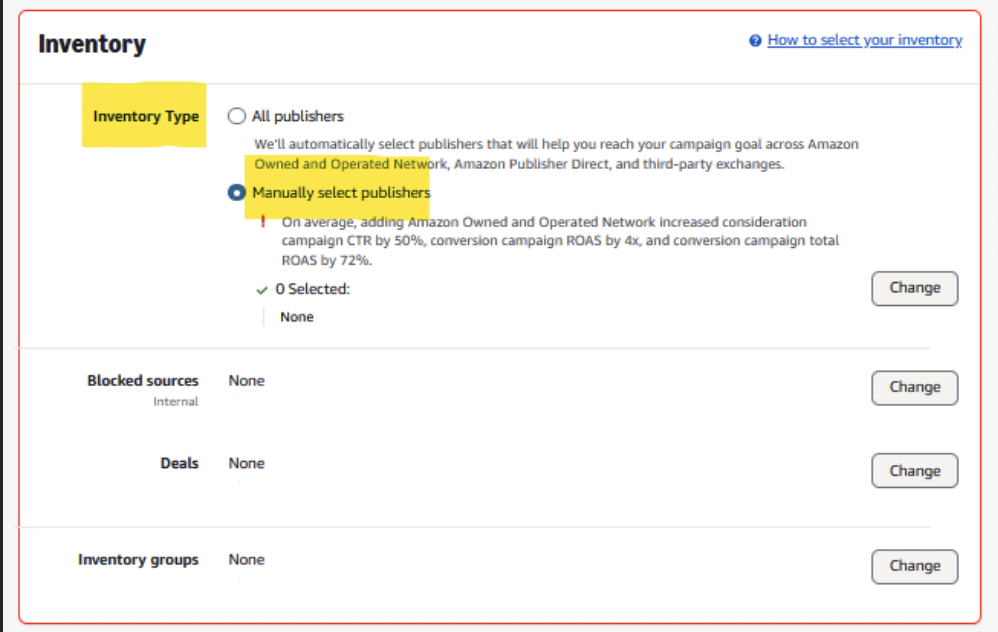
- Within the 'Inventory' section of your line-item setup, you'll find the ‘Manually select Publishers' field. Click the 'Change' button adjacent to this field to access the supply selection interface.
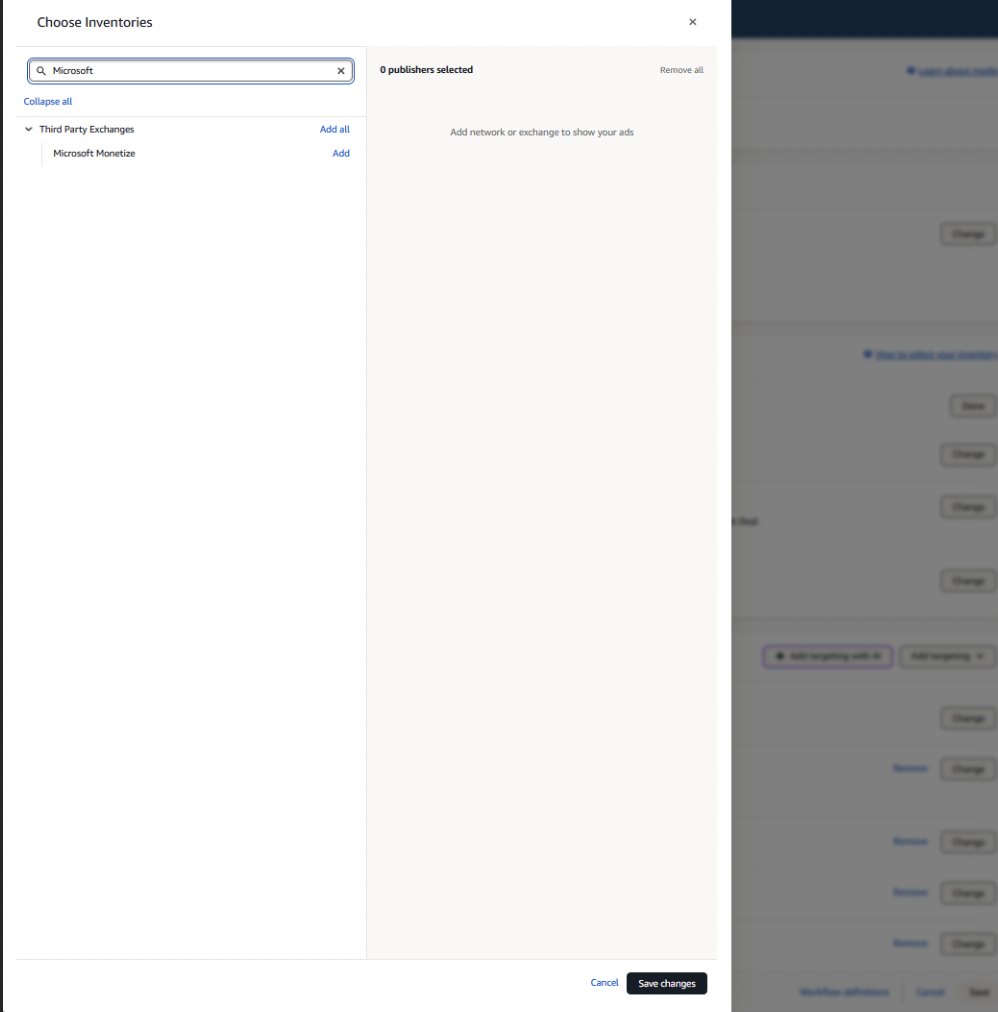
- From here, you can search for Microsoft, then click 'Add' to incorporate it into your line-item settings.
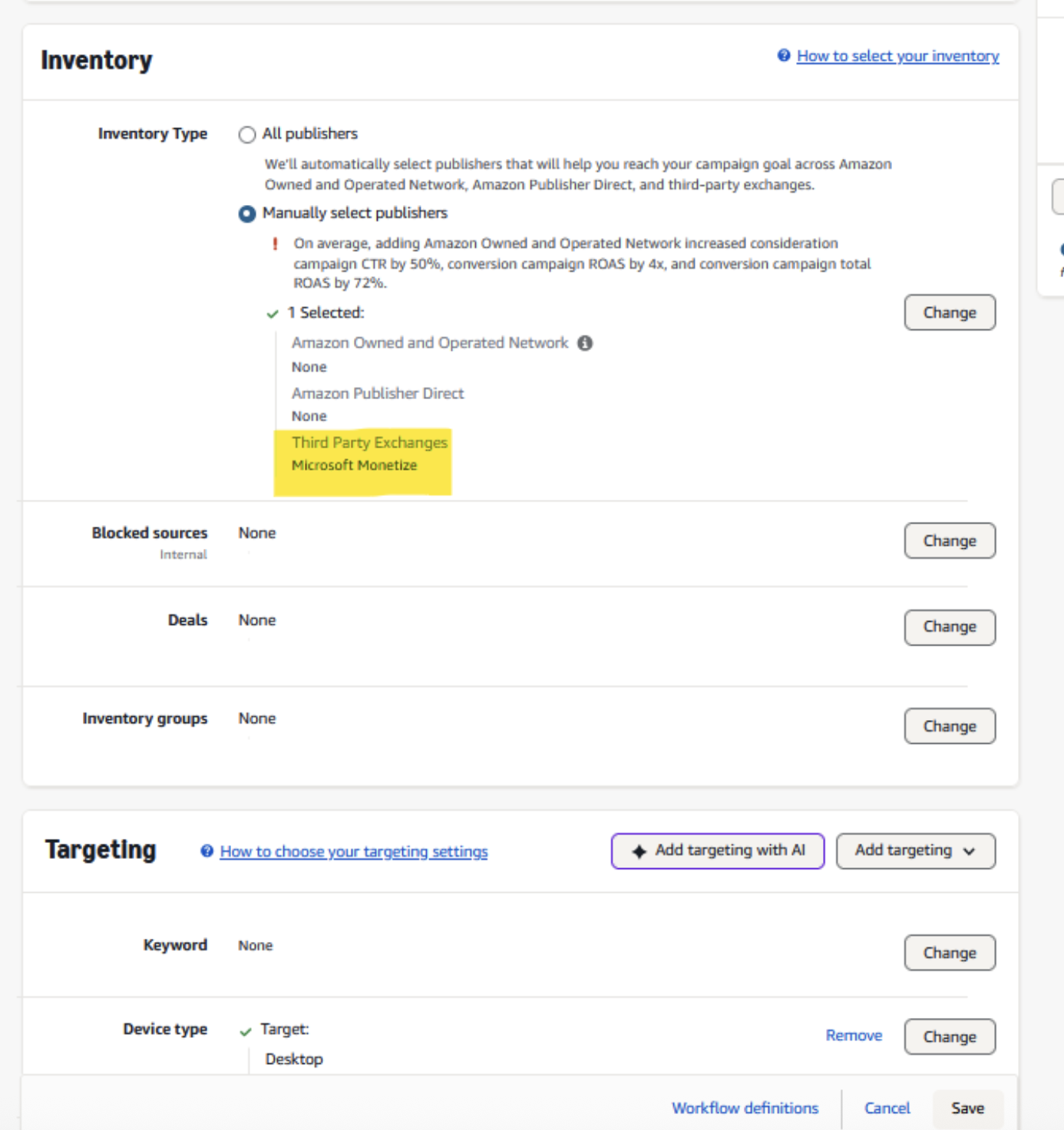
- After adding ‘Microsoft Monetize’, ensure you save all changes and proceed with configuring additional line-item parameters including budget allocation, pacing settings, and targeting criteria to align with your campaign's strategic objectives.
Deal activation workflow
- Deal Creation ID Requirement: When negotiating deals for Amazon DSP, advertisers must share their unique Amazon Deal Creation ID with publishers and curators during the negotiation process. This identifier is essential for proper deal routing and execution within the platform. To locate the Deal Tracking ID within the Amazon entity, a buyer should:
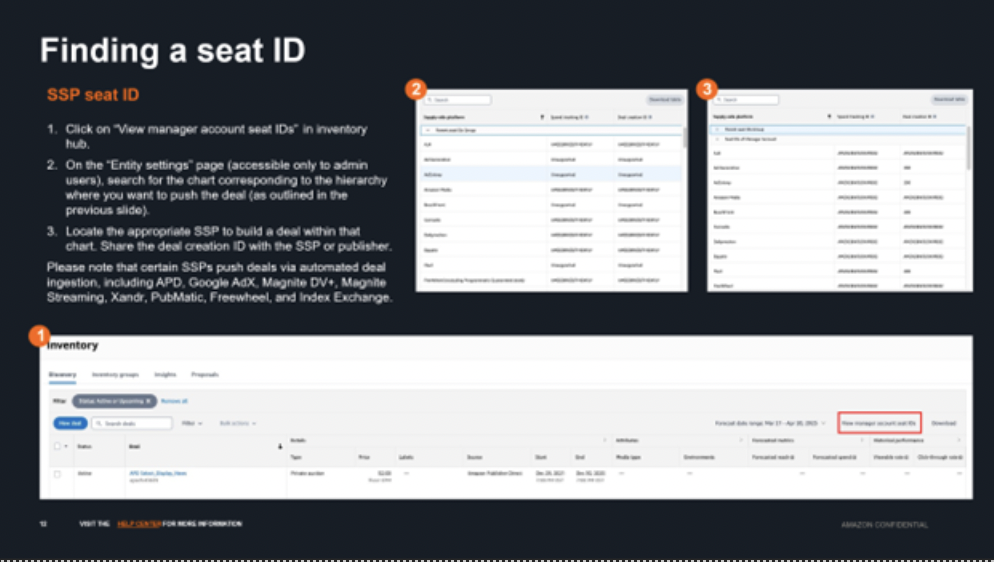
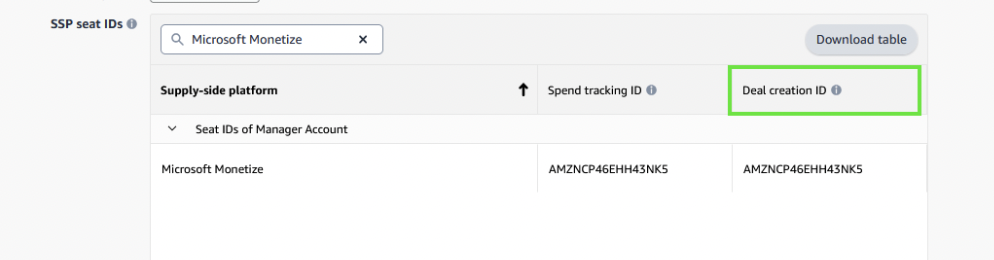
- Deal Discovery: Microsoft Monetize and Amazon DSP offer seamless integration through an automated API system that syncs deals automatically to the advertiser's entity. To locate a deal sourced from Microsoft Monetize, a buyer needs to navigate to Inventory Hub - a centralized destination within Amazon DSP that helps manage the complete lifecycle of deals, including deal creation, search, activation, management, and reporting insights. Important considerations:
- A valid Deal Creation ID must be provided to ensure proper routing and deal execution in the platform
- All deals must maintain a minimum floor price above $0 to successfully sync through the API system
- Deals can be accessed through the Inventory Hub platform by searching for "Microsoft" in the discovery section (see below)
- Single buyer and multi buyer deals are supported.
- For bidder level deals (catalogue deals available to all buyers through Inventory Hub), approval is required. If Amazon has requested you create a bidder level deal, please contact your Microsoft account manager for review.
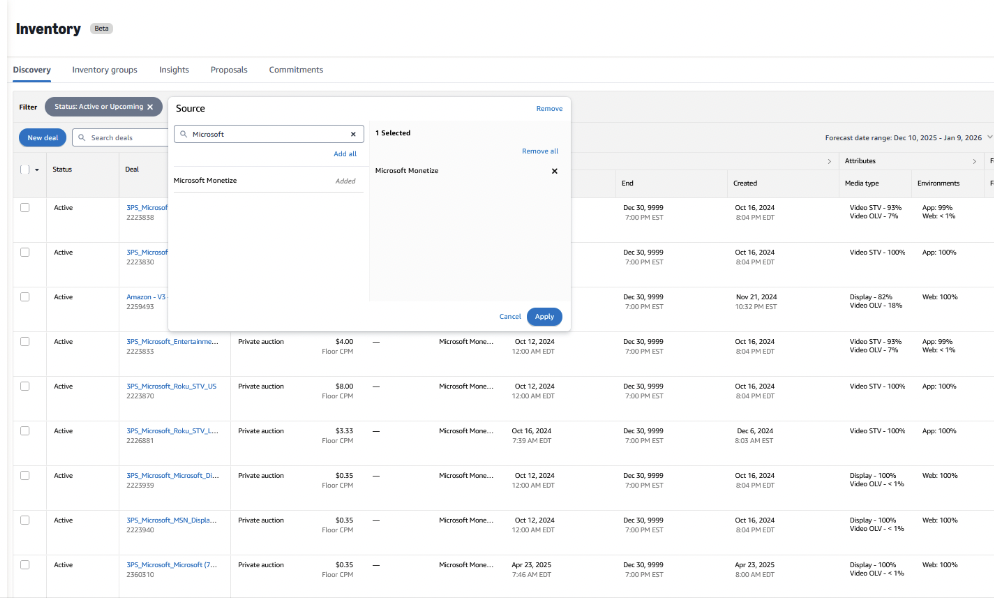
- Deal Targeting:To target a Microsoft Monetize deal on a line item, a buyer should:
- Select your Order or Campaign in the DSP UI. From there, navigate to the line-item section where you'll select "Create Line Item."
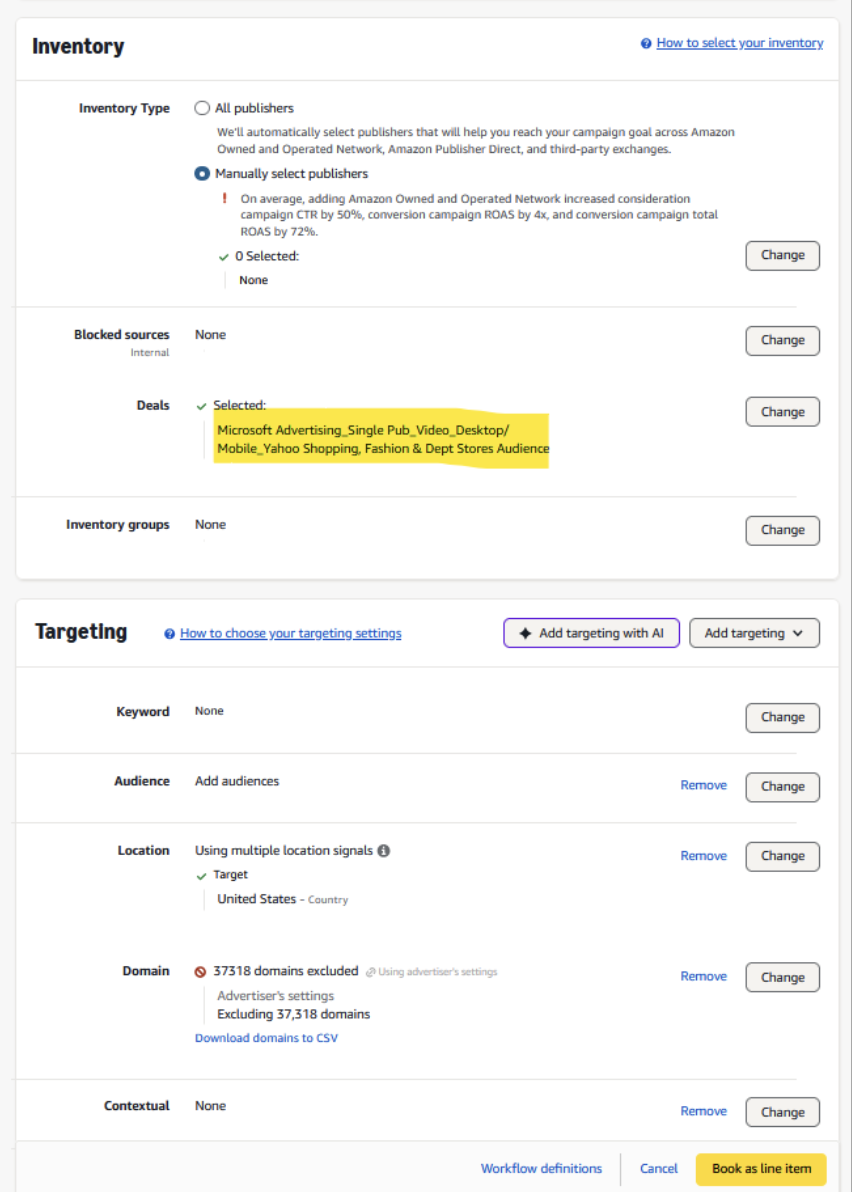
- Within the 'Inventory' section of your line-item setup, you'll find the 'Deals' field. Click the 'Change' button adjacent to this field to access the deal selection interface.
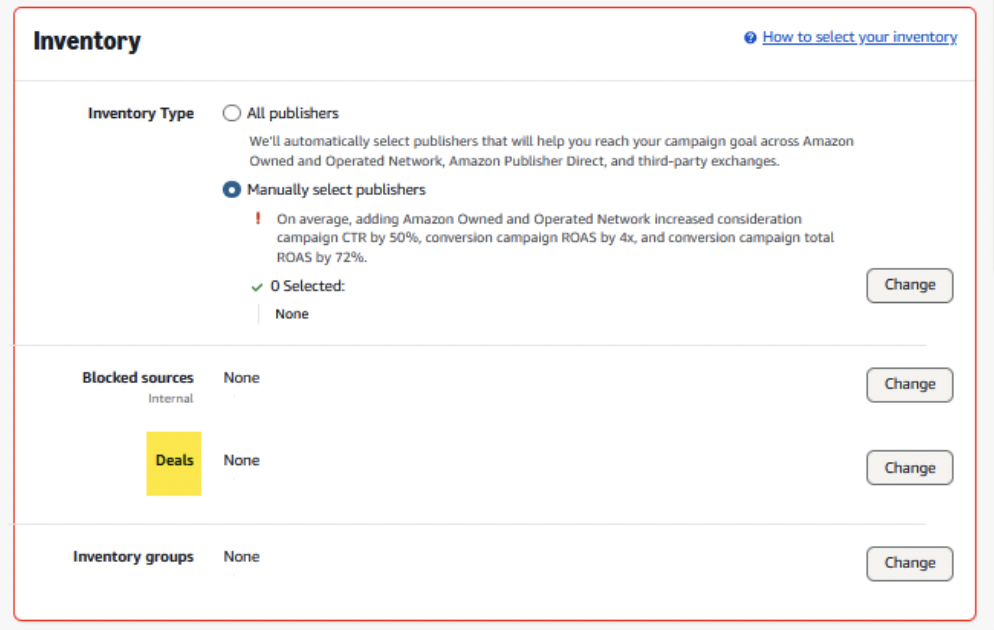
- From here, you can search for your previously negotiated deal using the deal name or ID, then click 'Add' to incorporate it into your line-item settings.
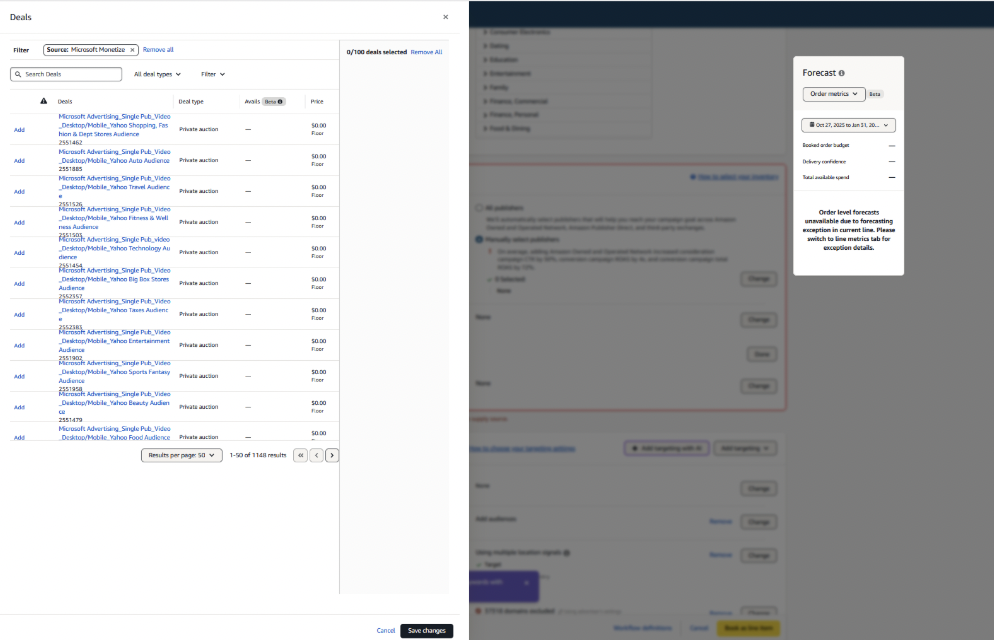
- After selecting the deal, ensure you save all changes and proceed with configuring additional line-item parameters including budget allocation, pacing settings, and targeting criteria to align with your campaign's strategic objectives.
- Select your Order or Campaign in the DSP UI. From there, navigate to the line-item section where you'll select "Create Line Item."
Important
While most Deal Creation IDs follow the "AMZN" nomenclature, please be aware that some legacy seat IDs, particularly those created prior to automation, may not follow this format. If you encounter a Deal Creation ID that doesn't begin with "AMZN," this doesn't necessarily indicate an error - it may be a valid legacy ID.
Troubleshooting steps
- Inclusion of DAAST categories in ad quality profile blocks will limit scale. Please reference this list.
- Deals must have a floor over $0 to sync via the API.
Related topics
For additional assistance, Amazon DSP offers several resources to help you optimize your Microsoft Monetize campaigns: