Note
Access to this page requires authorization. You can try signing in or changing directories.
Access to this page requires authorization. You can try changing directories.
Sensitive data threat detection is enabled by default when you enable Defender for Storage. You can enable or disable it in the Azure portal or with other at-scale methods. For instructions, see Configure Defender for Storage. This feature is included in the price of Defender for Storage.
This article explains what sensitive data threat detection includes, how to interpret sensitivity findings in alerts, and how to align detection with Microsoft Purview sensitivity settings.
Use the sensitivity context in the security alerts
Sensitive data threat detection helps security teams identify and prioritize incidents faster. Defender for Storage alerts include sensitivity scan findings and indicate operations performed on resources that contain sensitive data.
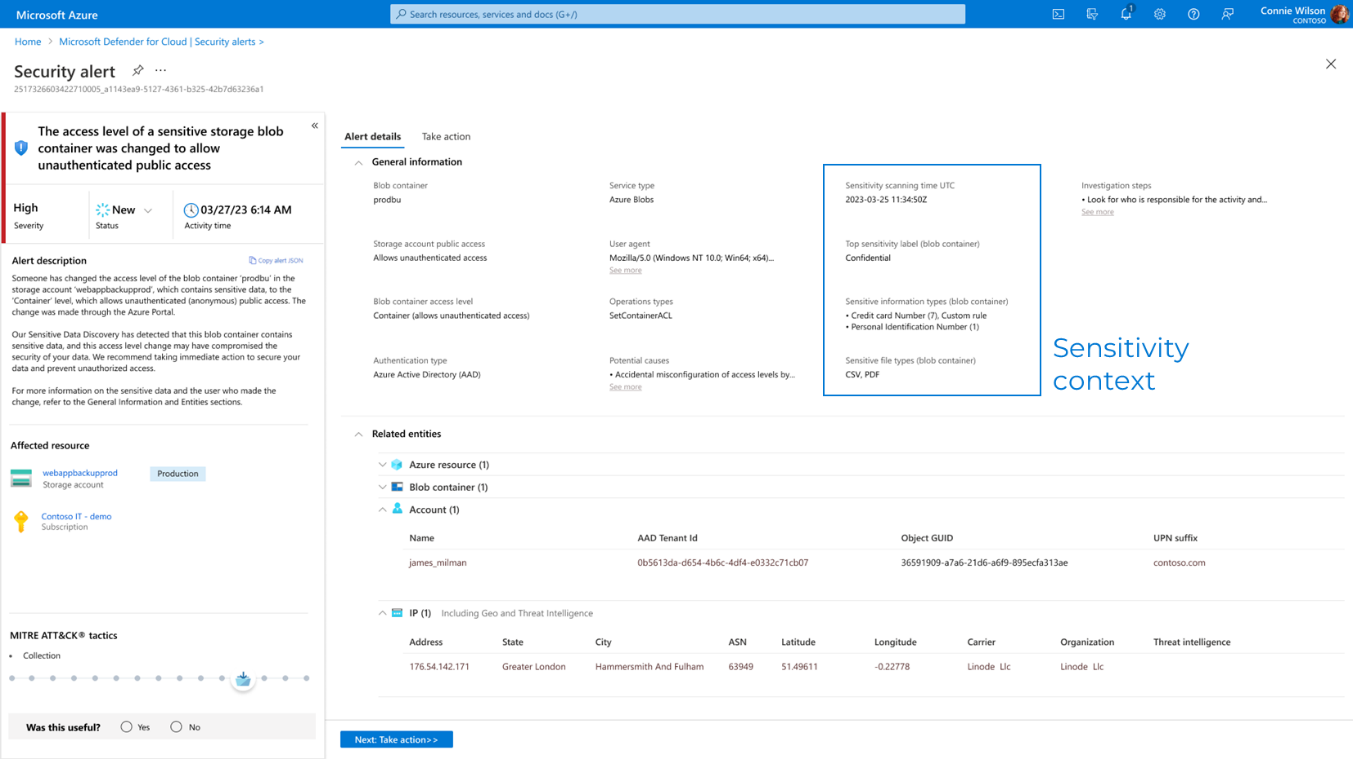
In the alert's extended properties, you can find sensitivity scanning findings for a blob container:
- Sensitivity scanning time (UTC): When the last scan was performed.
- Top sensitivity label: The most sensitive label found in the blob container.
- Sensitive information types: Information types that were found and whether they're based on custom rules.
- Sensitive file types: The file types of the sensitive data.
Integrate with the organizational sensitivity settings in Microsoft Purview (optional)
When you enable sensitive data threat detection, the sensitive data categories include built-in sensitive information types (SITs) in the default list of Microsoft Purview. Including built-in SITs in the default list affects the alerts you receive from Defender for Storage: storage accounts or containers that include these SITs are marked as containing sensitive data.
Of the built-in sensitive information types in the default list of Microsoft Purview, a subset is supported by sensitive data discovery. You can view a supported sensitive information types reference, which indicates which information types are enabled by default. To change these defaults, see Configure data sensitivity settings.
To customize data sensitivity discovery for your organization, create custom sensitive information types (SITs) and connect to organizational settings by using a single-step integration. For details, see Create a custom sensitive information type and advanced customization options for data sensitivity discovery.
You can also create and publish sensitivity labels for your tenant in Microsoft Purview. The sensitivity label scope includes Items, Schematized data assets, and autolabeling rules (recommended). For details, see Sensitivity labels in Microsoft Purview.