Note
Access to this page requires authorization. You can try signing in or changing directories.
Access to this page requires authorization. You can try changing directories.
Vulnerability assessment from Microsoft Defender Vulnerability Management helps security teams find and fix vulnerabilities in container images. The solution needs no onboarding configuration and no sensor deployment.
This article explains how vulnerability assessment works for container registries and runtime container images. It also shows how to enable the feature and where to review related guidance.
Note
Some Azure cloud environments automatically enable vulnerability assessment and don't allow toggling. For more information, see Defender for Containers support matrix.
Prerequisites
Verify that the target scope is onboarded to one of the following plans:
How to enable vulnerability assessment for container registries
To enable vulnerability assessment for container registries, complete the following steps:
Sign in to the Azure portal.
Go to Defender for Cloud > Environment settings.
Select Defender Plans Coverage.
Select the relevant Defender for Cloud coverage: Defender cloud security posture management (Defender CSPM) or Defender for Containers.
Select Enable.
Check that the Registry access extension is toggled to On.
Select Continue.
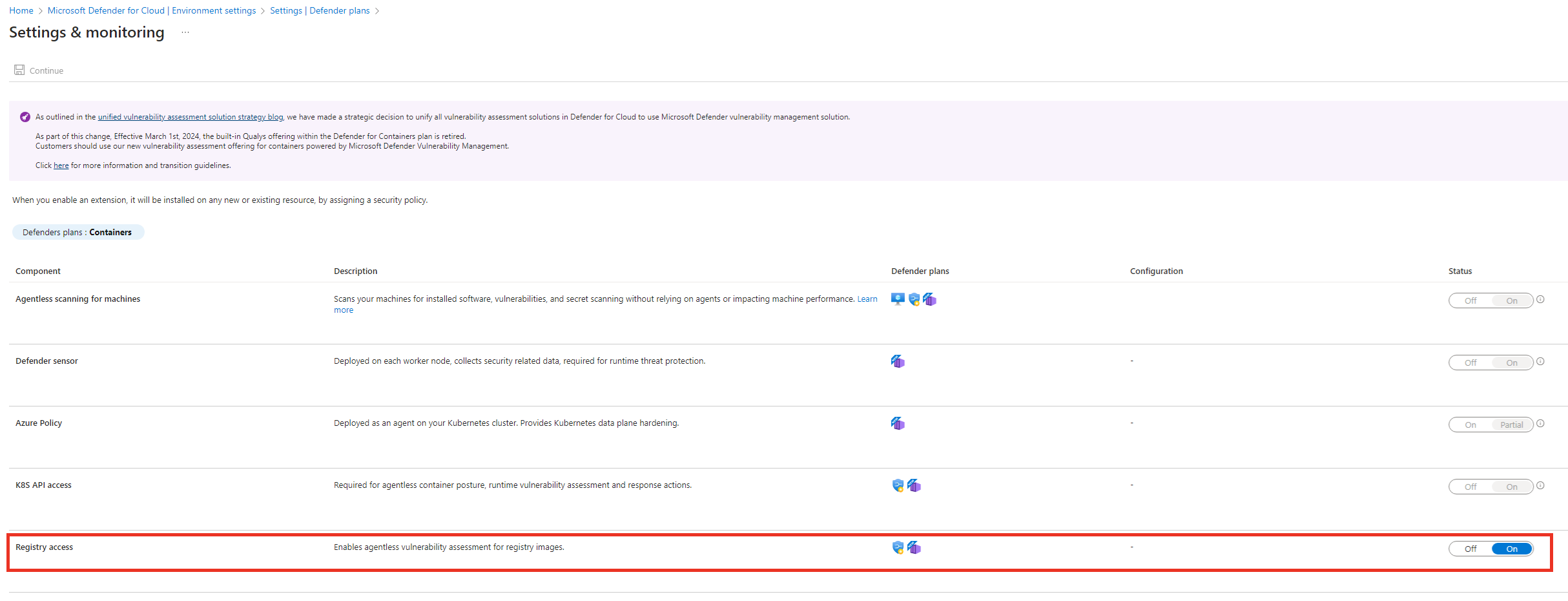
Select Save.
A notification message verifies that the settings are saved successfully.
Note
If you use external registries, it's recommended to enable Defender for Containers for those registries to enhance coverage of your Kubernetes environment.
How to enable coverage of runtime container images
To scan container images that are running in your environment, enable the required runtime scanning extensions.
If you enable the Agentless scanning for machines extension together with either the K8S API access or Defender sensor extensions in the Defender CSPM or Defender for Containers plans, you get runtime container image vulnerability assessment that is registry agnostic. For more information, see Onboard agentless container posture in Defender CSPM. For plan-specific behavior, see the Defender for Containers support matrix.
- The Defender for Container Registries (deprecated) plan doesn't offer runtime coverage of container images.
Note
To support comprehensive runtime container scanning coverage, turn on both registry scanning and runtime scanning.
Next steps
- Learn more about Trusted Access.
- Learn how to view and remediate vulnerability assessment findings for registry images and running images.
- Learn how to create an exemption for a resource or subscription.
- Learn more about Cloud Security Posture Management.