Developer technologies | Windows Forms
A set of .NET Framework managed libraries for developing graphical user interfaces.
This browser is no longer supported.
Upgrade to Microsoft Edge to take advantage of the latest features, security updates, and technical support.

Backend database: Access (date format: yyyy-mm-dd).
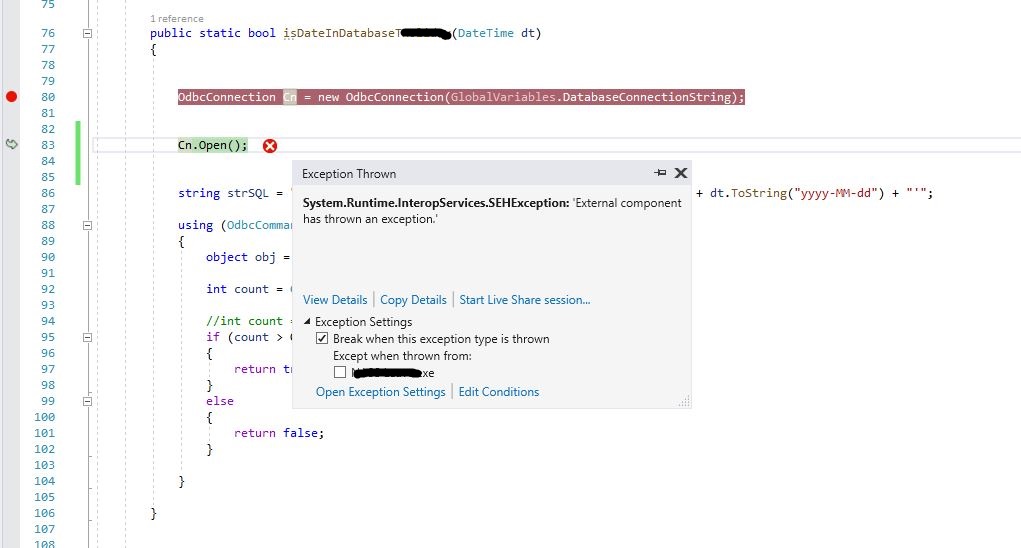
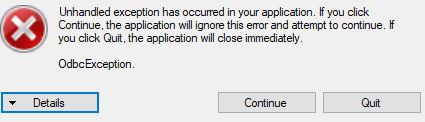
It returns error when I run below code.
Thanks.
        public static bool isDateInDatabaseTableAppointment(DateTime dt)
        {


            OdbcConnection Cn = new OdbcConnection(GlobalVariables.DatabaseConnectionString);


            Cn.Open();


            string strSQL = "select count(*) from TableAppointment WHERE AppointmentDate = '" + dt.ToString("yyyy-MM-dd") + "'";

            using (OdbcCommand cmd = new OdbcCommand(strSQL, Cn))
            {
                object obj = cmd.ExecuteScalar();

                int count = Convert.ToInt32(obj);

                //int count = Convert.ToInt32(cmd.ExecuteScalar());
                if (count > 0)
                {
                    return true;
                }
                else
                {
                    return false;
                }

            }

        }


                using (OdbcConnection Cn = new OdbcConnection(GlobalVariables.DatabaseConnectionString))
                {
                    for (DateTime dt = dateTimePickerBegin.Value; dt <= dateTimePickerEnd.Value; dt = dt.AddDays(1))
                    {
                        bool isFound = GlobalVariables.isDateInDatabaseTableAppointment(dt);

                        if (isFound)  // Check if it is in database TableAppointment
                        {
                            MessageBox.Show(dt.ToString() + " : you have an appointment today.");

                        }

                    } //end of for loop


                }// end of using


System.Runtime.InteropServices.SEHException
  HResult=0x80004005
  Message=External component has thrown an exception.
  Source=System.Data
  StackTrace:
   at System.Data.Common.UnsafeNativeMethods.SQLDriverConnectW(OdbcConnectionHandle hdbc, IntPtr hwnd, String connectionstring, Int16 cbConnectionstring, IntPtr connectionstringout, Int16 cbConnectionstringoutMax, Int16& cbConnectionstringout, Int16 fDriverCompletion)
   at System.Data.Odbc.OdbcConnectionHandle.Connect(String connectionString)
   at System.Data.Odbc.OdbcConnectionHandle..ctor(OdbcConnection connection, OdbcConnectionString constr, OdbcEnvironmentHandle environmentHandle)
   at System.Data.Odbc.OdbcConnectionOpen..ctor(OdbcConnection outerConnection, OdbcConnectionString connectionOptions)
   at System.Data.Odbc.OdbcConnectionFactory.CreateConnection(DbConnectionOptions options, DbConnectionPoolKey poolKey, Object poolGroupProviderInfo, DbConnectionPool pool, DbConnection owningObject)
   at System.Data.ProviderBase.DbConnectionFactory.CreateConnection(DbConnectionOptions options, DbConnectionPoolKey poolKey, Object poolGroupProviderInfo, DbConnectionPool pool, DbConnection owningConnection, DbConnectionOptions userOptions)
   at System.Data.ProviderBase.DbConnectionFactory.CreateNonPooledConnection(DbConnection owningConnection, DbConnectionPoolGroup poolGroup, DbConnectionOptions userOptions)
   at System.Data.ProviderBase.DbConnectionFactory.TryGetConnection(DbConnection owningConnection, TaskCompletionSource`1 retry, DbConnectionOptions userOptions, DbConnectionInternal oldConnection, DbConnectionInternal& connection)
   at System.Data.ProviderBase.DbConnectionInternal.TryOpenConnectionInternal(DbConnection outerConnection, DbConnectionFactory connectionFactory, TaskCompletionSource`1 retry, DbConnectionOptions userOptions)
   at System.Data.ProviderBase.DbConnectionClosed.TryOpenConnection(DbConnection outerConnection, DbConnectionFactory connectionFactory, TaskCompletionSource`1 retry, DbConnectionOptions userOptions)
   at System.Data.ProviderBase.DbConnectionInternal.OpenConnection(DbConnection outerConnection, DbConnectionFactory connectionFactory)
   at System.Data.Odbc.OdbcConnection.Open()
Edit: Above Using/FOR loop are inside ELSE statement, and there is another Cn in ELSE IF statement. Is that an issue?
private void butonSubmit_Click(object sender, EventArgs e)
{
    if (......)
    {
        MessageBox.Show(".....");
    }


    else if(.....)
    {
        using (OdbcConnection Cn = new OdbcConnection(GlobalVariables.DatabaseConnectionString))
        {
.....
        }
    }


    else
    {

        using (OdbcConnection Cn = new OdbcConnection(GlobalVariables.DatabaseConnectionString))
        {

            for (DateTime dt = dateTimePickerBegin.Value; dt <= dateTimePickerEnd.Value; dt = dt.AddDays(1))
            {
                bool isFound = GlobalVariables.isDateInDatabaseTableAppointment(dt);
                 if (isFound)  // Check if it is in database TableAppointment
                 {
                     MessageBox.Show(dt.ToString() + " : you have an appointment today.");

                 }
            }

        }

    }
}
' cx='32' cy='32' r='32' /%3E%3Ctext x='50%25' y='55%25' dominant-baseline='middle' text-anchor='middle' fill='%23FFF' %3ETY%3C/text%3E%3C/svg%3E)
@VAer-4038
I cannot reproduce your error, but according to the current information, this error has nothing to do with the time format, the code related to the time format has not been executed.
The current error message is a bit general, and I cannot get the real cause of the error from it. One guess is that the Microsoft Access database engine does not match the platform of the current project.
Could you please provide a more complete code? Let's reproduce the error before trying to solve it.
Solved now. I adjusted my code, and it works on ANOTHER machine (not sure about why).

I usually use OleDbConnection when opening an access database. I do see the error is when you are opening the connection to the database. I would check the connection string, make sure your app can access the database's location, and finally open the database in access and make sure it does not need to be repaired. Also recommend you put the database access code in a try catch block. If you get an error about the Micorosft.Ace.OldDB.12.0 drivers you need to install the drivers for you computers processor type
https://www.microsoft.com/en-us/download/confirmation.aspx?id=13255
put a sample on GitHub.