Microsoft 365 and Office | SharePoint | For business | Windows
A group of Microsoft Products and technologies used for sharing and managing content, knowledge, and applications.

This browser is no longer supported.
Upgrade to Microsoft Edge to take advantage of the latest features, security updates, and technical support.
' cx='32' cy='32' r='32' /%3E%3Ctext x='50%25' y='55%25' dominant-baseline='middle' text-anchor='middle' fill='%23FFF' %3EEB%3C/text%3E%3C/svg%3E)
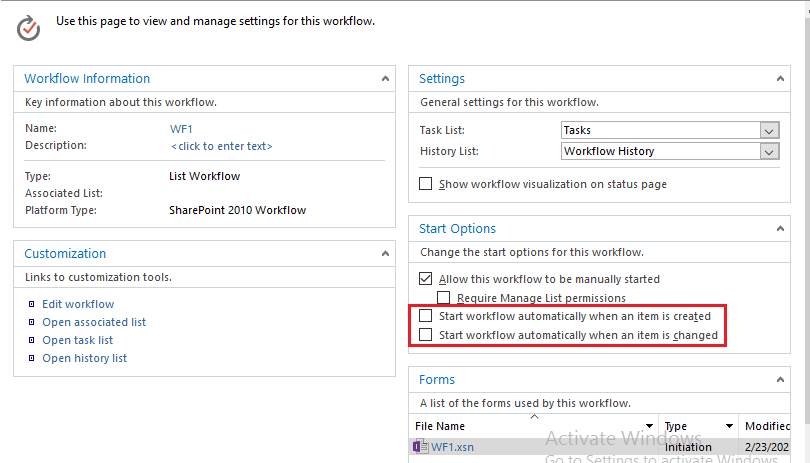
We just set up an external server in Windows 2016. We install SharePoint 2016 server and use SharePoint Designer 2013. We use a non System account to create workflows. However, the workflows are not start automatically (please see the attachment). When I manually start the workflow, it works fine. See if someone can tell me what can be wrong, many thanks.

' cx='32' cy='32' r='32' /%3E%3Ctext x='50%25' y='55%25' dominant-baseline='middle' text-anchor='middle' fill='%23FFF' %3EA%3C/text%3E%3C/svg%3E)
Hi,
Since the question is more related to the SharePoint, i removed the server tag and added the SharePoint tag to get more professional advice.
Best Regards,
Thanks for your response, Echo Du. However, we already checked these options. What we fund out is that the workflow is not work for "anonymous" users. This was the main point because we want "anonymous" users to send an email to the admins. So we made a custom form and use a function to accomplish what we did in the workflow. We solve the issue. Thanks.

Hi @Er Bo Guan ,
Thanks for your reply.
I am glad to hear that your problem has been solved.
Have a nice day!
Thanks,
Echo Du
Hi @Er Bo Guan ,
Workflow will never start automatically with system account.
Check the options Start workflow automatically when an item is created or changed from Workflow Start Options.
Thanks,
Echo Du