Azure SQL Database
An Azure relational database service.
This browser is no longer supported.
Upgrade to Microsoft Edge to take advantage of the latest features, security updates, and technical support.
' cx='32' cy='32' r='32' /%3E%3Ctext x='50%25' y='55%25' dominant-baseline='middle' text-anchor='middle' fill='%23FFF' %3EHA%3C/text%3E%3C/svg%3E)
Hello to all.
I am a computer science student and I am currently learning SQL Server. I currently have a free student subscription which gives me access to install a SQL database on Azure.
In order to affiliate myself with the environment, I decided to create two logins and two users (affiliated with these logins) on which I would like to be able to assign them different server-roles, but I am running into a problem.
On this page: server-level-roles, I noticed that we can assign different roles. The one I am interested in is dbcreator (example I am trying to document).
However, when I try to assign dbcreator to my (fictitious) stephanlogin login ;
ALTER SERVER ROLE dbcreator ADD MEMBER stephanlogin;
ALTER SERVER ROLE dbcreator ADD MEMBER stephanuser;
EXEC sp_addrolemember 'dbcreator', 'stephanlogin';
EXEC sp_addrolemember 'dbcreator', 'stephanuser';
I get different errors;
Msg 15151, Level 16, State 1, Line 1
Cannot alter the server role 'dbcreator', because it does not exist or you do not have permission.
Msg 15151, Level 16, State 1, Line 2
Cannot alter the server role 'dbcreator', because it does not exist or you do not have permission.
Msg 15410, Level 11, State 1, Procedure sp_addrolemember, Line 35 [Batch Start Line 0]
User or role 'stephanlogin' does not exist in this database.
Msg 15410, Level 11, State 1, Procedure sp_addrolemember, Line 35 [Batch Start Line 0]
User or role 'stephanuser' does not exist in this database.
My questions are simple :
Thank you for your attention to my request and have a nice day
An Azure relational database service.
Answer accepted by question author

Hello @HE-ARC User Welcome to Microsoft Q&A and Thank you for posting your question.
@Alberto Morillo and @Guoxiong Thanks also for sharing your insights and for helping the community.
The script above only applies to SQL Server and Parallel Data Warehouse Azure SQL does not support Server Roles , Please follow this documentation for more info.
Please do let us know if you have further query. Thanks
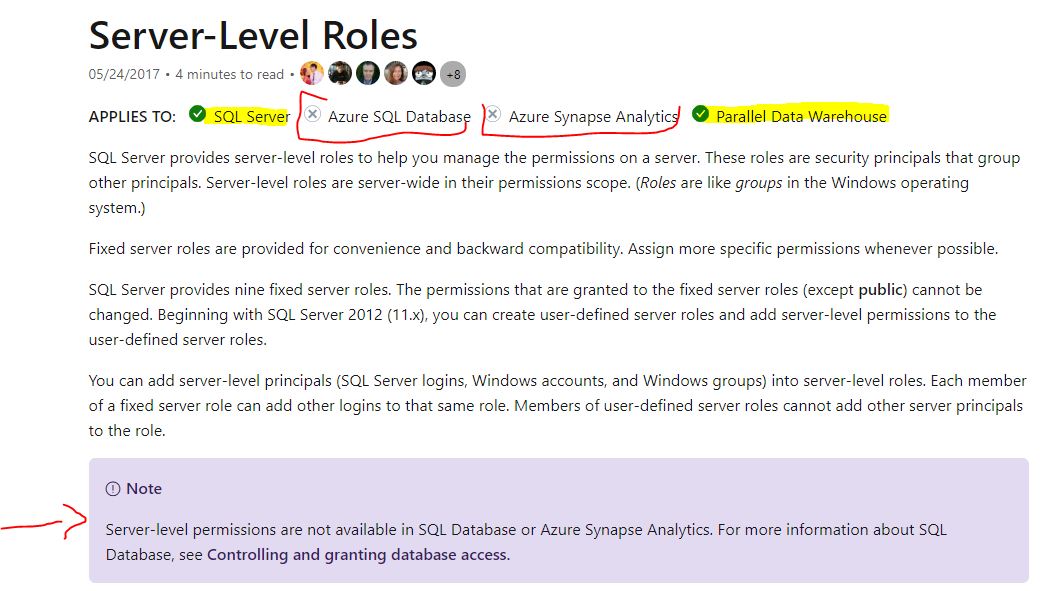 .
.

It is a database level role not a server level role. Please refer to this documentation. https://learn.microsoft.com/en-us/sql/relational-databases/security/authentication-access/database-level-roles?view=sql-server-ver15#special-roles-for--and-azure-synapse
Hello to all.
Thank you for taking the time to write to me.
I have indeed managed to "solve" my problem. That is to say, I have assigned the dbmanager role to my stephanlogin login.
Here are the queries I used in my SQL database server (and it has worked) :
CREATE LOGIN michaellogin WITH password='...';

CREATE USER michaeluser FOR LOGIN michaellogin
WITH DEFAULT_SCHEMA = master;

alter role [dbmanager] add member michaeluser;
I wish you a good day
The proper role name on Azure SQL database is not dbcreator but dbmanager. Logins assigned to this role are able to create and drop databases.
To assign a login to this role, please see below example usign an Azure Active Directory user..
-- add contained Azure AD user
CREATE USER [******@sqlcoffee.com]
FROM EXTERNAL PROVIDER
WITH DEFAULT_SCHEMA = dbo;

-- add user to role(s) in db
ALTER ROLE dbmanager ADD MEMBER [******@sqlcoffee.com];
For a normal SQL login you can assign the login to the role as shown below:
alter role [dbmanager] add member sqlloginname;
You can learn more about the dbmanager role here.
I also thank you for answering me.
When I execute your command, I got this :
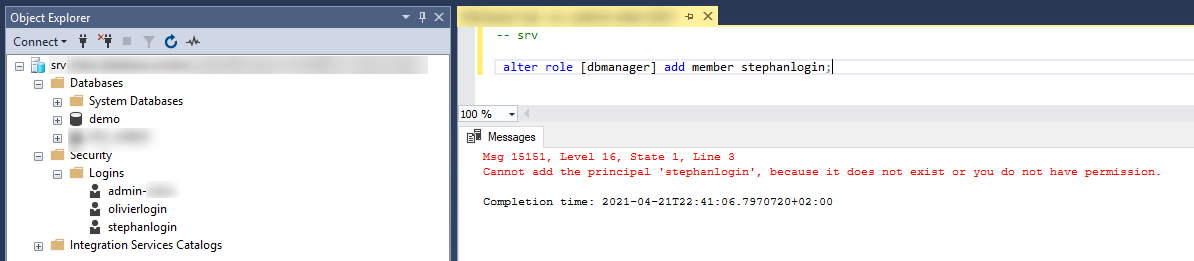
Msg 15151, Level 16, State 1, Line 3
Cannot add the principal 'stephanlogin', because it does not exist or you do not have permission.
It's strange because I connect with the administrator account that I set up when I created my database on the Azure portal. And this without specifying a database when I connect (so logically in the master database)
Please try this on the master database:
CREATE LOGIN stephanlogin WITH PASSWORD = 'hjdajdajhhda'
CREATE USER stephanlogin FROM LOGIN stephanlogin;
ALTER ROLE dbmanager ADD MEMBER stephanlogin;
' cx='32' cy='32' r='32' /%3E%3Ctext x='50%25' y='55%25' dominant-baseline='middle' text-anchor='middle' fill='%23FFF' %3EG%3C/text%3E%3C/svg%3E)
If you want to assign a server role to a login, you need to use the system stored procedure sp_addsrvrolemember. For your case, try this:
EXEC sp_addsrvrolemember 'stephanlogin', 'dbcreator';
Hello @Guoxiong
Thank you for your message.
But when I try your command, I got this message :
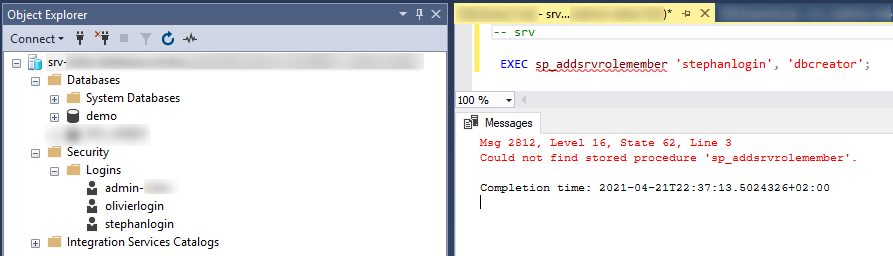
Msg 2812, Level 16, State 62, Line 3
Could not find stored procedure 'sp_addsrvrolemember'.
I think it's not supported on Azure SQL Database, isn'it ?
You are right. sp_addsrvrolemember is not supported on Azure SQL Database. You need to make sure that only users in the master database can be added to these database roles (dbmanager and loginmanager). Here is a good example code from the article "Managing databases and logins in Azure SQL Database" on the GitHub:
-- first, connect to the master database
CREATE LOGIN login1 WITH password='<ProvidePassword>';
CREATE USER login1User FROM LOGIN login1;
EXEC sp_addrolemember 'dbmanager', 'login1User';
EXEC sp_addrolemember 'loginmanager', 'login1User';