Parsing / filtering a text file using Powershell

curttc 1 Reputation point
2021-05-12T14:00:51.783+00:00

Powershell novice here,

Trying to figure out the best method for cleaning up this specific string of text (this is the only string in the log file):

5/12/2021 12:00:00 AM 05:50:52.2540000 TERMINAL :TRMW:'AA R1Hello David Stall '

Ideally, I would like to be able to filter the data from the string above to something useable using ConvertFrom-String and defining custom property names. Something like this:

Date: 5/21/2021
Time: 5:50:52
First Name: David
Last Name: Stall
Last Message: Hello

I'm fairly sure I can figure out defining the properties, it is more or less trying to figure out the best way to clean up some of the unnecessary data in the string.

Windows for business | Windows Server | User experience | PowerShell
0 comments No comments
{count} votes

2 answers

Sort by: Most helpful
  1. Andreas Baumgarten 129.4K Reputation points MVP Volunteer Moderator
    2021-05-12T16:21:38.983+00:00

    Hi @curttc ,

    maybe this helps to get started:

    $a = "5/12/2021 12:00:00 AM 05:50:52.2540000 TERMINAL :TRMW:'AA R1Hello David Stall'"  
    $b = ($a.Split(" "))  
    $1 = "Date: " + $b[0]  
    $1  
    $2 = "Time: " + ($b[3].Split("."))[0]  
    $2  
    $3 = "First Name: " + $b[7]  
    $3  
    $4 = "Last Name: " + ($b[8]).Substring(0,($b[8]).Length-1)  
    $4  
    $5 = "Last Message: " + ($b[6]).Substring(2)  
    $5  
    

    ----------

    (If the reply was helpful please don't forget to upvote and/or accept as answer, thank you)

    Regards
    Andreas Baumgarten

    0 comments No comments

  2. gastone canali 241 Reputation points Volunteer Moderator
    2021-05-12T19:41:13.25+00:00

    HI @curttc
    ConvertFrom-String is a nice and strong cmdlet; defining the best way is hard without know exactly your log file, "one line" should be enought if other lines are similar ...

    This is a sample of code tha do the work

    $template = @'  
    {Date*:5/12/2021} {[string]Time:12:00:00 AM} 05:50:52.2540000 {app:TERMINAL} :{term:TRMW}:'AA R1{LastMessage:Hello} {FirstName:David} {LastName:Stall} '  
    {Date*:6/12/2022} {[string]Time:01:00:00 PM} 06:40:52.2240000 {app:TERMINAL} :{term:TRMW}:'AA R1{LastMessage:Hello} {FirstName:Robert} {LastName:Stio} '  
    '@  
      
    $testTxt = @'  
    5/12/2021 12:00:00 AM 05:50:52.2540000 TERMINAL :TRMW:'AA R1Hello David Stall '  
    6/12/2022 11:00:00 AM 06:40:52.2240000 TERMINAL :TRMW:'AA R1Hello Robert Stio '  
    3/02/2022 10:00:00 AM 08:40:52.2640000 TERMINAL :TRMW:'AA R1Hello Richard Gere '  
    3/2/2012 9:30:20 AM 08:50:52.2640000 TERMINAL :TRMW:'AA R1Hello Genghis Khan '  
    '@  
    $ParsedData = $testTxt | ConvertFrom-String -TemplateContent $template #  
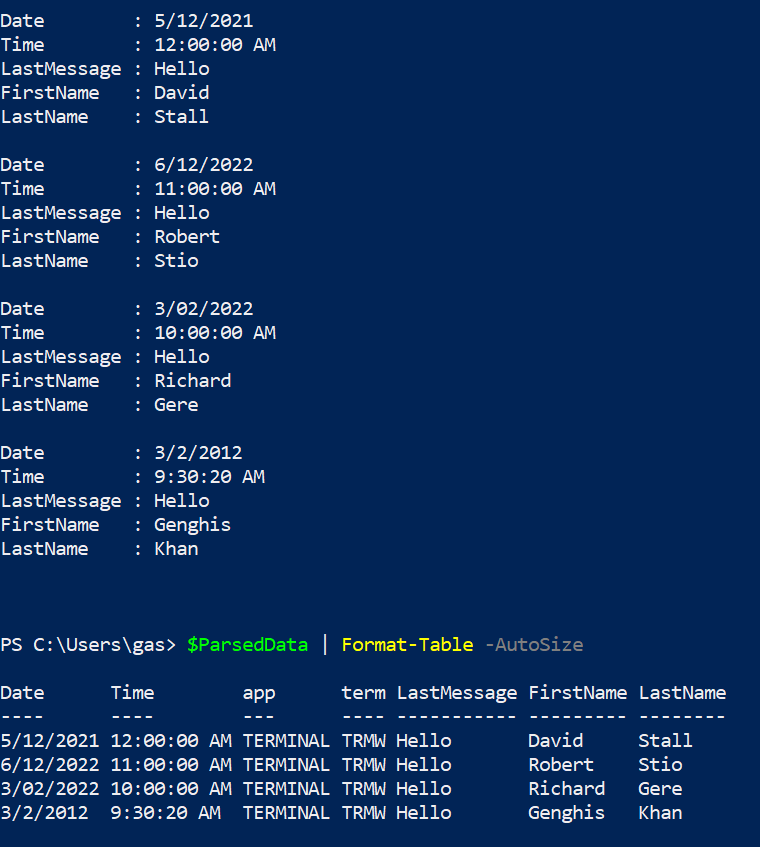
    $ParsedData | Format-list  Date,Time,LastMessage,FirstName, LastName  
    $ParsedData | Format-Table -AutoSize  
    

    and this is the output

    96121-immagine.png

    0 comments No comments

Your answer

Answers can be marked as 'Accepted' by the question author and 'Recommended' by moderators, which helps users know the answer solved the author's problem.