hi alison,
sorry for not mentioning this point: for macro enabled excel files, we have to enable marcos in
file > options > trust center > trust center settings > macro settings as the following screenshot shows.
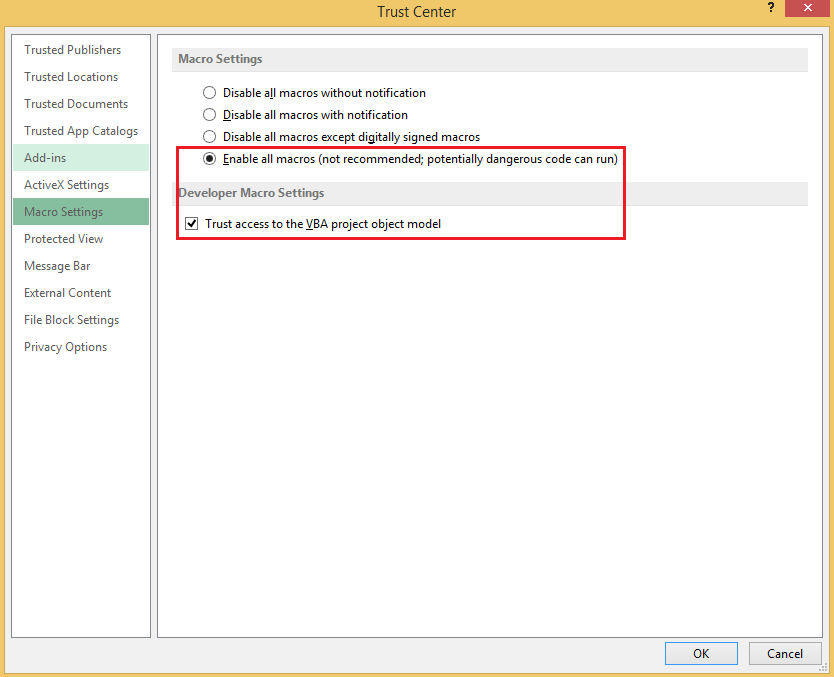
if you have not done this before, i suggest you enable it first and then repeat the steps above, also make sure you save the excel file into a .xlsm type.

note: after you complete the setup, an excel macro-enabled workbook template will be created. please
do not edit, move or delete the .xlsm file.
if you need more assistance about excel usability, we would suggest you post to ourexcel forum, which is dedicated to handing this kind of question.
regards,
linda
' cx='32' cy='32' r='32' /%3E%3Ctext x='50%25' y='55%25' dominant-baseline='middle' text-anchor='middle' fill='%23FFF' %3EA%3C/text%3E%3C/svg%3E)
