Outlook | Windows | Classic Outlook for Windows | For business
Using classic Outlook for Windows in business environments

This browser is no longer supported.
Upgrade to Microsoft Edge to take advantage of the latest features, security updates, and technical support.
' cx='32' cy='32' r='32' /%3E%3Ctext x='50%25' y='55%25' dominant-baseline='middle' text-anchor='middle' fill='%23FFF' %3EML%3C/text%3E%3C/svg%3E)
Hello everyone
I have a problem.
I have usermailbox in exchange 2016.
When someone try to use scheduling assistant to make appointment with me he can see a details of my appointments ( instead of blue/ blue symbol).
How can I fix it?
Thanks
Using classic Outlook for Windows in business environments
The administration and maintenance of Microsoft Exchange Server to ensure secure, reliable, and efficient email and collaboration services across an organization.
' cx='32' cy='32' r='32' /%3E%3Ctext x='50%25' y='55%25' dominant-baseline='middle' text-anchor='middle' fill='%23FFF' %3EYS%3C/text%3E%3C/svg%3E)
Hi @michael lustig ,
When someone try to use scheduling assistant to make appointment with me he can see a details of my appointments ( instead of blue/ blue symbol).
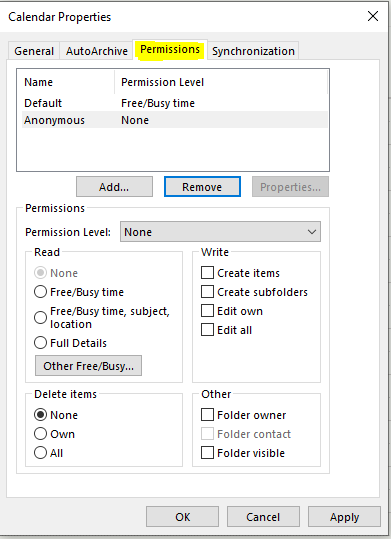
Please check the permission settings of your calendar to see if the permission to view full details has been accidentally granted to the user:
If an Answer is helpful, please click "Accept Answer" and upvote it.
Note: Please follow the steps in our documentation to enable e-mail notifications if you want to receive the related email notification for this thread.
Hi @michael lustig ,
I'm writing to check if you have had a chance to check the permission settings of the calendar and if it worked. Should there's any update or you still need help on this, feel free to post back.
If the answer is helpful, please click "Accept Answer" and kindly upvote it. If you have extra questions about this answer, please click "Comment".
Note: Please follow the steps in our documentation to enable e-mail notifications if you want to receive the related email notification for this thread.