Microsoft Security | Intune | Configuration Manager | Other
Other Configuration Manager-related features and issues

This browser is no longer supported.
Upgrade to Microsoft Edge to take advantage of the latest features, security updates, and technical support.
' cx='32' cy='32' r='32' /%3E%3Ctext x='50%25' y='55%25' dominant-baseline='middle' text-anchor='middle' fill='%23FFF' %3EDD%3C/text%3E%3C/svg%3E)
Hello,
I am looking for a query to list the machine name and its SID as well as the CIDs.
I am confused with what is what... any clear explanation?
I was doing this query but not sure the SID is for the Machine or the User?
Select Name0, SID0 from v_R_SYSTEM
Where Name0 like 'VI%EPSI%'
order by SID0
I did not see the duplicates...
Name0 SID0
VITEPSIRS1 S-1-5-21-73586283-1284227242-1801674531-1140134
VITEPSIWS1 S-1-5-21-73586283-1284227242-1801674531-1140136
VIPEPSIAPP1 S-1-5-21-73586283-1284227242-1801674531-1140271
VIPEPSIRS1 S-1-5-21-73586283-1284227242-1801674531-1140272
VIPEPSIWS1 S-1-5-21-73586283-1284227242-1801674531-1140273
VIPEPSIWS2 S-1-5-21-73586283-1284227242-1801674531-1140274
VIPEPSIWS3 S-1-5-21-73586283-1284227242-1801674531-1140275
but when running
$comp = import-csv C:\users\xxxxxx\Desktop\comp.txt
foreach ($computer in $comp.comp)
{
$LocalAccountSID = Get-WmiObject -Query "SELECT SID FROM Win32_UserAccount WHERE LocalAccount = 'True'" -computername $computer | Select-Object -First 1 -ExpandProperty SID
$MachineSID = ($p = $LocalAccountSID -split "-")[0 .. ($p.Length - 2)] -join "-"
$MachineSID = $MachineSID + ";" + "$computer"
$MachineSID >> c:\temp\sid.csv
$MachineSID = $Null
this script is showing duplicates!!!
S-1-5-21-3195015131-3355721831-4064164013;VITEPSIRS1
S-1-5-21-3195015131-3355721831-4064164013;VITEPSIWS1
S-1-5-21-3195015131-3355721831-4064164013;VIPEPSIRS1
S-1-5-21-3195015131-3355721831-4064164013;VIPEPSIWS1
S-1-5-21-3195015131-3355721831-4064164013;VIPEPSIWS2
S-1-5-21-3195015131-3355721831-4064164013;VIPEPSIWS3
S-1-5-21-3195015131-3355721831-4064164013;VIPEPSIAPP1
And question
VITEPSIRS1 is shwoing two different SID numbers depending on the query or script so why?
S-1-5-21-3195015131-3355721831-4064164013
S-1-5-21-73586283-1284227242-1801674531-1140134
Thanks,
Dom
Other Configuration Manager-related features and issues
' cx='32' cy='32' r='32' /%3E%3Ctext x='50%25' y='55%25' dominant-baseline='middle' text-anchor='middle' fill='%23FFF' %3EAM%3C/text%3E%3C/svg%3E)
Hi,
There are two different management boundary to handle the resources (users and computers): domain and local
=== domain part starts ====
1) psgetsid.exe get the computer sid. If we run psgetsid.exe \dc01 (assuming hostname is dc01), it will return
S-1-5-21-73586283-1284227242-1801674531
2) when it becomes a DC, it uses this SID for all the resources in the domain, for example, it recognizes itself as
S-1-5-21-73586283-1284227242-1801674531-1000
S-1-5-21-73586283-1284227242-1801674531-1140272 for host VIPEPSIRS1
For domain users/computers, the prefix is the same, just the last segment is different. No special for the computers.
For the sql query, it get the information from domain controller and the result is as the above.
=== domain part ends ====
=== local part starts ====
Now, let's go to the local computer VIPEPSIRS1, which manages one computer (itself) and serveral local user accounts
S-1-5-21-3195015131-3355721831-4064164013
So if we logon as a local user account and use whoami /user command to get the current logged on user account sid, it should have the prefix and the last segment indicates the user, for example, built-in administrator: 500, other users: starts from 1000
The below powershell script to retrieve all the local user account sid in computer cm16
 $computer = "VIPEPSIRS1"
 $query1 = "SELECT SID FROM Win32_UserAccount WHERE LocalAccount = 'True'"
 $LocalAccountSID = Get-WmiObject -Query $query1 -computername $computer
 $LocalAccountSID
=== local part ends ====
In a word, psgetsid get the local computer account id if we do not specify a user account; get-adcompouter get the computer account sid within the domain boundary (not local, if in DC, they are the same, just as shown in the article mentioned above); Get-WmiObject only get local user account sid for the a specified computer.
Hope the above clarifies.
Alex
If the response is helpful, please click "Accept Answer" and upvote it.
Hi,
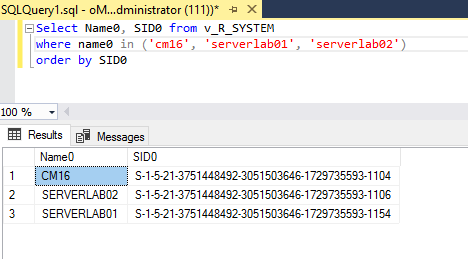
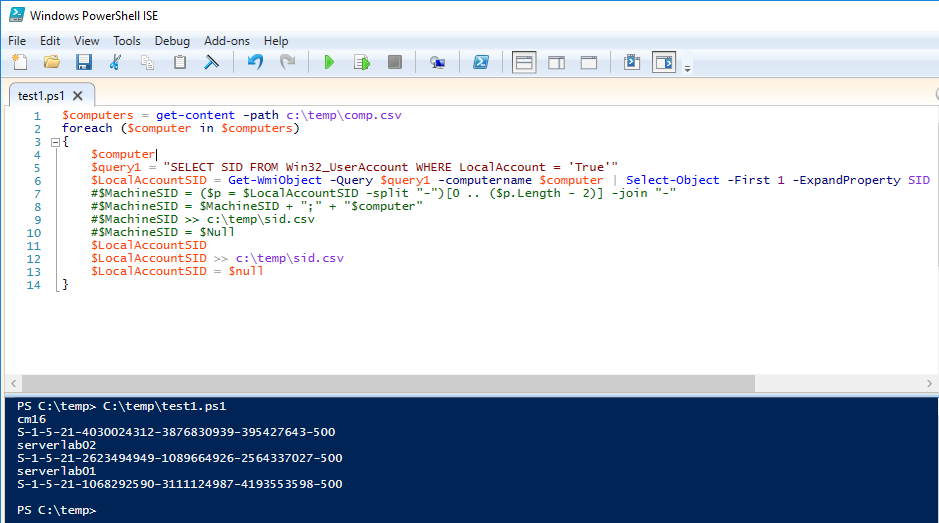
I performed a quick test in my lab and it seems the sql query and the powershell will return the different result? Do we want to retrieve the local account of the listed computer? If my memory doesn't go wrong, the account in sccm is the domain account.
$computers = get-content -path c:\temp\comp.csv
foreach ($computer in $computers)
{
    $computer
    $query1 = "SELECT SID FROM Win32_UserAccount WHERE LocalAccount = 'True'"
    $LocalAccountSID = Get-WmiObject -Query $query1 -computername $computer | Select-Object -First 1 -ExpandProperty SID
    #$MachineSID = ($p = $LocalAccountSID -split "-")[0 .. ($p.Length - 2)] -join "-"
    #$MachineSID = $MachineSID + ";" + "$computer"
    #$MachineSID >> c:\temp\sid.csv
    #$MachineSID = $Null
    $LocalAccountSID
    $LocalAccountSID >> c:\temp\sid.csv
    $LocalAccountSID = $null
}
sql result
powershell result
Alex
If the response is helpful, please click "Accept Answer" and upvote it.
' cx='32' cy='32' r='32' /%3E%3Ctext x='50%25' y='55%25' dominant-baseline='middle' text-anchor='middle' fill='%23FFF' %3EDD%3C/text%3E%3C/svg%3E)
Hello,
Excellent explanation Thanks a lot.
but how in the article https://devblogs.microsoft.com/scripting/weekend-scripter-use-powershell-to-find-computers-sids-in-ad-ds/ the result are the same between Get-ADComputer & psgetsid.exe?
Thanks,
Dom
Hi,
I would like to clarify why I am getting the same SID in powershell for different machines?
The SID should be unique, isn't it? Having duplicated SID will create issues?
Also if you do a Get-dtc it is always the same CID which are display as well...
Do we have the equivalent in powershell for the SID? I could not find a get-sid , any module to be loaded?
I built a new machine again and the CID are always the same and the SID as well...
So I am trying to get the SID with 3 different ways:
1) ./PsGetsid.exe \VIPEPSIRS1
S-1-5-21-3195015131-3355721831-4064164013
2) Get-ADComputer -Filter "name -eq 'VIPEPSIRS1'" -Properties sid | select name, sid | fl *
name : VIPEPSIRS1
sid : S-1-5-21-73586283-1284227242-1801674531-1140272
3)
$comp = import-csv C:\users\rmppqx\Desktop\comp.txt
foreach ($computer in $comp.comp)
{
$LocalAccountSID = Get-WmiObject -Query "SELECT SID FROM Win32_UserAccount WHERE LocalAccount = 'True'" -computername $computer | Select-Object -First 1 -ExpandProperty SID
$MachineSID = ($p = $LocalAccountSID -split "-")[0 .. ($p.Length - 2)] -join "-"
$MachineSID = $MachineSID + ";" + "$computer"
$MachineSID >> c:\temp\sid.csv
$MachineSID = $Null
}
S-1-5-21-3195015131-3355721831-4064164013;VIPEPSIRS1
Why do I get different results of SID for the same machine?
In this article the two options gave the same results...
https://devblogs.microsoft.com/scripting/weekend-scripter-use-powershell-to-find-computers-sids-in-ad-ds/
Thanks,
Dom