Developer technologies | VB
An object-oriented programming language developed by Microsoft that can be used in .NET.
This browser is no longer supported.
Upgrade to Microsoft Edge to take advantage of the latest features, security updates, and technical support.
' cx='32' cy='32' r='32' /%3E%3Ctext x='50%25' y='55%25' dominant-baseline='middle' text-anchor='middle' fill='%23FFF' %3EAZ%3C/text%3E%3C/svg%3E)
I was using crystal report on vb.net application to create this report
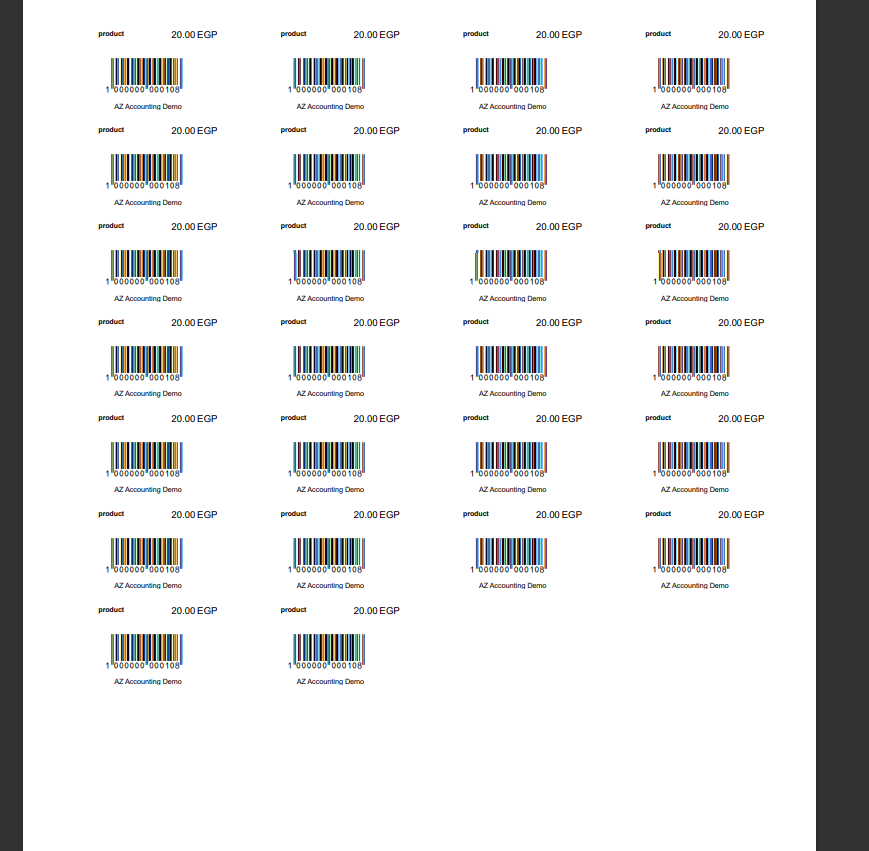
So if the user what to print 26 labels he can on A4 Paper Uncountably I wasn't able to achieve that on RDLC My code is Simple I have table called Temp with 5 Strings values and I populate it as the following:
Dim DT As New DataTable
    DT.TableName = "Temp"
    DT.Columns.Add("BarcodeId", Type.GetType("System.String"))
    DT.Columns.Add("BarcodePrice", Type.GetType("System.String"))
    DT.Columns.Add("BarcodeLabel", Type.GetType("System.String"))
    DT.Columns.Add("CurrencyType", Type.GetType("System.String"))
    DT.Columns.Add("Store", Type.GetType("System.String"))
    DT.Clear()
    For i = 1 To 1
    DT.Rows.Add(Label4.Text, Price.Text, Item_NameTextBox.Text, combobox1z, Main.Companylabel2.Text)
    Next
    ReportViewer1.Invoke(Sub() ReportViewer1.LocalReport.DataSources.Clear())
    ReportViewer1.Invoke(Sub() ReportViewer1.LocalReport.ReportPath = "D:\AZFTSAIO\AZFTS\RDLC Reports\Report2No.rdlc")
    ReportViewer1.Invoke(Sub() ReportViewer1.LocalReport.DataSources.Add(New Microsoft.Reporting.WinForms.ReportDataSource("DataSet1", DT)))
    ReportViewer1.Invoke(Sub() ReportViewer1.RefreshReport())
Now the Problem is I'm not able to repeat the data based on rows number. I need the page to hold 44 labels 4 horizontally * 11 vertically
' cx='32' cy='32' r='32' /%3E%3Ctext x='50%25' y='55%25' dominant-baseline='middle' text-anchor='middle' fill='%23FFF' %3EJL%3C/text%3E%3C/svg%3E)
Hi @Abanoub Zak ,
May I know whether your issue has been solved or not? If not, please share it in here. We can work together to figure it out.
Hi @Abanoub Zak ,
You can modify your report by referring to the solution in the questions below.
Create Employee Card By Reporting Services
Multi Column Report - printing Across and then Down
Or use Tablix control.
https://www.grapecity.com/blogs/how-to-create-a-label-report-using-tablix
Best Regards.
Jiachen Li
----------
If the answer is helpful, please click "Accept Answer" and upvote it.
Note: Please follow the steps in our documentation to enable e-mail notifications if you want to receive the related email notification for this thread.