Azure Synapse Analytics
An Azure analytics service that brings together data integration, enterprise data warehousing, and big data analytics. Previously known as Azure SQL Data Warehouse.
This browser is no longer supported.
Upgrade to Microsoft Edge to take advantage of the latest features, security updates, and technical support.
' cx='32' cy='32' r='32' /%3E%3Ctext x='50%25' y='55%25' dominant-baseline='middle' text-anchor='middle' fill='%23FFF' %3EMV%3C/text%3E%3C/svg%3E)
Hi,
I am exploring the usage of flowlets and wonder how I should implement the following scenario:
I have a dataflow which reads a source with 10 columns, one of these columns contains a customer number for which I want a flowlet to execute some logic on it.
The flowlet will accept the customer number as input and returns another column as output.
How can I use the output column in the dataflow in such the 10 columns from the source will stay available further downstream as well as the output column returned from the flowlet?
When I develop the dataflow as follows:
Source -> Flowlet -> Sink
I will only have one output column after the flowlet while I want it to be 11 columns.
Should I create an additional branch and perform a lookup on the flowlet to accomplish what I want or is there a better way?
Source -> Flowlet
---------|
---------|
---------|Source (branch) -> Lookup flowlet (customer id) -> Sink
Thanks for your thoughts!
An Azure analytics service that brings together data integration, enterprise data warehousing, and big data analytics. Previously known as Azure SQL Data Warehouse.
An Azure service for ingesting, preparing, and transforming data at scale.

Hi @Marc van der Wielen ,
Just checking in to see if the below answer helped. If this answers your query, do click  and upvote
  for the same. And, if you have any further query do let us know.
Answer accepted by question author
Hi @Marc van der Wielen ,
Thank you for follow up ask with details.
Flowlets in ADF will need to supply all the columns as input to work. If we don't supply then it is going to return only one column always.
For example, lets as Source1 has columns A,B,C and Source2 has columns B,M,N. Then if we want flow let to work for both the sources we should consider adding input columns as A,B,C,M,N.
Below is an idea which I have on high to avoid adding all source columns to flowlet. Kindly check its feasible in your case.
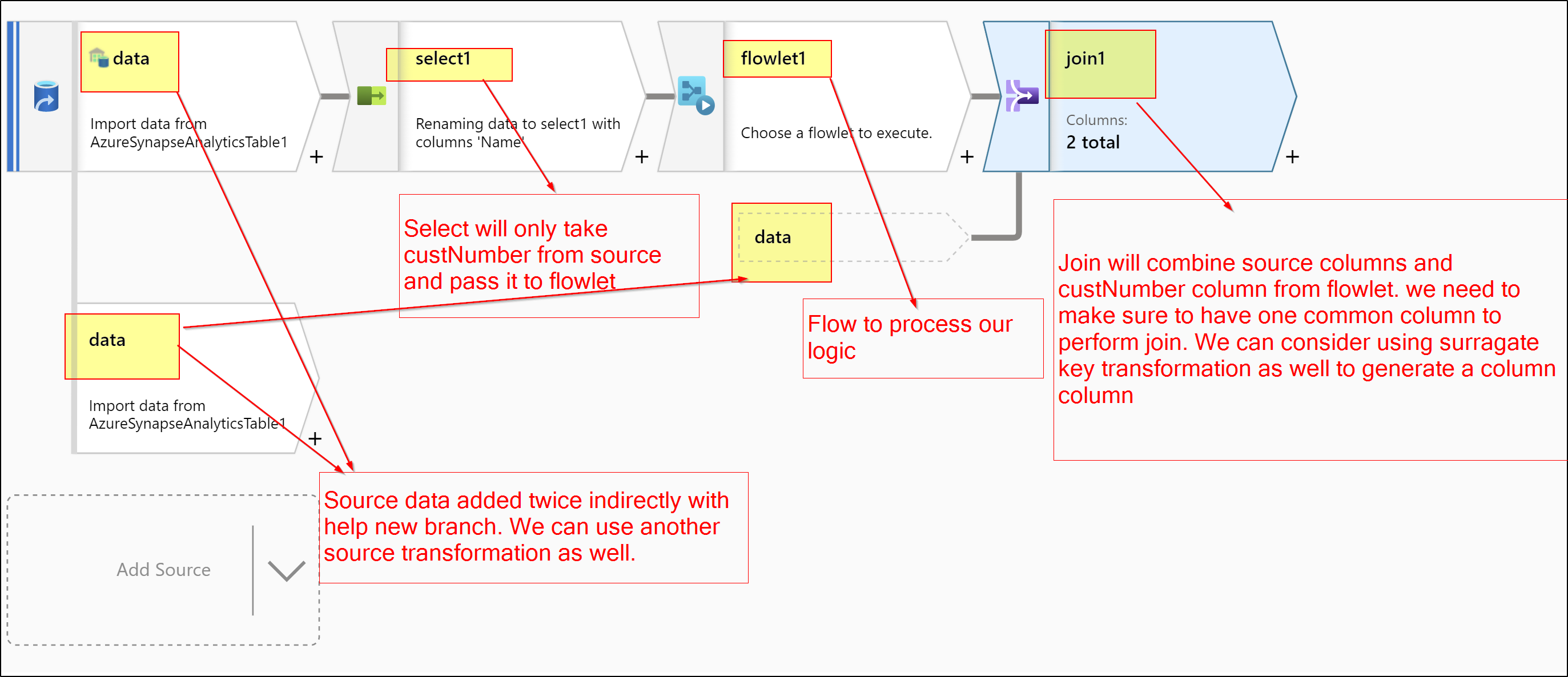
Step1: Create a Flowlet with only customerNumber column as input.
Step2: Inside dataflow on source transformation use New Branch transformation to clone source as sperate branch OR add another source transformation with same source data.
Step3: On source transformation use Select transformation to get take only customerNumber column.
Step4: Add Flowlet transformation after select transformation.
Step5: From Flowlet transformation try to join columns between both paths(step2 & step3)
Please Note, make sure have a common column between source and new branch, so that we can easily join as mentioned in Step5.
Below screenshot shows high level implementation suggested.
Hope this helps. Please let us know if any further queries.
------------------
Please consider hitting Accept Answer button. Accepted answers helps community as well.
Hi @Marc van der Wielen ,
Just checking in to see if the above answer helped. If this answers your query, do click and upvote for the same. And, if you have any further query do let us know.
Hi @Marc van der Wielen ,
Thank you for posting query in Microsoft Q&A Platform.
To summarize ask here, you are looking a way to include all source columns in to Flowlet along with customer number column. Please feel free to correct if my understanding is wrong here.
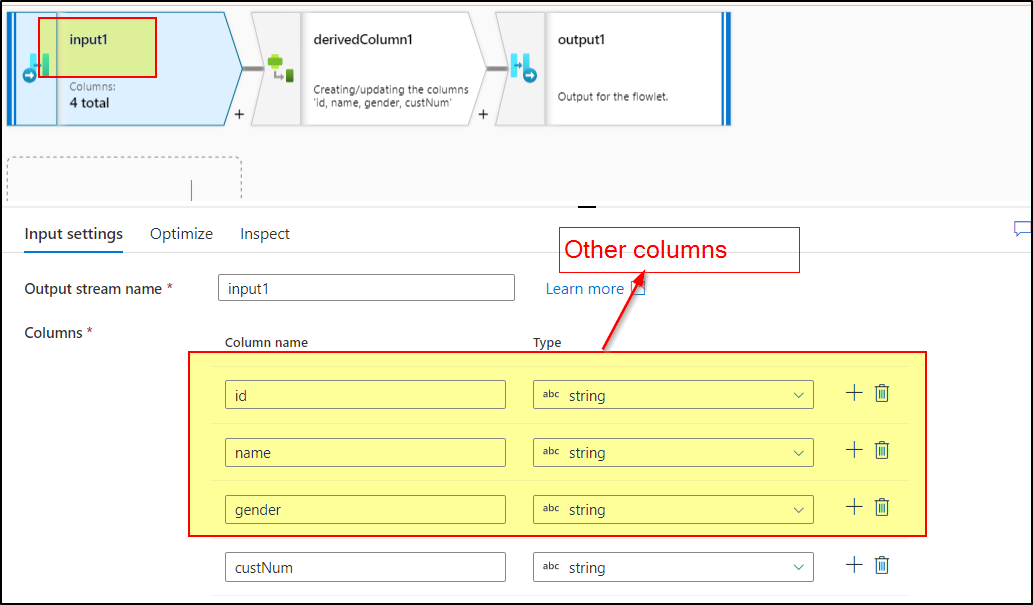
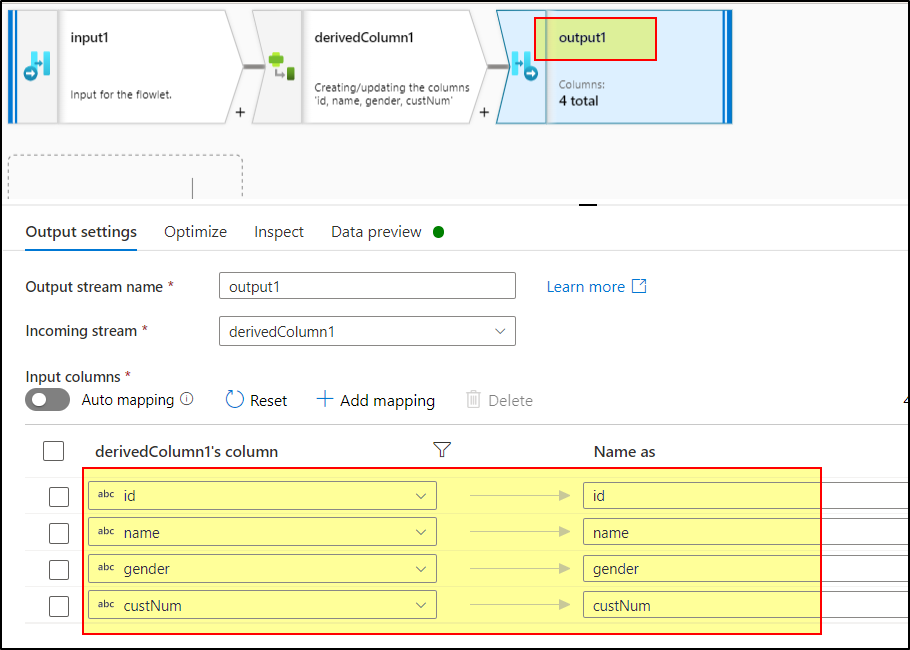
While creating flowlet under input we can add all the columns manually or by using source. Those columns will be available to through out of logic of flowlet and output from flowlet too.
Please check below screenshot where I added columns in flowlet input along with custNum column.
All above columns output from flowlet.
Kindly check below video in which detailed explanation of flow lets available. This will help.
Flowlets in Mapping data flow in Azure Data Factory
Hope this helps. Please let us know if any further queries.
-----------------
Please consider hitting Accept Answer. Accepted answers helps community as well.
Hi @ShaikMaheer-MSFT , I am aware of the options to add more columns to the input flowlet, however this would not solve my scenario as I will use this flowlet for multiple datasource which have different kind and number of input columns.
Example:
Data source 1 has 20 columns with a customer number
Data source 2 has 50 columns with a customer number
Data source 3 has 100 columns with a customer number
For each data source I want to use the flowlet to apply the logic on the customer number and retrieve the result via an output column of the flowlet and additionally I want to keep all columns coming from the source.
Adding all columns as input columns to the flowlet will make the flowlet a source specific solution while I want to keep it generic in such there is no dependency with the schema of any source.
What is the best way to accomplish what I am looking for?
Kind regards,
Marc
@ShaikMaheer-MSFT sorry for the delay, yes your answer was what I already expected. Creating an addtional branch and then use a join or a lookup to the flowlet will solve the scenario but I do feel this is not optimal as an additional join or lookup and having two datastreams are required. I wondered if the flowlet supports some column passthrough feature which will dynamically accept any number of input columns (besides the input columns needed for the logic in the flowlet) which you could then use further downstream. Apparently this is not possible and therefore this alternative solution is how I should solve my scenario.
Kind regards,
Marc
Hi @Marc van der Wielen - Yes this the work around we should go with. I encourage you to have feedback item logged for the feature which you were suggesting above. Product team closely monitor feedbacks there and consider them for future releases.
https://feedback.azure.com/d365community/forum/1219ec2d-6c26-ec11-b6e6-000d3a4f032c
' cx='32' cy='32' r='32' /%3E%3Ctext x='50%25' y='55%25' dominant-baseline='middle' text-anchor='middle' fill='%23FFF' %3EJN%3C/text%3E%3C/svg%3E)
Since I ran into this same issue and couldn't find this feature posted in the feedback forum linked above I've posted it myself, https://feedback.azure.com/d365community/idea/05138c7a-0f0d-ed11-a81b-6045bd853198.