Microsoft 365 and Office | Access | Development
The creation and customization of database applications using Microsoft Access

This browser is no longer supported.
Upgrade to Microsoft Edge to take advantage of the latest features, security updates, and technical support.
' cx='32' cy='32' r='32' /%3E%3Ctext x='50%25' y='55%25' dominant-baseline='middle' text-anchor='middle' fill='%23FFF' %3EFR%3C/text%3E%3C/svg%3E)
Hello,
I have two tables EmployeeT and EEAssessmentT. The EmployeeT consists of two fields including EmployeeName and Craft. The EEAssessmentT contains (5) fields...Employee, RecDate, Bldg, Work Desc and Craft.
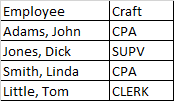
I will be receiving support data (via Excel) by Employee Name but it will not have the Craft.
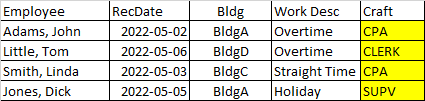
Is there a way that my table can auto populate the "Craft" field (in yellow) in the EEAssementT based on the Excel data I paste in the EEAssessmentT?
Thanks

With the sample data you have posted, in which the Employee values are distinct, you can easily do that with an UPDATE query:
UPDATE EEAssessmentT INNER JOIN EmployeeT
ON EEAssessmentT.Employee = EmployeeT.Employee
SET EEAssessmentT.Craft = EmployeeT.Craft
WHERE EmployeeT.Craft IS NULL;
However, personal names can legitimately be duplicated, so must never be used as keys. Nor is a combination of names and other columns as a composite key always reliable. I was once present at a clinic when two patients arrived within minutes of each other, both female, both with the same first and last names and both with the same date of birth. People should always be identified by a 'surrogate' numeric primary key, e.g. PatientID, usually an autonumber for convenience.
Imagine what would happen if a second John Adams joins the workforce. The query would have no way of knowing to which John Adams each row with that employee names in the Excel worksheet refers.
The solution to the database design would be to add an autonumber EmployeeID column to the EmployeeT table as the primary key, and a corresponding EmployeeID column as the foreign key to the EEAssessmentT table as a foreign key. The latter will not be an autonumber of course, but a long integer number indexed to allow duplicates. Once the foreign key column has been correctly populated the redundant Employee and Craft columns would be deleted from EEAssessmentT, which would then be normalized to Third Normal Form (3NF) and no longer at risk of update anomalies. An enforced relationship between the tables on EmployeeID should then be created.
While this would correct the database design, it would not overcome the problem of appending rows from the Excel worksheet. In the absence of an EmployeeID column in the worksheet the only way this could be done would be by identifying a candidate key for the worksheet data, composed of multiple columns. The only possible example that I can see would be a Employee and Bldg, which would require that in all rows the combination of the values these two columns must be distinct, and must remain so in the future. I would be doubtful that this is the case, but only you can say.
You might like to take a look at DecomposerDemo.zip in my public databases folder at:
https://onedrive.live.com/?cid=44CC60D7FEA42912&id=44CC60D7FEA42912!169
This little demo file illustrates how data from an Excel worksheet can be imported into Access and then decomposed into a set of correctly normalized related tables, using a set of 'append' queries. A brief explanation is given of each step as you work through the demo.
It would also be preferable to split the Employee column into separate FirstName and LastName columns, though this is not relevant to the current issue.