Exchange | Exchange Server | Management
The administration and maintenance of Microsoft Exchange Server to ensure secure, reliable, and efficient email and collaboration services across an organization.
This browser is no longer supported.
Upgrade to Microsoft Edge to take advantage of the latest features, security updates, and technical support.
' cx='32' cy='32' r='32' /%3E%3Ctext x='50%25' y='55%25' dominant-baseline='middle' text-anchor='middle' fill='%23FFF' %3ECB%3C/text%3E%3C/svg%3E)
Hello ,
We enabled the Microsoft Report message button in the Exchange online , Office 365 for our users and we are using only internal mailbox to receive the user submissions .
We were looking to find a way to differentiate emails based on whether they were flagged as Spam or Phishing . Looks no way to find as the mailbox which receives the emails have all emails which same format across all fields . We want to treat spam and phishing differently so any way to find which emails were clicked as spam and which were clicked as phishing by the users in the report message button which we implement in the Outlook button for all users .
Thanks in advance for help
' cx='32' cy='32' r='32' /%3E%3Ctext x='50%25' y='55%25' dominant-baseline='middle' text-anchor='middle' fill='%23FFF' %3EAX%3C/text%3E%3C/svg%3E)
Hi @Cheluvappa, Balaraju ,
It's been a while, is there any update?
Greetings , thanks for your comment , did not receive any solution yet , not even partial solution or any other pointers .
Based on my knowledge, it seems does not have a button to achieve the requirement.
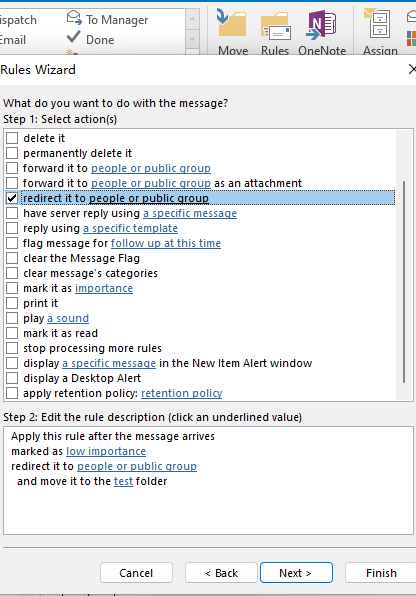
But I think maybe you could through outlook rules to work around.
For example: When user receive a spam email, he can mark the email’s importance as low, the it would be moved to another folder or redirect/forward to another mailbox to collect the spam email.
If the response is helpful, please click "Accept Answer" and upvote it.
Note: Please follow the steps in our documentation to enable e-mail notifications if you want to receive the related email notification for this thread.
Hi @Cheluvappa, Balaraju ,
It's been a while. Does the issue get resolved?

Thanks , as I said in my post , we are using only internal mailbox to receive the user submissions, nothing is being sent to Microsoft , so how can we find from the email content/subject or any other field that the user clicked on Spam or Phishing ?
What did you configure so it only sends messages to an internal mailbox and not Microsoft? Trying to understand why you wouldnt want the messages to go to Microsoft as well? What actions do you take on reported messages?
Andy , thanks and good question .
We have 2 tenants and for one we do normally i.e send to Microsoft and to internal mailbox . However the second tenant has special considerations due to data protection and client requirement , we cannot have the data leave certain geographic boundaries , hence looking to send the message to internal mailbox only . So need help in that context , the mail box shows both type of emails as exactly same so looking for way to differentiate .
Thanks
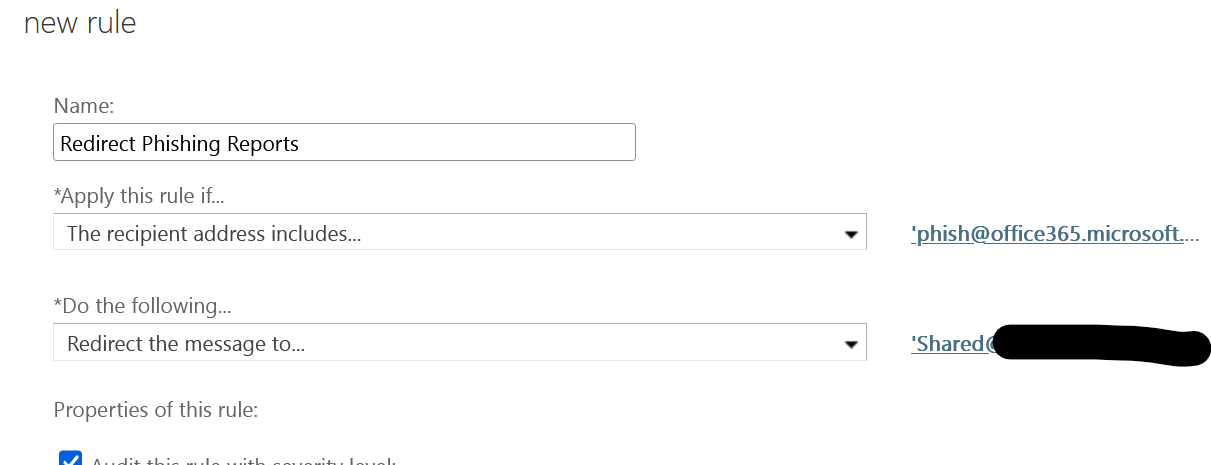
Ah , ok. So If I was doing this, I would create rules that redirects any messages sent to those SMTP addresses:
junk@OFFICE .microsoft.com
******@messaging.microsoft.com
phish@OFFICE .microsoft.com
not_junk@OFFICE .microsoft.com
Then I would create multiple mailboxes and redirect based on that ( You could in theory create Outlook rules as well based on the TO: header and route to different folders within one internal mailbox
Something like this:
This link has the solution .I got it here
https://learn.microsoft.com/en-gb/microsoft-365/security/office-365-security/user-submission?view=o365-worldwide