Note
Access to this page requires authorization. You can try signing in or changing directories.
Access to this page requires authorization. You can try changing directories.
Decouple back-end processing from a front-end host when back-end processing needs to run asynchronously but the front end needs a clear response.
Context and problem
In modern application development, client applications often depend on remote APIs to provide business logic and compose functionality. Many applications run code in a web browser, and other environments also host client code. The APIs might relate directly to the application or operate as shared services from an external service. Most API calls use HTTP or HTTPS and follow REST semantics.
In most cases, APIs for a client application respond in about 100 milliseconds (ms) or less. Many factors can affect the response latency:
- The application's hosting stack
- Security components
- The relative geographic location of the caller and the back end
- Network infrastructure
- Current load
- The size of the request payload
- Processing queue length
- The time for the back end to process the request
These factors can add latency to the response. You can mitigate some factors by scaling out the back end. Other factors, like network infrastructure, are outside the application developer's control. Most APIs respond quickly enough for the response to return over the same connection. Application code can make a synchronous API call in a nonblocking way to give the appearance of asynchronous processing. We recommend this approach for input and output (I/O)‑bound operations.
In some scenarios, the back end does work that's long-running and takes a few seconds. In other scenarios, the back end does long-running background work for minutes or for extended periods. In these cases, you can't wait for the work to finish before you send a response. This situation can create a problem for synchronous request-reply patterns. For guidance about designing the back-end processing, see Background jobs.
Some architectures solve this problem by using a message broker to separate the request and response stages. Many systems achieve this separation through the Queue-Based Load Leveling pattern. This separation lets the client process and the back-end API scale independently. It also introduces extra complexity when the client requires success notification because that step must also become asynchronous.
Many of the same considerations that apply to client applications also apply to server-to-server REST API calls in distributed systems, like in a microservices architecture.
Solution
One solution to this problem is to use HTTP polling. Polling works well for client-side code when callback endpoints are unavailable or when long-running connections add too much complexity. Even when callbacks are possible, the extra libraries and services that they require can increase complexity.
The following steps describe the solution:
The client application makes a synchronous call to the API to trigger a long-running operation on the back end.
The API responds synchronously as quickly as possible. It returns an HTTP 202 (Accepted) status code to acknowledge that it received the request for processing.
Note
The API should validate the request and the action to be performed before it starts the long-running process. If the request isn't valid, reply immediately with an error code like HTTP 400 (Bad Request).
The response includes a location reference that points to an endpoint that the client can poll to check the result of the long-running operation.
The API offloads processing to another component, like a message queue.
For every successful call to the status endpoint, the endpoint returns HTTP 200 (OK). While the work is in progress, the status endpoint returns a resource that indicates that state. The status response body should include enough information for the client to understand the current state of the operation.
When the work completes, the status endpoint returns a resource that indicates completion or redirects to another resource URL. For example, if the asynchronous operation creates a new resource, the status endpoint redirects to the URL for that resource.
The following diagram shows a typical flow.
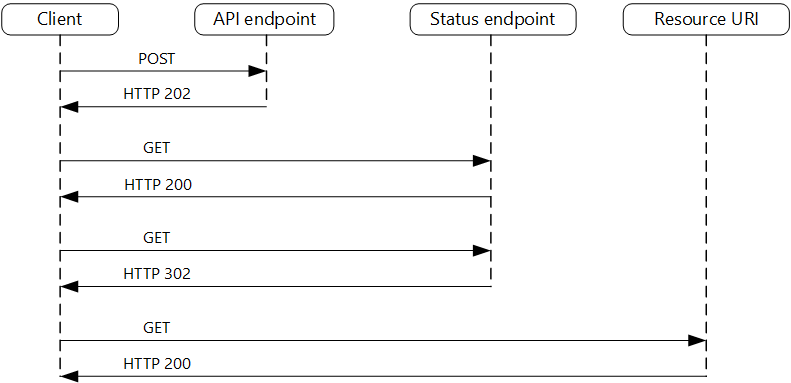
The client sends a request and receives an HTTP 202 (Accepted) response.
The client sends an HTTP GET request to the status endpoint. This call returns HTTP 200 because the work is pending.
At some point, the work completes and the status endpoint returns HTTP 303 (See Other) to redirect to the resource.
The client fetches the resource at the specified URL.
Problems and considerations
Consider the following points as you decide how to implement this pattern:
Multiple ways exist to implement this pattern over HTTP, and upstream services don't always use the same semantics. For example, some implementations don't use a separate status endpoint. Instead, the client polls the target resource URL directly and receives HTTP 404 (Not Found) until the resource is created. This response is generated because the resource doesn't exist yet. However, this approach can be unclear because invalid request IDs also return HTTP 404. A dedicated status endpoint that returns HTTP 200 with a status body, as described in this pattern, avoids this confusion.
An HTTP 202 response indicates where the client polls and how often. It should include the following headers.
Header Description Notes LocationA URL that the client polls for a response status This URL can be a shared access signature (SAS) token. The Valet Key pattern works well when this location needs access control. The pattern also applies when response polling needs to move to another back end. Retry-AfterAn estimated completion time for processing This header helps polling clients avoid sending too many requests to the back end. Consider expected client behavior when you design this response. A client that you control can follow these response values exactly. Clients that others author, including clients built by using no-code or low-code tools like Azure Logic Apps, can apply their own handling for HTTP 202.
Consider including the following fields in the status endpoint response.
Field Description Notes statusThe current state of the operation, such as Pending, Running, Succeeded, Failed, or Canceled Uses a consistent, documented set of terminal and nonterminal values createdAtThe time that the operation was accepted Helps clients detect stale or abandoned operations lastUpdatedAtThe time that the status was last updated Helps clients distinguish between stalled and in-progress operations percentCompleteAn optional progress indicator Useful when the back end can estimate progress errorA structured error object when the status is Failed For consistency, consider using the RFC 9457 format. You might need to use a processing proxy to adjust the response headers or payload, depending on the underlying services that you use.
If the status endpoint redirects after completion, use HTTP 303 (See Other). A 303 instructs the client to issue a GET request to the redirect URL, regardless of the original request method. This behavior is the correct semantic for this pattern because the client is retrieving a distinct result resource, not resubmitting the original operation. HTTP 302 (Found) doesn't guarantee a method change. Some clients replay the original method on redirect. This behavior can cause unintended side effects, such as duplicate POST requests.
After the server successfully processes the request, the resource that the
Locationheader specifies returns an HTTP status code like 200, 201 (Created), or 204 (No Content).If an error occurs during processing, persist the error at the resource URL that the
Locationheader specifies and return a 4xx status code from the resource that matches the failure. Use a structured error format, such as RFC 9457 (Problem Details for HTTP APIs), so that clients can programmatically parse and handle failures.The status resource and any stored results consume storage and compute. Define a retention policy to clean them up after a reasonable period. To inform clients of the retention window, you can add an
Expiresheader to the status response.Solutions don't all implement this pattern the same way, and some services include extra or alternate headers. For example, Azure Resource Manager uses a modified variant of this pattern. For more information, see Resource Manager asynchronous operations.
Legacy clients might not support this pattern. In that case, you might need to place a façade over the asynchronous API to hide the asynchronous processing from the original client. For example, Logic Apps supports this pattern natively, and you can use it as an integration layer between an asynchronous API and a client that makes synchronous calls. For more information, see Asynchronous request-response behavior in Logic Apps.
To provide a way for clients to cancel a long-running request, expose a DELETE operation on the status endpoint resource. This request should forward a cancellation instruction to the back-end processing component. After the back end handles the cancellation, it should update the status resource to reflect the canceled state. This process helps prevent incomplete work from consuming resources indefinitely. Determine whether the operation supports partial rollback or requires a compensating transaction.
You can require clients to supply an idempotency key, for example in an
Idempotency-Keyrequest header, when they submit the initial request. If the back end receives a duplicate key, it should return the existing status resource instead of enqueuing a second work item. This approach protects against network failures that cause the client to retry a POST that the server already accepted. It's especially important in this pattern because the client can't distinguish between a lost response and a request that was never received.
Note
This pattern describes HTTP polling, in which the client periodically issues new requests to check status. In long polling, the client sends a request and the server holds the connection open until new data is available or a timeout occurs. Long polling reduces response latency compared to periodic polling, but it introduces complexity around connection management and timeouts.
When to use this pattern
Use this pattern when:
You work with client-side code, like browser applications, and those constraints make callback endpoints difficult to provide, or long-running connections add too much complexity.
You call a service that uses only the HTTP protocol and the return service can't send callbacks because of firewall restrictions on the client side.
You integrate with workloads that don't support modern callback mechanisms like WebSockets or webhooks.
This pattern might not be suitable when:
You can use a service built for asynchronous notifications instead, like Azure Event Grid.
Responses must stream in real time to the client. Consider using Server-Sent Events (SSEs), which provide a lightweight, HTTP-native, unidirectional push channel from server to client without requiring the client to poll.
The client needs to collect many results, and the latency of those results is important. Consider using a message broker instead.
Server-side persistent network connections like WebSockets or SignalR are available. You can use these connections to notify the caller of the result.
The network design supports open ports to receive asynchronous callbacks or webhooks.
Workload design
An architect should evaluate how they can use the Asynchronous Request-Reply pattern in their workload's design to address the goals and principles covered in the Azure Well-Architected Framework pillars.
| Pillar | How this pattern supports pillar goals |
|---|---|
| Performance Efficiency helps your workload efficiently meet demands through optimizations in scaling, data, and code. | You improve responsiveness and scalability by decoupling the request and reply phases for processes that don't require an immediate response. An asynchronous approach increases concurrency and lets the server schedule work as capacity becomes available. - PE:05 Scaling and partitioning - PE:07 Code and infrastructure |
As with any design decision, consider trade-offs against the goals of the other pillars that this pattern might introduce.
Example
The following code shows excerpts from an application that uses Azure Functions to implement this pattern. This solution has three functions:
- The asynchronous API endpoint
- The status endpoint
- A back-end function that takes queued work items and runs them
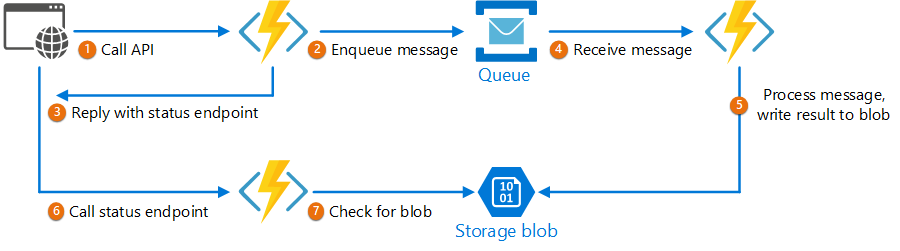
 This sample is available on GitHub.
The implementation uses managed identity to authenticate with Azure Service Bus and Azure Blob Storage, which avoids storing connection strings or account keys. Dependencies are registered in Program.cs by using DefaultAzureCredential and are injected through primary constructors.
AsyncProcessingWorkAcceptor function
The AsyncProcessingWorkAcceptor function implements an endpoint that accepts work from a client application and enqueues it for processing:
The function generates a request ID and adds it as metadata to the queue message.
The HTTP response includes a
Locationheader that points to a status endpoint and aRetry-Afterheader that suggests a polling interval. The request ID appears in the URL path.
public class AsyncProcessingWorkAcceptor(ServiceBusClient _serviceBusClient)
{
    [Function("AsyncProcessingWorkAcceptor")]
    public async Task<IActionResult> Run(
        [HttpTrigger(AuthorizationLevel.Anonymous, "post", Route = null)] HttpRequest req,
        [FromBody] CustomerPOCO customer)
    {
        if (string.IsNullOrEmpty(customer.id) || string.IsNullOrEmpty(customer.customername))
        {
            return new BadRequestResult();
        }

        string requestId = Guid.NewGuid().ToString();

        string statusUrl = $"https://{Environment.GetEnvironmentVariable("WEBSITE_HOSTNAME")}/api/RequestStatus/{requestId}";

        var messagePayload = JsonConvert.SerializeObject(customer);
        var message = new ServiceBusMessage(messagePayload);
        message.ApplicationProperties.Add("RequestGUID", requestId);
        message.ApplicationProperties.Add("RequestSubmittedAt", DateTime.UtcNow);
        message.ApplicationProperties.Add("RequestStatusURL", statusUrl);
        var sender = _serviceBusClient.CreateSender("outqueue");

        await sender.SendMessageAsync(message);

        req.HttpContext.Response.Headers["Retry-After"] = "5";

        return new AcceptedResult(statusUrl, null);
    }
}
AsyncProcessingBackgroundWorker function
The AsyncProcessingBackgroundWorker function reads the operation from the queue, processes it based on the message payload, and writes the result to a storage account.
public class AsyncProcessingBackgroundWorker(BlobContainerClient _blobContainerClient)
{
    [Function("AsyncProcessingBackgroundWorker")]
    public async Task Run(
        [ServiceBusTrigger("outqueue", Connection = "ServiceBusConnection")] ServiceBusReceivedMessage message)
    {
        // Perform an action against the blob data source for the async readers to check against.
        // This is where your service worker processing will be performed.

        var requestGuid = message.ApplicationProperties["RequestGUID"].ToString();
        string blobName = $"{requestGuid}.blobdata";

        var blobClient = _blobContainerClient.GetBlobClient(blobName);
        using (MemoryStream memoryStream = new MemoryStream())
        using (StreamWriter writer = new StreamWriter(memoryStream))
        {
            writer.Write(message.Body.ToString());
            writer.Flush();
            memoryStream.Position = 0;

            await blobClient.UploadAsync(memoryStream, overwrite: true);
        }
    }
}
AsyncOperationStatusChecker function
The AsyncOperationStatusChecker function implements the status endpoint. This function checks the status of the request:
If the request completes, the function returns HTTP 303 (See Other) and redirects the client to a valet key URL for the result.
If the request is pending, the function returns an HTTP 200 code that includes the current state.
public class AsyncOperationStatusChecker(ILogger<AsyncOperationStatusChecker> _logger)
{
    [Function("AsyncOperationStatusChecker")]
    public async Task<IActionResult> Run(
        [HttpTrigger(AuthorizationLevel.Anonymous, "get", Route = "RequestStatus/{requestId}")] HttpRequest req,
        [BlobInput("data/{requestId}.blobdata", Connection = "DataStorage")] BlockBlobClient inputBlob, string requestId)
    {
        OnCompleteEnum OnComplete = Enum.Parse<OnCompleteEnum>(req.Query["OnComplete"].FirstOrDefault() ?? "Redirect");
        OnPendingEnum OnPending = Enum.Parse<OnPendingEnum>(req.Query["OnPending"].FirstOrDefault() ?? "OK");

        _logger.LogInformation("Received status request for {RequestId} - OnComplete {OnComplete} - OnPending {OnPending}",
            requestId, OnComplete, OnPending);

        // Check whether the blob exists.
        if (await inputBlob.ExistsAsync())
        {
            // If the blob exists, the function uses the OnComplete parameter to determine the next action.
            return await OnCompleted(OnComplete, inputBlob, requestId, req);
        }
        else
        {
            // If the blob doesn't exist, the function uses the OnPending parameter to determine the next action.
            switch (OnPending)
            {
                case OnPendingEnum.OK:
                    {
                        // Return an HTTP 200 status code.
                        return new OkObjectResult(new { status = "In progress", Location = rqs });
                    }

                case OnPendingEnum.Synchronous:
                    {
                        // Long polling example: hold the connection open and check for completion
                        // using exponential backoff. Time out after approximately one minute.
                        int backoff = 250;

                        while (!await inputBlob.ExistsAsync() && backoff < 64000)
                        {
                            _logger.LogInformation("Synchronous mode {RequestId} - retrying in {Backoff} ms", requestId, backoff);
                            backoff = backoff * 2;
                            await Task.Delay(backoff);
                        }

                        if (await inputBlob.ExistsAsync())
                        {
                            _logger.LogInformation("Synchronous mode {RequestId} - completed after {Backoff} ms", requestId, backoff);
                            return await OnCompleted(OnComplete, inputBlob, requestId, req);
                        }
                        else
                        {
                            _logger.LogInformation("Synchronous mode {RequestId} - NOT FOUND after timeout {Backoff} ms", requestId, backoff);
                            return new NotFoundResult();
                        }
                    }

                default:
                    {
                        throw new InvalidOperationException($"Unexpected value: {OnPending}");
                    }
            }
        }
    }

    private async Task<IActionResult> OnCompleted(OnCompleteEnum OnComplete, BlockBlobClient inputBlob, string requestId, HttpRequest req)
    {
        switch (OnComplete)
        {
            case OnCompleteEnum.Redirect:
                {
                    // Generate a user delegation SAS URI by using managed identity credentials.
                    BlobServiceClient blobServiceClient = inputBlob.GetParentBlobContainerClient().GetParentBlobServiceClient();
                    var userDelegationKey = await blobServiceClient.GetUserDelegationKeyAsync(DateTimeOffset.UtcNow, DateTimeOffset.UtcNow.AddDays(7));

                    // Return 303 (See Other) to redirect the client to the result resource.
                    // GenerateUserDelegationSasUri is a custom helper. See the full implementation on GitHub.
                    req.HttpContext.Response.Headers.Location = GenerateUserDelegationSasUri(inputBlob, userDelegationKey);
                    return new StatusCodeResult(StatusCodes.Status303SeeOther);
                }

            case OnCompleteEnum.Stream:
                {
                    // Download the file and return it directly to the caller.
                    // For larger files, use a stream to minimize RAM usage.
                    return new OkObjectResult(await inputBlob.DownloadContentAsync());
                }

            default:
                {
                    throw new InvalidOperationException($"Unexpected value: {OnComplete}");
                }
        }
    }
}

public enum OnCompleteEnum
{
    Redirect,
    Stream
}

public enum OnPendingEnum
{
    OK,
    Synchronous
}