Manage the pricing tier of your Azure Maps account
You can manage the pricing tier of your Azure Maps account through the Azure portal or an Azure Resource Manager (ARM) template.
For information related to calculating costs, see Azure Maps pricing and Understanding Azure Maps Transactions.
Note
Azure Maps Gen1 pricing tier retirement
Gen1 pricing tier is now deprecated and will be retired on 9/15/26. Gen2 pricing tier replaces Gen1 (both S0 and S1) pricing tier. If your Azure Maps account has Gen1 pricing tier selected, you can switch to Gen2 pricing tier before it’s retired, otherwise it will automatically be updated.
After 9/14/23, Gen1 pricing tier will no longer be available when creating new Azure Maps accounts via the Azure Portal. After 10/12/23, Gen1 pricing tier will no longer be available when creating new Azure Maps accounts when using an ARM template.
You don't have to generate new subscription keys, client ID (for Microsoft Entra authentication) or shared access signature (SAS) tokens if you change the pricing tier for your Azure Maps account.
For more information on Gen2 pricing tier, see Azure Maps pricing.
Change a pricing tier
Azure portal
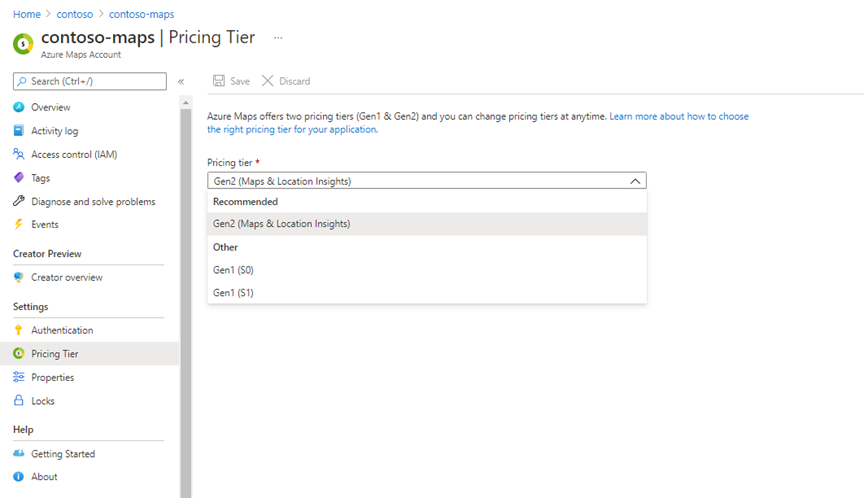
To change your pricing tier from Gen1 to Gen2 in the Azure Portal, navigate to the Pricing tier option in the settings menu of your Azure Maps account. Select Gen2 from the Pricing tier drop-down list then the Save button.
Note
You don't have to generate new subscription keys, client ID (for Microsoft Entra authentication) or shared access signature (SAS) tokens if you change the pricing tier for your Azure Maps account.
ARM template
To change your pricing tier from Gen1 to Gen2 in the ARM template, update pricingTier to G2 and kind to Gen2. For more info on using ARM templates, see Create account with ARM template.
{
  "$schema": "https://schema.management.azure.com/schemas/2019-04-01/deploymentTemplate.json#",
  "contentVersion": "1.0.0.0",
  "metadata": {
    "_generator": {
      "name": "bicep",
      "version": "0.25.53.49325",
      "templateHash": "695164742048978243"
    }
  },
  "parameters": {
    "accountName": {
      "type": "string",
      "defaultValue": "[uniqueString(resourceGroup().id)]",
      "metadata": {
        "description": "The name for your Azure Maps account. This value must be globally unique."
      }
    },
    "location": {
      "type": "string",
      "allowedValues": [
        "westeurope",
        "eastus",
        "westus2",
        "northeurope",
        "westcentralus",
        "usgovvirginia",
        "usgovarizona"
      ],
      "metadata": {
        "description": "Specifies the location for all the resources."
      }
    },
    "pricingTier": {
      "type": "string",
      "defaultValue": "G2",
      "allowedValues": [
        "G2"
      ],
      "metadata": {
        "description": "The pricing tier SKU for the account."
      }
    },
    "kind": {
      "type": "string",
      "defaultValue": "Gen2",
      "allowedValues": [
        "Gen2"
      ],
      "metadata": {
        "description": "The pricing tier for the account."
      }
    }
  },
  "resources": [
    {
      "type": "Microsoft.Maps/accounts",
      "apiVersion": "2023-06-01",
      "name": "[parameters('accountName')]",
      "location": "[parameters('location')]",
      "sku": {
        "name": "[parameters('pricingTier')]"
      },
      "kind": "[parameters('kind')]"
    }
  ]
}
Next steps
Learn how to see the API usage metrics for your Azure Maps account: