Note
Access to this page requires authorization. You can try signing in or changing directories.
Access to this page requires authorization. You can try changing directories.
APPLIES TO:  Azure Data Factory
  Azure Synapse Analytics
Tip
Try out Data Factory in Microsoft Fabric, an all-in-one analytics solution for enterprises. Microsoft Fabric covers everything from data movement to data science, real-time analytics, business intelligence, and reporting. Learn how to start a new trial for free!
Important
On January 1, 2026 you'll no longer be able to create new Airflow instances using ADF's Workflow Orchestration Manager. We recommend that you migrate all Workflow Orchestration Manager (Apache Airflow in Azure Data Factory) workloads to Apache Airflow jobs in Microsoft Fabric before December 31, 2025.
For more information or for support during your migration to Apache Airflow in Microsoft Fabric, contact Microsoft Support.
This article describes how to change the password for a Workflow Orchestration Manager environment in Azure Data Factory using Basic authentication.
Updating the password
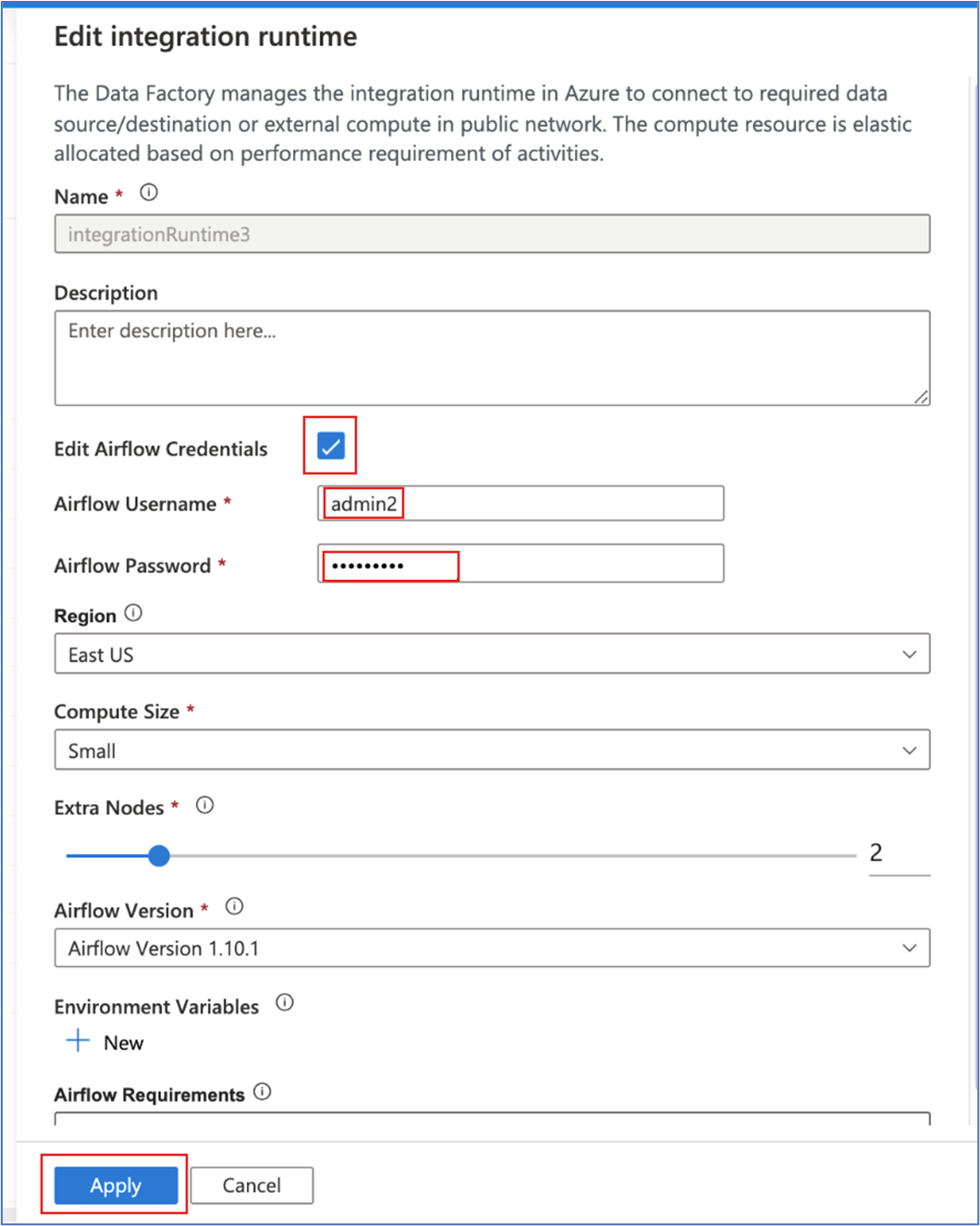
We recommend using Microsoft Entra ID authentication in Workflow Orchestration Manager environments. However, if you choose to use Basic authentication, you can still update the Airflow password by editing the Airflow environment configuration and updating the username/password in the integration runtime settings, as shown here: