Note
Access to this page requires authorization. You can try signing in or changing directories.
Access to this page requires authorization. You can try changing directories.
Important
Kubernetes misconfiguration enforcement is currently in public preview. This feature is available only in commercial clouds. It isn't available in national or sovereign clouds, including US Government, China Government, and other sovereign regions.
Microsoft Defender for Cloud extends Kubernetes security from detection to prevention with Kubernetes misconfiguration enforcement. This capability lets organizations audit or block insecure Kubernetes configurations at deployment time, helping teams stop misconfigurations before they become incidents. Misconfiguration enforcement evaluates Kubernetes resources during deployment and enforces Microsoft security best-practice rules consistently across clusters without relying on post-deployment scans or fragmented policy tools.
After you enable the feature, a default security rule named Default K8s misconfiguration rule is automatically created in Audit mode and applied globally to all your Kubernetes clusters. You can modify it to Block mode or create additional scoped policies to actively prevent non-compliant deployments.
Scope
- Applies to Kubernetes resource evaluation at deployment time.
- Supports Audit and Block (enforcement) modes.
- Enforces Microsoft security best-practice rules across clusters.
Use cases
Kubernetes misconfiguration enforcement helps you:
- Stop risky Kubernetes workloads before deployment by blocking containers with unsafe or non-compliant configurations.
- Enforce non-root execution and approved user or group IDs so containers can't run with excessive OS privileges.
- Prevent containers from automatically mounting Kubernetes API credentials to reduce blast radius if a pod is compromised.
- Block use of the default Kubernetes namespace to reduce accidental exposure and privilege leakage.
- Protect the host by preventing containers from sharing sensitive host namespaces such as PID, IPC, or network.
- Reduce supply-chain risk by allowing only container images from trusted registries or approved patterns.
- Prevent denial-of-service and noisy-neighbor scenarios by enforcing CPU and memory limits on all containers.
- Protect data in transit by requiring HTTPS for Kubernetes Ingress resources.
- Enforce least privilege at runtime by blocking containers that allow privilege escalation to root.
- Prevent high-impact security incidents by blocking fully privileged containers entirely.
- Stop runtime tampering and persistence by requiring containers to run with a read-only root filesystem.
Prerequisites
Environmental requirements
| Requirement | Details |
|---|---|
| Defender plan | Enable Defender for Containers on the subscription or cloud account where the Kubernetes cluster is running. |
| Defender sensor (Azure) | Enable the Defender sensor in the plan, or enable Kubernetes API Access. |
| Agentless Threat Protection (AWS/GCP) | For AWS and GCP scenarios, also enable Agentless Threat Protection in the plan. |
| Kubernetes cluster | Supported cluster running in a commercial cloud environment: AKS, EKS, or GKE. |
| VAP policies | The Kubernetes cluster must have VAP policies enabled. Kubernetes 1.30 and later versions enable these policies by default. |
Required roles and permissions
| Role | Access |
|---|---|
| Subscription Owner or Security Admin | Required to enable and manage deployment-time enforcement policies. |
| Security Reader or equivalent | Required for visibility and monitoring only. |
Supported cloud environments
- Available in commercial clouds: Azure, AWS, and GCP.
- Not available in national or sovereign clouds, including US Government, China Government, and other sovereign regions.
Enable the feature
Kubernetes misconfiguration enforcement requires the Defender for Containers sensor (version 0.11) to be deployed to your cluster with misconfiguration policies enabled.
Follow the Helm installation guide for the Defender for Containers sensor for your environment. Use the latest
0.11.*tag from the following Helm repository:oci://mcr.microsoft.com/azuredefender-preview/microsoft-defender-for-containersWhen installing the chart, include the following value in addition to those specified in the general guide:
defender-admission-controller.enableMisconfigurationPolicies=true
After you deploy the sensor with this value, the feature is active and the default audit rule is created automatically in the portal.
Configure misconfiguration enforcement rules
By default, the portal creates the Default K8s misconfiguration rule in Audit mode, scoped to all resources. While in Audit mode, the admission controller logs violations but still allows deployments to proceed. You can modify the default rule's action or create additional rules scoped to specific subscriptions, clusters, or namespaces.
Go to Microsoft Defender for Cloud > Environment Settings.
Select the relevant subscription, AWS account, or GCP project.
Select the Security Rules tile.
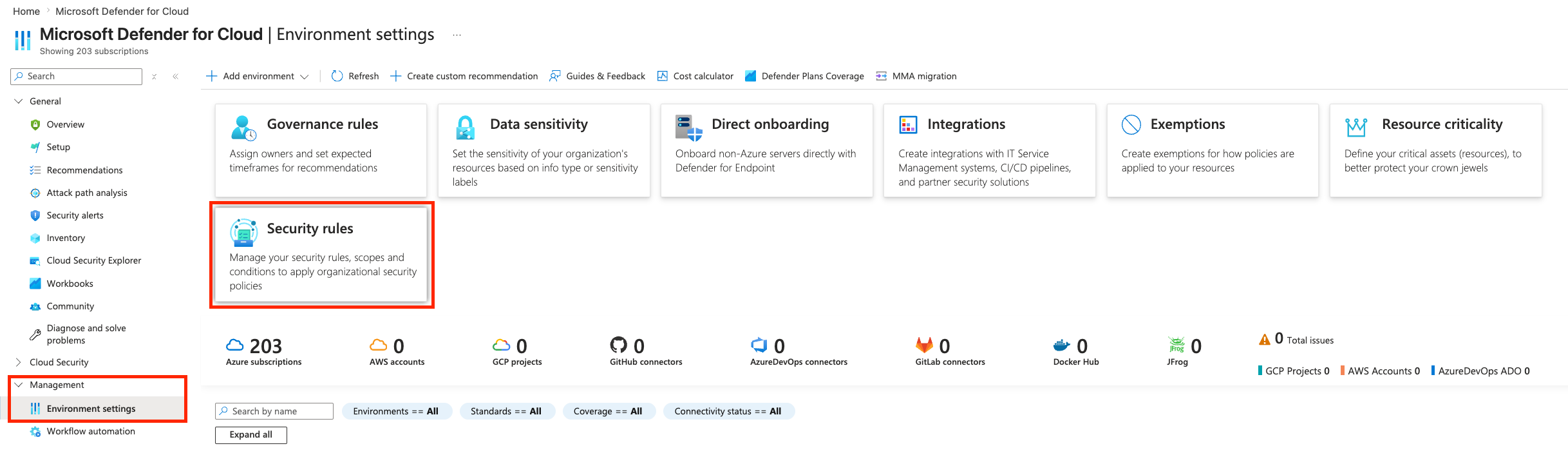
Select the Misconfiguration tab to view available policies.

Open an existing policy to edit it, or select Create new policy to create a scoped policy.
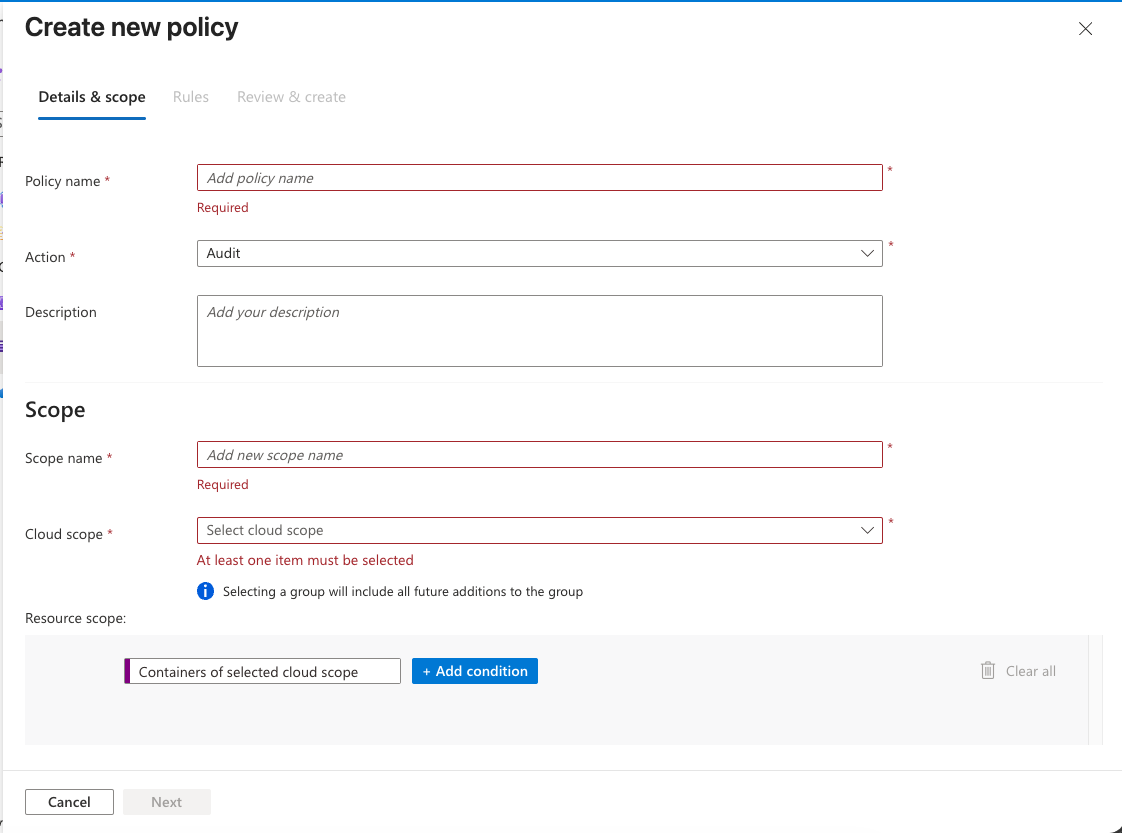
Configure the policy:
- Policy name: Enter a unique name.
- Action: Choose Audit to log violations without blocking, or Block to deny non-compliant deployments.
- Scope: Select the cloud scope (Azure subscription, AWS account, or GCP project) and Kubernetes scope (cluster, namespace) to target.
Select the Rules tab. Enable or disable individual rules and configure parameters for rules that support customization.
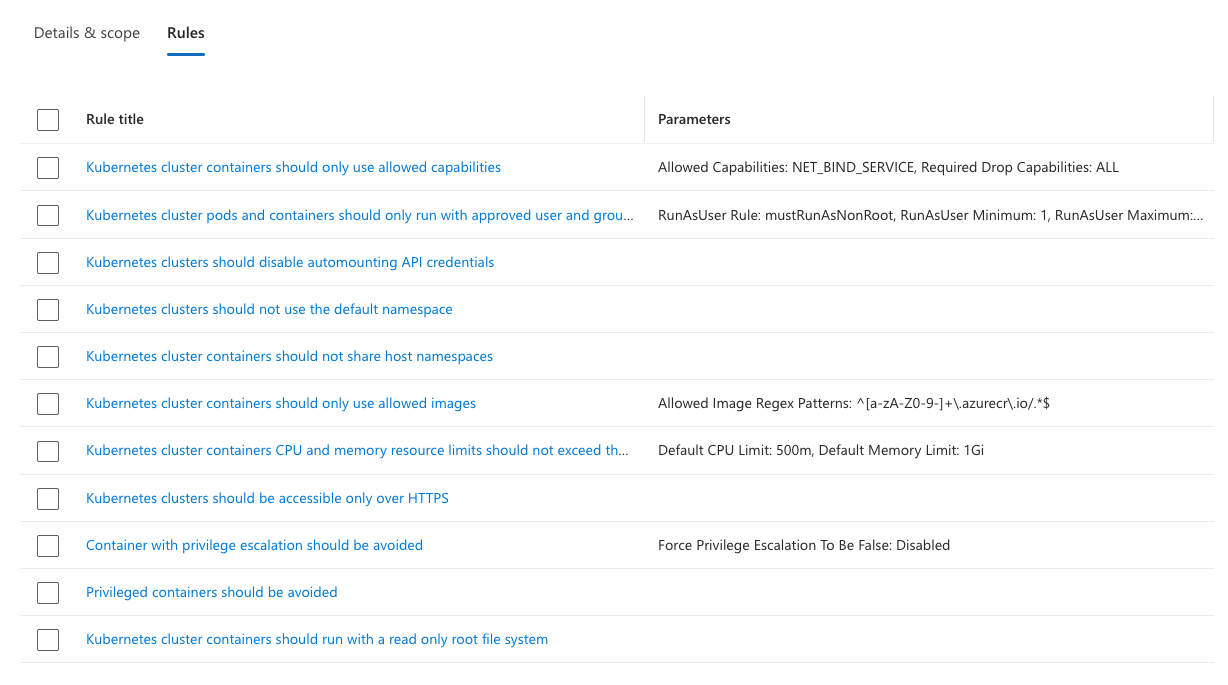
To configure parameters for a specific rule, select the rule name.
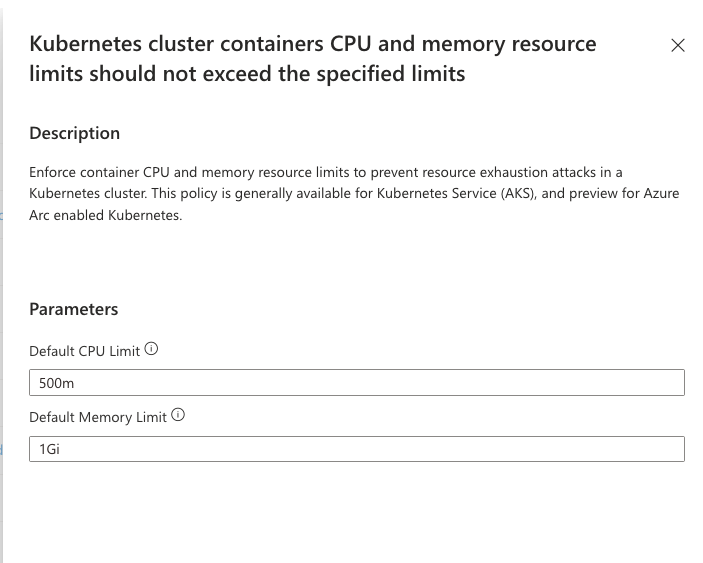
Select Save to activate the policy. The updated parameters appear in the Rules table.
Note
Selecting Block mode can introduce a short delay during deployments because of real-time policy enforcement.
Default policy limitations
The built-in Default K8s misconfiguration rule has the following constraints:
- You can change the Action between Audit and Block.
- You can enable or disable individual rules and configure their parameters.
- You can't edit the policy name, description, or scope.
Custom policies you create don't have these restrictions.
Built-in misconfiguration rules
Misconfiguration Enforcement includes built-in rules based on Microsoft Defender security best practices. These rules cover:
- Container resource limits (CPU and memory): Ensures containers don't exceed specified limits to prevent resource exhaustion.
- Privilege and capability management: Prevents containers from running with elevated privileges, unnecessary Linux capabilities, or privilege escalation paths.
- Non-root execution: Enforces non-root user and group IDs so containers can't run with excessive OS privileges.
- API credential mounting: Prevents containers from automatically mounting Kubernetes API credentials.
- Default namespace: Blocks workloads from running in the default Kubernetes namespace.
- Host namespace isolation: Blocks containers from sharing the host PID, IPC, or network namespace.
- Trusted image sources: Restricts container images to trusted registries or approved patterns.
- Network security: Enforces HTTPS for Kubernetes Ingress resources.
- Runtime security: Requires containers to use a read-only root filesystem and blocks fully privileged containers.
You can enable or disable individual rules within a policy and configure parameters for rules that support customization.
Related content
Enable gated deployment in Defender for Containers Configuration steps for gated deployment, which enforces container image vulnerability policies at deployment time.
Overview: Gated Deployment of Container Images to a Kubernetes Cluster Introduction to gated deployment, its benefits, key capabilities, and how it works.
FAQ: Gated Deployment in Defender for Containers Answers to common questions about gated deployment behavior and configuration.
Troubleshooting Guide: Gated Deployment and Developer Experience Help resolving onboarding issues, deployment failures, and interpreting developer-facing messages.