Note
Access to this page requires authorization. You can try signing in or changing directories.
Access to this page requires authorization. You can try changing directories.
Use vector search in Azure DocumentDB with the Python client library. Store and query vector data efficiently.
This quickstart uses a sample hotel dataset in a JSON file with vectors from the text-embedding-ada-002 model. The dataset includes hotel names, locations, descriptions, and vector embeddings.
Find the sample code on GitHub.
Prerequisites
An Azure subscription
- If you don't have an Azure subscription, create a free account
An existing Azure DocumentDB cluster
- If you don't have a cluster, create a new cluster
Firewall configured to allow access to your client IP address
-
text-embedding-ada-002model deployed
Use the Bash environment in Azure Cloud Shell. For more information, see Get started with Azure Cloud Shell.

If you prefer to run CLI reference commands locally, install the Azure CLI. If you're running on Windows or macOS, consider running Azure CLI in a Docker container. For more information, see How to run the Azure CLI in a Docker container.
If you're using a local installation, sign in to the Azure CLI by using the az login command. To finish the authentication process, follow the steps displayed in your terminal. For other sign-in options, see Authenticate to Azure using Azure CLI.
When you're prompted, install the Azure CLI extension on first use. For more information about extensions, see Use and manage extensions with the Azure CLI.
Run az version to find the version and dependent libraries that are installed. To upgrade to the latest version, run az upgrade.
- Python 3.9 or greater
Create a Python project
Create a new directory for your project and open it in Visual Studio Code:
mkdir vector-search-quickstart
code vector-search-quickstart
In the terminal, create and activate a virtual environment:
For Windows:
python -m venv venv
venv\\Scripts\\activate
For macOS/Linux:
python -m venv venv
source venv/bin/activate
Install the required packages:
pip install pymongo azure-identity openai python-dotenvpymongo: MongoDB driver for Pythonazure-identity: Azure Identity library for passwordless authenticationopenai: OpenAI client library to create vectorspython-dotenv: Environment variable management from .env files
Create a
.envfile in your project root for environment variables:# Azure OpenAI configuration AZURE_OPENAI_EMBEDDING_ENDPOINT= AZURE_OPENAI_EMBEDDING_MODEL=text-embedding-ada-002 AZURE_OPENAI_EMBEDDING_API_VERSION=2024-02-01 # Azure DocumentDB configuration MONGO_CLUSTER_NAME= # Data Configuration (defaults should work) DATA_FILE_WITH_VECTORS=data/HotelsData_with_vectors.json EMBEDDED_FIELD=text_embedding_ada_002 EMBEDDING_DIMENSIONS=1536 EMBEDDING_SIZE_BATCH=16 LOAD_SIZE_BATCH=100For the passwordless authentication used in this article, replace the placeholder values in the
.envfile with your own information:AZURE_OPENAI_EMBEDDING_ENDPOINT: Your Azure OpenAI resource endpoint URLMONGO_CLUSTER_NAME: Your Azure DocumentDB resource name
You should always prefer passwordless authentication, but it will require additional setup. For more information on setting up managed identity and the full range of your authentication options, see Authenticate Python apps to Azure services by using the Azure SDK for Python.
Create a new subdirectory off the root named
data.Copy the raw data file with vectors into a new
HotelsData_with_vectors.jsonfile in thedatasubdirectory.The project structure should look like this:
vector-search-quickstart
├── .env
├── data
│   └── HotelsData_with_vectors.json
└── venv (or your virtual environment folder)
Create code files for vector search
Continue the project by creating code files for vector search. When you are done, the project structure should look like this:
vector-search-quickstart
├── .env
├── data
│   └── HotelsData_with_vectors.json
├── src
│   ├── diskann.py
│   ├── ivf.py
│   └── hnsw.py
│   └── utils.py
└── venv (or your virtual environment folder)
Create a src directory for your Python files. Add two files: diskann.py and utils.py for the DiskANN index implementation:
mkdir src
touch src/diskann.py
touch src/utils.py
Create code for vector search
Paste the following code into the diskann.py file.
import os
from typing import List, Dict, Any
from utils import get_clients, get_clients_passwordless, read_file_return_json, insert_data, print_search_results, drop_vector_indexes
from dotenv import load_dotenv

# Load environment variables
load_dotenv()


def create_diskann_vector_index(collection, vector_field: str, dimensions: int) -> None:

    print(f"Creating DiskANN vector index on field '{vector_field}'...")

    # Drop any existing vector indexes on this field first
    drop_vector_indexes(collection, vector_field)

    # Use the native MongoDB command for Cosmos DB vector indexes
    index_command = {
        "createIndexes": collection.name,
        "indexes": [
            {
                "name": f"diskann_index_{vector_field}",
                "key": {
                    vector_field: "cosmosSearch"  # Cosmos DB vector search index type
                },
                "cosmosSearchOptions": {
                    # DiskANN algorithm configuration
                    "kind": "vector-diskann",

                    # Vector dimensions must match the embedding model
                    "dimensions": dimensions,

                    # Vector similarity metric - cosine is good for text embeddings
                    "similarity": "COS",

                    # Maximum degree: number of edges per node in the graph
                    # Higher values improve accuracy but increase memory usage
                    "maxDegree": 20,

                    # Build parameter: candidates evaluated during index construction
                    # Higher values improve index quality but increase build time
                    "lBuild": 10
                }
            }
        ]
    }

    try:
        # Execute the createIndexes command directly
        result = collection.database.command(index_command)
        print("DiskANN vector index created successfully")

    except Exception as e:
        print(f"Error creating DiskANN vector index: {e}")

        # Check if it's a tier limitation and suggest alternatives
        if "not enabled for this cluster tier" in str(e):
            print("\nDiskANN indexes require a higher cluster tier.")
            print("Try one of these alternatives:")
            print("  • Upgrade your Cosmos DB cluster to a higher tier")
            print("  • Use HNSW instead: python src/hnsw.py")
            print("  • Use IVF instead: python src/ivf.py")
        raise


def perform_diskann_vector_search(collection,
                                 azure_openai_client,
                                 query_text: str,
                                 vector_field: str,
                                 model_name: str,
                                 top_k: int = 5) -> List[Dict[str, Any]]:

    print(f"Performing DiskANN vector search for: '{query_text}'")

    try:
        # Generate embedding for the query text
        embedding_response = azure_openai_client.embeddings.create(
            input=[query_text],
            model=model_name
        )

        query_embedding = embedding_response.data[0].embedding

        # Construct the aggregation pipeline for vector search
        # Cosmos DB for MongoDB vCore uses $search with cosmosSearch
        pipeline = [
            {
                "$search": {
                    # Use cosmosSearch for vector operations in Cosmos DB
                    "cosmosSearch": {
                        # The query vector to search for
                        "vector": query_embedding,

                        # Field containing the document vectors to compare against
                        "path": vector_field,

                        # Number of final results to return
                        "k": top_k
                    }
                }
            },
            {
                # Add similarity score to the results
                "$project": {
                    "document": "$$ROOT",
                    # Add search score from metadata
                    "score": {"$meta": "searchScore"}
                }
            }
        ]

        # Execute the aggregation pipeline
        results = list(collection.aggregate(pipeline))

        return results

    except Exception as e:
        print(f"Error performing DiskANN vector search: {e}")
        raise


def main():

    # Load configuration from environment variables
    config = {
        'cluster_name': os.getenv('MONGO_CLUSTER_NAME', 'vectorSearch'),
        'database_name': 'vectorSearchDB',
        'collection_name': 'vectorSearchCollection',
        'data_file': os.getenv('DATA_FILE_WITH_VECTORS', 'data/HotelsData_with_vectors.json'),
        'vector_field': os.getenv('EMBEDDED_FIELD', 'DescriptionVector'),
        'model_name': os.getenv('AZURE_OPENAI_EMBEDDING_MODEL', 'text-embedding-ada-002'),
        'dimensions': int(os.getenv('EMBEDDING_DIMENSIONS', '1536')),
        'batch_size': int(os.getenv('LOAD_SIZE_BATCH', '100'))
    }

    try:
        # Initialize clients
        print("\nInitializing MongoDB and Azure OpenAI clients...")
        mongo_client, azure_openai_client = get_clients_passwordless()

        # Get database and collection
        database = mongo_client[config['database_name']]
        collection = database[config['collection_name']]

        # Load data with embeddings
        print(f"\nLoading data from {config['data_file']}...")
        data = read_file_return_json(config['data_file'])
        print(f"Loaded {len(data)} documents")

        # Verify embeddings are present
        documents_with_embeddings = [doc for doc in data if config['vector_field'] in doc]
        if not documents_with_embeddings:
            raise ValueError(f"No documents found with embeddings in field '{config['vector_field']}'. "
                           "Please run create_embeddings.py first.")

        # Insert data into collection
        print(f"\nInserting data into collection '{config['collection_name']}'...")

        # Clear existing data to ensure clean state
        collection.delete_many({})
        print("Cleared existing data from collection")

        # Insert the hotel data
        stats = insert_data(
            collection,
            documents_with_embeddings,
            batch_size=config['batch_size']
        )

        if stats['inserted'] == 0:
            raise ValueError("No documents were inserted successfully")

        # Create DiskANN vector index
        create_diskann_vector_index(
            collection,
            config['vector_field'],
            config['dimensions']
        )

        # Wait briefly for index to be ready
        import time
        print("Waiting for index to be ready...")
        time.sleep(2)

        # Perform sample vector search
        query = "quintessential lodging near running trails, eateries, retail"

        results = perform_diskann_vector_search(
            collection,
            azure_openai_client,
            query,
            config['vector_field'],
            config['model_name'],
            top_k=5
        )

        # Display results
        print_search_results(results, max_results=5, show_score=True)


    except Exception as e:
        print(f"\nError during DiskANN demonstration: {e}")
        raise

    finally:
        # Close the MongoDB client
        if 'mongo_client' in locals():
            mongo_client.close()


if __name__ == "__main__":
    main()
This main module provides these features:
Includes utility functions
Creates a configuration object for environment variables
Creates clients for Azure OpenAI and Azure DocumentDB
Connects to MongoDB, creates a database and collection, inserts data, and creates standard indexes
Creates a vector index using IVF, HNSW, or DiskANN
Creates an embedding for a sample query text using the OpenAI client. You can change the query at the top of the file
Runs a vector search using the embedding and prints the results
Create utility functions
Paste the following code into utils.py:
import json
import os
import time
from typing import Dict, List, Any, Optional, Tuple
from pymongo import MongoClient, InsertOne
from pymongo.collection import Collection
from pymongo.errors import BulkWriteError
from azure.identity import DefaultAzureCredential
from pymongo.auth_oidc import OIDCCallback, OIDCCallbackContext, OIDCCallbackResult
from openai import AzureOpenAI
from dotenv import load_dotenv

# Load environment variables from .env file
load_dotenv()

class AzureIdentityTokenCallback(OIDCCallback):
    def __init__(self, credential):
        self.credential = credential

    def fetch(self, context: OIDCCallbackContext) -> OIDCCallbackResult:
        token = self.credential.get_token(
            "https://ossrdbms-aad.database.windows.net/.default").token
        return OIDCCallbackResult(access_token=token)

def get_clients() -> Tuple[MongoClient, AzureOpenAI]:

    # Get MongoDB connection string - required for Cosmos DB access
    mongo_connection_string = os.getenv("MONGO_CONNECTION_STRING")
    if not mongo_connection_string:
        raise ValueError("MONGO_CONNECTION_STRING environment variable is required")

    # Create MongoDB client with optimized settings for Cosmos DB
    mongo_client = MongoClient(
        mongo_connection_string,
        maxPoolSize=50,  # Allow up to 50 connections for better performance
        minPoolSize=5,   # Keep minimum 5 connections open
        maxIdleTimeMS=30000,  # Close idle connections after 30 seconds
        serverSelectionTimeoutMS=5000,  # 5 second timeout for server selection
        socketTimeoutMS=20000  # 20 second socket timeout
    )

    # Get Azure OpenAI configuration
    azure_openai_endpoint = os.getenv("AZURE_OPENAI_EMBEDDING_ENDPOINT")
    azure_openai_key = os.getenv("AZURE_OPENAI_EMBEDDING_KEY")

    if not azure_openai_endpoint or not azure_openai_key:
        raise ValueError("Azure OpenAI endpoint and key are required")

    # Create Azure OpenAI client for generating embeddings
    azure_openai_client = AzureOpenAI(
        azure_endpoint=azure_openai_endpoint,
        api_key=azure_openai_key,
        api_version=os.getenv("AZURE_OPENAI_EMBEDDING_API_VERSION", "2024-02-01")
    )

    return mongo_client, azure_openai_client


def get_clients_passwordless() -> Tuple[MongoClient, AzureOpenAI]:

    # Get MongoDB cluster name for passwordless authentication
    cluster_name = os.getenv("MONGO_CLUSTER_NAME")
    if not cluster_name:
        raise ValueError("MONGO_CLUSTER_NAME environment variable is required")

    # Create credential object for Azure authentication
    credential = DefaultAzureCredential()

    authProperties = {"OIDC_CALLBACK": AzureIdentityTokenCallback(credential)}

    # Create MongoDB client with Azure AD token callback
    mongo_client = MongoClient(
        f"mongodb+srv://{cluster_name}.global.mongocluster.cosmos.azure.com/",
        connectTimeoutMS=120000,
        tls=True,
        retryWrites=True,
        authMechanism="MONGODB-OIDC",
        authMechanismProperties=authProperties
    )

    # Get Azure OpenAI endpoint
    azure_openai_endpoint = os.getenv("AZURE_OPENAI_EMBEDDING_ENDPOINT")
    if not azure_openai_endpoint:
        raise ValueError("AZURE_OPENAI_EMBEDDING_ENDPOINT environment variable is required")

    # Create Azure OpenAI client with credential-based authentication
    azure_openai_client = AzureOpenAI(
        azure_endpoint=azure_openai_endpoint,
        azure_ad_token_provider=lambda: credential.get_token("https://cognitiveservices.azure.com/.default").token,
        api_version=os.getenv("AZURE_OPENAI_EMBEDDING_API_VERSION", "2024-02-01")
    )

    return mongo_client, azure_openai_client


def azure_identity_token_callback(credential: DefaultAzureCredential) -> str:

    # Cosmos DB for MongoDB requires this specific scope
    token_scope = "https://cosmos.azure.com/.default"

    # Get token from Azure AD
    token = credential.get_token(token_scope)

    return token.token


def read_file_return_json(file_path: str) -> List[Dict[str, Any]]:

    try:
        with open(file_path, 'r', encoding='utf-8') as file:
            return json.load(file)
    except FileNotFoundError:
        print(f"Error: File '{file_path}' not found")
        raise
    except json.JSONDecodeError as e:
        print(f"Error: Invalid JSON in file '{file_path}': {e}")
        raise


def write_file_json(data: List[Dict[str, Any]], file_path: str) -> None:

    try:
        with open(file_path, 'w', encoding='utf-8') as file:
            json.dump(data, file, indent=2, ensure_ascii=False)
        print(f"Data successfully written to '{file_path}'")
    except IOError as e:
        print(f"Error writing to file '{file_path}': {e}")
        raise


def insert_data(collection: Collection, data: List[Dict[str, Any]],
                batch_size: int = 100, index_fields: Optional[List[str]] = None) -> Dict[str, int]:

    total_documents = len(data)
    inserted_count = 0
    failed_count = 0

    print(f"Starting batch insertion of {total_documents} documents...")

    # Create indexes if specified
    if index_fields:
        for field in index_fields:
            try:
                collection.create_index(field)
                print(f"Created index on field: {field}")
            except Exception as e:
                print(f"Warning: Could not create index on {field}: {e}")

    # Process data in batches to manage memory and error recovery
    for i in range(0, total_documents, batch_size):
        batch = data[i:i + batch_size]
        batch_num = (i // batch_size) + 1
        total_batches = (total_documents + batch_size - 1) // batch_size

        try:
            # Prepare bulk insert operations
            operations = [InsertOne(document) for document in batch]

            # Execute bulk insert
            result = collection.bulk_write(operations, ordered=False)
            inserted_count += result.inserted_count

            print(f"Batch {batch_num} completed: {result.inserted_count} documents inserted")

        except BulkWriteError as e:
            # Handle partial failures in bulk operations
            inserted_count += e.details.get('nInserted', 0)
            failed_count += len(batch) - e.details.get('nInserted', 0)

            print(f"Batch {batch_num} had errors: {e.details.get('nInserted', 0)} inserted, "
                  f"{failed_count} failed")

            # Print specific error details for debugging
            for error in e.details.get('writeErrors', []):
                print(f"  Error: {error.get('errmsg', 'Unknown error')}")

        except Exception as e:
            # Handle unexpected errors
            failed_count += len(batch)
            print(f"Batch {batch_num} failed completely: {e}")

        # Small delay between batches to avoid overwhelming the database
        time.sleep(0.1)

    # Return summary statistics
    stats = {
        'total': total_documents,
        'inserted': inserted_count,
        'failed': failed_count
    }

    return stats


def drop_vector_indexes(collection, vector_field: str) -> None:

    try:
        # Get all indexes for the collection
        indexes = list(collection.list_indexes())

        # Find vector indexes on the specified field
        vector_indexes = []
        for index in indexes:
            if 'key' in index and vector_field in index['key']:
                if index['key'][vector_field] == 'cosmosSearch':
                    vector_indexes.append(index['name'])

        # Drop each vector index found
        for index_name in vector_indexes:
            print(f"Dropping existing vector index: {index_name}")
            collection.drop_index(index_name)

        if vector_indexes:
            print(f"Dropped {len(vector_indexes)} existing vector index(es)")
        else:
            print("No existing vector indexes found to drop")

    except Exception as e:
        print(f"Warning: Could not drop existing vector indexes: {e}")
        # Continue anyway - the error might be that no indexes exist


def print_search_resultsx(results: List[Dict[str, Any]],
                        max_results: int = 5,
                        show_score: bool = True) -> None:

    if not results:
        print("No search results found.")
        return

    print(f"\nSearch Results (showing top {min(len(results), max_results)}):")
    print("=" * 80)

    for i, result in enumerate(results[:max_results], 1):

        # Display hotel name and ID
        print(f"HotelName: {result['HotelName']}, Score: {result['score']:.4f}")

def print_search_results(results: List[Dict[str, Any]],
                        max_results: int = 5,
                        show_score: bool = True) -> None:

    if not results:
        print("No search results found.")
        return

    print(f"\nSearch Results (showing top {min(len(results), max_results)}):")
    print("=" * 80)

    for i, result in enumerate(results[:max_results], 1):

        # Check if results are nested under 'document' (when using $$ROOT)
        if 'document' in result:
            doc = result['document']
        else:
            doc = result

        # Display hotel name and ID
        print(f"HotelName: {doc['HotelName']}, Score: {result['score']:.4f}")


    if len(results) > max_results:
        print(f"\n... and {len(results) - max_results} more results")
This utility module provides these features:
JsonData: Interface for the data structurescoreProperty: Location of the score in query results based on vector search methodgetClients: Creates and returns clients for Azure OpenAI and Azure DocumentDBgetClientsPasswordless: Creates and returns clients for Azure OpenAI and Azure DocumentDB using passwordless authentication. Enable RBAC on both resources and sign in to Azure CLIreadFileReturnJson: Reads a JSON file and returns its contents as an array ofJsonDataobjectswriteFileJson: Writes an array ofJsonDataobjects to a JSON fileinsertData: Inserts data in batches into a MongoDB collection and creates standard indexes on specified fieldsprintSearchResults: Prints the results of a vector search, including the score and hotel name
Authenticate with Azure CLI
Sign in to Azure CLI before you run the application so it can access Azure resources securely.
az login
Run the application
To run the Python scripts:
You see the top five hotels that match the vector search query and their similarity scores.
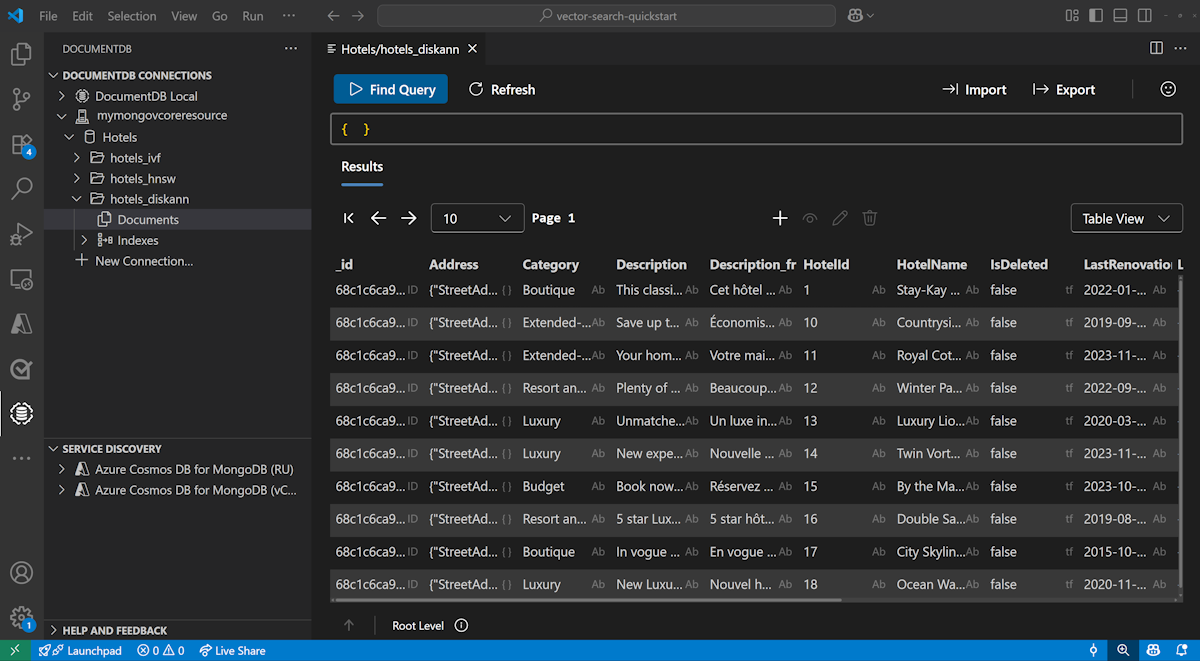
View and manage data in Visual Studio Code
Select the DocumentDB extension in Visual Studio Code to connect to your Azure DocumentDB account.
View the data and indexes in the Hotels database.
Clean up resources
Delete the resource group, Azure DocumentDB account, and Azure OpenAI resource when you don't need them to avoid extra costs.