Note
Access to this page requires authorization. You can try signing in or changing directories.
Access to this page requires authorization. You can try changing directories.
The Microsoft Quantum Development Kit (QDK) provides a set of simulation tools that you can use to evaluate and iterate on your quantum programs before you run them on real quantum hardware. The neutral atom device simulation APIs model the types of noise and qubit operations that occur when programs run on neutral atom quantum computers, such as qubit loss and qubit movement. If you plan to run your quantum programs on neutral atom hardware, use the neutral atom device simulation APIs to test and refine your code.
How neutral atom quantum computers work
Neutral atom devices are one of many current quantum computer hardware technologies. Other technologies include superconducting qubits, trapped-ion qubits, and topological qubits. Each technology has its own strengths and drawbacks. Neutral atom quantum computers offer good scalability, flexible qubit connectivity, and long coherence times, but face challenges with gate fidelity and laser control complexity.
The exact qubit technology in a neutral atom device depends on the specific architecture. But in general, each qubit is a single electrically neutral atom. The qubit 0 and 1 states correspond to different energy states of the atoms. The atoms are arranged in 2D or 3D arrays on the device. Lasers trap the atoms in place and move the atoms between different zones on the device for storage, for measurement, and for interactions that perform quantum gates.
Neutral atom device simulation tools in the QDK
Neutral atom device simulation in the QDK models these properties of neutral atom quantum hardware:
- Devices contain only $S_X$, $R_Z$, and $CZ$ gates.
- Qubits physically move between storage, interaction, and measurement zones on the device.
The format of your program determines which neutral atom device simulation API to use:
| API | QDK module | Input format | Supported simulators |
|---|---|---|---|
NeutralAtomDevice |
qdk.simulation |
QIR | Stabilizer, GPU, and CPU |
NeutralAtomBackend |
qdk.qiskit |
Qiskit | Stabilizer, GPU, and CPU |
Both APIs compile your program into QIR that has qubit movement instructions and contains only the gates that neutral atom devices support.
Both "stabilizer" and "clifford" select the stabilizer backend. When you select this backend for a neutral atom device simulation, the compiled $R_Z$ rotations must have Clifford-compatible angles. Use the CPU or GPU simulator for neutral atom circuits that contain other $R_Z$ angles.
For more information on quantum simulation in the QDK, see Overview of quantum simulators in the QDK.
Neutral atom device visualizer
The NeutralAtomDevice API includes a neutral atom device visualizer for Jupyter Notebook through the show_trace method. The visualizer creates an interactive diagram that shows how qubits move through a basic neutral atom device as your program runs. The visualizer doesn't include the effects of qubit loss or other noise.
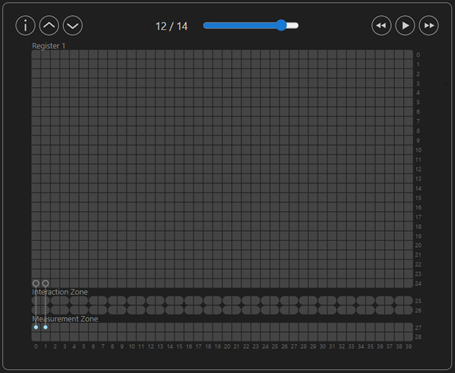
For more information on the neutral atom device visualizer, see How to use the neutral atom device visualizer.
Noise models for neutral atom device simulations
The quantum simulators in the QDK Python package use the NoiseConfig class from the qdk.simulation module to add noise models to simulations. When you perform simulations with the NeutralAtomDevice or NeutralAtomBackend APIs, your noise models only include noise from neutral atom device gates, qubit movement, and measurement.
For more information on neutral atom device noise models in the QDK, see How to build noise models for neutral atom device simulations in the QDK.
Get started with neutral atom device simulation
To get started with quantum simulation in the QDK Python package, see Run quantum simulations with the QDK Python package.
To learn how to use the neutral atom device visualizer, see How to use the neutral atom device visualizer.