Note
Access to this page requires authorization. You can try signing in or changing directories.
Access to this page requires authorization. You can try changing directories.
[This article is prerelease documentation and is subject to change.]
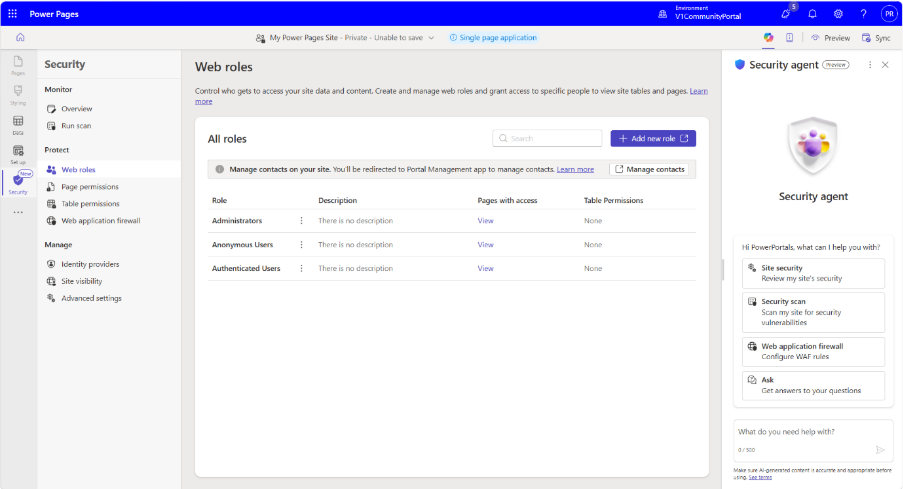
Security agent is an AI-powered assistant built into the Power Pages Security workspace that helps makers review, configure, and strengthen the security of their Power Pages sites using natural language. The agent analyzes your site's authentication, authorization, security settings, and scan results to provide site-specific recommendations and guided remediation.
All configuration changes require explicit user approval before execution, giving makers control over what is applied to their site while benefiting from AI-driven guidance grounded in their specific environment.
Important
- This is a preview feature.
- Preview features aren’t meant for production use and might have restricted functionality. These features are subject to supplemental terms of use, and are available before an official release so that customers can get early access and provide feedback.
Security scenarios
Security agent supports four primary security scenarios that cover the core areas of Power Pages site protection.
Site security posture review
The agent assesses your site's overall security by reviewing authentication settings, table permissions, web roles, page permissions, site visibility, security headers, and recent scan results. It identifies issues such as overly broad access, anonymous data exposure, authentication misconfigurations, and missing security protections. Findings are prioritized and explained in plain language, along with recommended remediation steps.
Authorization configuration
The agent configures how users access your site's pages and data. It can create and update table permissions, web roles, and page permissions, explain existing authorization settings, and recommend least-privilege access based on your site's configuration.
Authentication configuration and troubleshooting
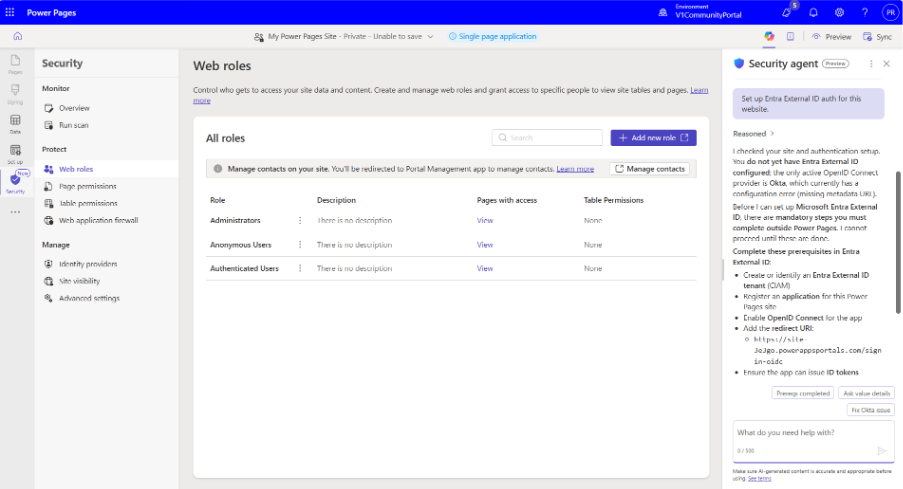
The agent helps configure identity providers such as Microsoft Entra ID, OpenID Connect, and SAML 2.0. It validates authentication settings against your site configuration, diagnoses common sign-in issues, and recommends configuration updates to resolve them.
Application security settings
The agent can configure application-level security settings including Content Security Policy (CSP), HTTP security headers, CORS, cookie settings, and other site-level security configurations. It also provides guidance for WAF-related configurations where applicable.
How the agent works
Security agent is available in the Security workspace of Power Pages Design Studio. After launching the agent chat, makers describe what they want to accomplish using natural language. Example prompts include:
- Review my site's security.
- Configure Microsoft Entra ID authentication.
- Create permissions for the Sales role.
- Why can't users sign in?
- Configure a Content Security Policy.
The agent analyzes your site's configuration, explains its findings, and proposes configuration changes where appropriate. Before applying any change, it requests your approval and, once complete, confirms exactly what was updated.
Recommended usage practices
Security agent is best used in development or test environments before promoting changes to production. Every proposed configuration should be reviewed before approving write actions. The conversational experience supports not only making changes but also understanding security concepts.
Because recommendations are grounded in your site's configuration, the guidance is specific to your environment rather than generic best practices.
Related security capabilities
In addition to the Security agent, the Security workspace includes automated security capabilities that help continuously monitor your site.
Security scan (preview) lets you schedule recurring vulnerability scans that evaluate your site against OWASP-based security rules.
Site traffic monitoring (preview) continuously analyzes traffic patterns to detect suspicious activity and potential attacks.
Findings from both capabilities appear as alerts in the Overview page of the Security workspace. From there, you can review the alert details, take recommended actions directly, or open the Security agent to understand the issue and receive guided remediation.