Explore Copilot experiences
Copilot doesn’t live in one place—it’s woven into the tools your organization already uses every day. Let’s explore the different experiences, why they matter for business outcomes, and how they support collaboration and efficiency at scale.
Copilot Chat: fast answers and organizational context
Copilot Chat offers a conversational interface on web and mobile that delivers quick, context-aware responses grounded in your organization’s data. It helps teams stay agile by providing instant access to relevant information without switching between apps. Copilot Chat also supports mobile work scenarios, ensuring decisions move forward even when employees are away from their desks. Copilot Chat:
- Improves agility by giving employees instant access to organizational knowledge without switching apps.
- Supports mobile work scenarios, ensuring decisions don’t stall when teams are on the move.
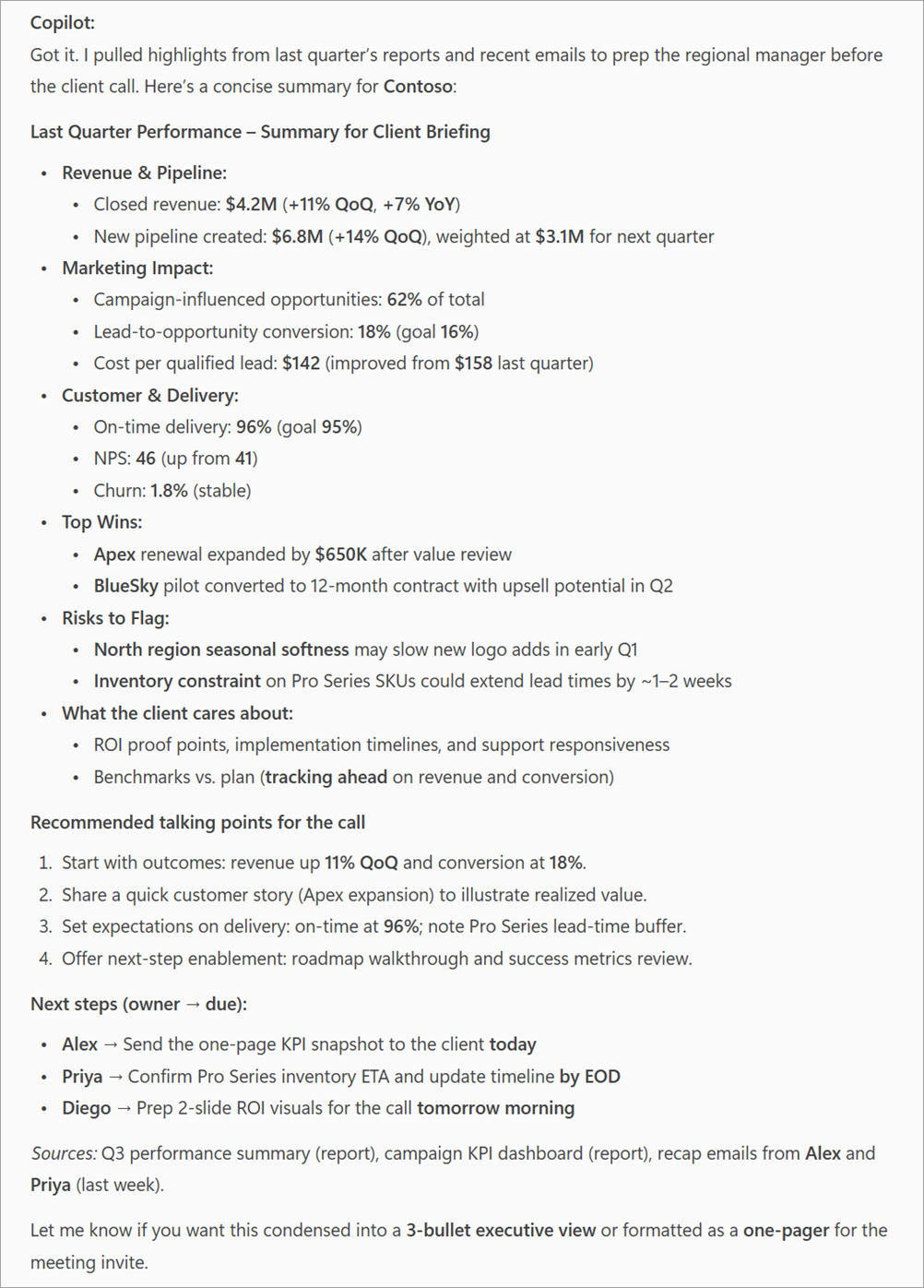
Example scenario: Image a regional manager needs a summary of last quarter’s performance before a client call. Copilot Chat pulls data from reports and emails, delivering a concise, accurate summary in seconds.
Tip
Encourage teams to use Copilot Chat for quick research and summaries instead of searching multiple systems manually.
Copilot in Microsoft 365 apps: embedded intelligence for everyday work
Copilot is more than an added feature—it’s an integrated capability that brings AI-powered assistance into the apps your organization relies on every day. By embedding intelligence into familiar tools, Copilot helps transform routine tasks into opportunities for efficiency and impact. Instead of spending hours on manual work, teams can redirect their time toward innovation and strategic decision-making. It matters for organizations because it:
- Accelerates workflows: Cuts down repetitive tasks so teams can deliver faster.
- Raises quality standards: Ensures documents, presentations, and communications meet brand and compliance guidelines.
- Drives consistency: Keeps messaging and formatting aligned across departments.
The following table identifies some examples of how Copilot adds value by app:
| Microsoft 365 App | How Copilot adds value | Example |
|---|---|---|
| Microsoft Word | Draft proposals in minutes, rewrite content for clarity, and adjust tone to match your brand voice. | Imagine turning a rough outline into a polished executive summary without hours of editing. |
| Microsoft Excel | Analyze trends, create visualizations, and model scenarios instantly. | Forecast next quarter's revenue with a single prompt instead of building complex formulas. |
| Microsoft PowerPoint | Transform ideas into polished presentations in minutes. | Speed up time-to-market for initiatives by skipping the slide design grind. |
| Microsoft Outlook | Summarize long email threads and suggest responses. | Reduce inbox overload and keep communication flowing without delays. |
| Microsoft Teams | Recap meetings, highlight decisions, and track action items automatically. | No more missed follow-ups—Copilot keeps projects moving. |
Tip
Encourage teams to use Copilot for first drafts and analysis, then refine outputs collaboratively. This approach balances speed with human judgment.
Copilot Search: AI-powered enterprise search
Microsoft 365 Copilot Search is a universal, AI-powered search experience that works across all Microsoft 365 applications and connected data sources. Copilot Search helps users quickly find relevant information—from emails, files, chats, and meetings to external systems—using natural language. It integrates seamlessly into the Microsoft 365 Copilot app, so users can search for what they need and then transition to chat for deeper exploration or follow-up task completion.
- Finds information fast: Delivers secure, personalized search results across Microsoft 365 data.
- Uses natural language: Users ask questions in plain language instead of relying on keywords.
- Connects to external data: When combined with Copilot connectors, Copilot Search extends to non-Microsoft data sources.
Example scenario:
A product manager searches for "latest customer feedback on feature X" and Copilot Search returns relevant emails, meeting notes, and shared documents—then offers to summarize the findings in chat.
Tip
Copilot Search helps reduce the time users spend looking for information. Encourage teams to use it as a starting point for research and discovery tasks.
Researcher and Analyst: specialized agents in the Copilot ecosystem
Copilot isn’t a single monolithic AI—it’s a collection of intelligent agents designed to handle different types of work. Two of the most important agents are Researcher and Analyst. These aren’t just "personas"—they’re specialized roles that bring targeted capabilities to your organization.
Note
Copilot agents are task-oriented components within the Copilot ecosystem. Each agent is optimized for a specific type of work, using Microsoft Graph for context and Microsoft 365 apps for execution. This modular approach helps ensure Copilot can deliver precise, relevant results across diverse business scenarios.
Researcher agent

The Researcher agent is designed to help organizations make informed decisions quickly by simplifying complex research tasks and delivering actionable insights. Built into Microsoft 365 Copilot, this agent goes beyond drafting—it specializes in discovery and synthesis, pulling together information from internal data and trusted external sources to create clear, structured outputs.
Researcher saves time on tasks that traditionally require hours of manual effort, such as compiling market intelligence or preparing executive briefings. By automating research and summarization, it enables leaders and their teams to focus on strategic analysis rather than data gathering.
Researcher works best in:
- Word: Draft comprehensive reports or briefing documents with well-organized insights.
- Teams: Summarize discussions and compile related resources for quick reference.
- Copilot Chat: Generate concise knowledge briefs for fast decision-making.
Example scenario:
A strategy team needs a competitive analysis before a leadership meeting. Researcher pulls recent market reports, internal notes, and meeting summaries, then compiles them into a concise briefing document—complete with citations—that’s ready for review and discussion.
Tip
Use Researcher when you need depth and accuracy, not just speed. It’s ideal for tasks that require gathering multiple sources and presenting insights in a structured format, such as executive briefings or strategic planning sessions.
Analyst agent

The Analyst agent is designed to help organizations turn data into decisions by interpreting complex information and generating actionable insights. Built into Microsoft 365 Copilot, this agent focuses on analysis rather than drafting, making it ideal for scenarios where speed and accuracy in data interpretation are critical.
Analyst reduces the time spent on manual calculations and trend analysis, enabling leaders to make informed decisions faster. By automating forecasting and modeling, it supports strategic planning and helps organizations respond quickly to changing conditions.
Analyst works best in:
- Excel: Build forecasts, analyze trends, and model scenarios without complex formulas.
- Power BI: Create dashboards and visualizations for real-time insights.
- Teams: Provide decision support during meetings with instant data summaries.
Analyst processes structured and semi-structured data, identifies patterns, and presents insights in a clear, visual format—ready for executive review.
Example scenario:
A finance team needs revenue projections for the next quarter. Analyst uses historical data and current trends to produce a forecast with charts and visualizations, giving leadership the clarity they need to make strategic decisions.
Tip
Use Analyst for tasks that require precision and speed, such as financial modeling or operational performance reviews. It’s ideal for turning raw data into actionable insights.
Both agents are integral parts of the Microsoft 365 Copilot ecosystem, using Microsoft Graph to deliver secure, context-aware insights. They enhance Copilot’s core experiences by specializing in distinct tasks—Researcher focuses on knowledge synthesis, while Analyst drives data-based decisions. Organizations can further extend their capabilities through Copilot Studio, creating custom workflows that combine these agents with proprietary systems for tailored business solutions.
Tip
Train teams to recognize which agent to invoke for a given task. Using the right agent improves accuracy, relevance, and efficiency.
Copilot brings intelligence into the tools your organization already uses, from quick answers in Copilot Chat to embedded AI in Microsoft 365 apps like Word, Excel, PowerPoint, Outlook, and Teams. These experiences accelerate workflows, improve quality, and keep communication consistent. Behind the scenes, Microsoft Graph helps ensure every response is secure and context-aware. Specialized agents—Researcher and Analyst—add depth by handling knowledge synthesis and data-driven insights, making Copilot a flexible ecosystem that turns everyday tasks into strategic outcomes.
Next, let's consider how to map your business processes to Copilot solutions.