Design a compliant audit strategy
Configuring auditing destinations is only the first step. A compliant audit strategy requires consistent coverage, verified operation, and ongoing enforcement across all SQL resources. Contoso Financial Services configured auditing on both Azure SQL Database and SQL Managed Instance. The security team must design a complete strategy that satisfies the financial regulator's requirements while providing the operational monitoring data they need.
| Decision | Options | Recommendation for regulated financial workloads |
|---|---|---|
| Audit scope | Server-level or database-level | Database-level for high-volume Online Transaction Processing (OLTP); server-level for low-volume or multi-database compliance |
| Action groups | Subset or full BATCH_COMPLETED | BATCH_COMPLETED + SUCCESSFUL_DATABASE_AUTHENTICATION + FAILED_DATABASE_AUTHENTICATION (Microsoft-recommended default) |
| Compliance destination | Blob storage, Log Analytics, Event Hubs | Blob storage with immutable WORM policies |
| Operational destination | Log Analytics, Event Hubs | Log Analytics for queryable operational data |
| Retention | 0 (unlimited) to 365+ days | Match regulatory requirement (minimum 90 days); Log Analytics supports up to 730-day interactive and 12-year archival retention |
| Coverage enforcement | Manual or Azure Policy | Azure Policy with DeployIfNotExists for automatic coverage |
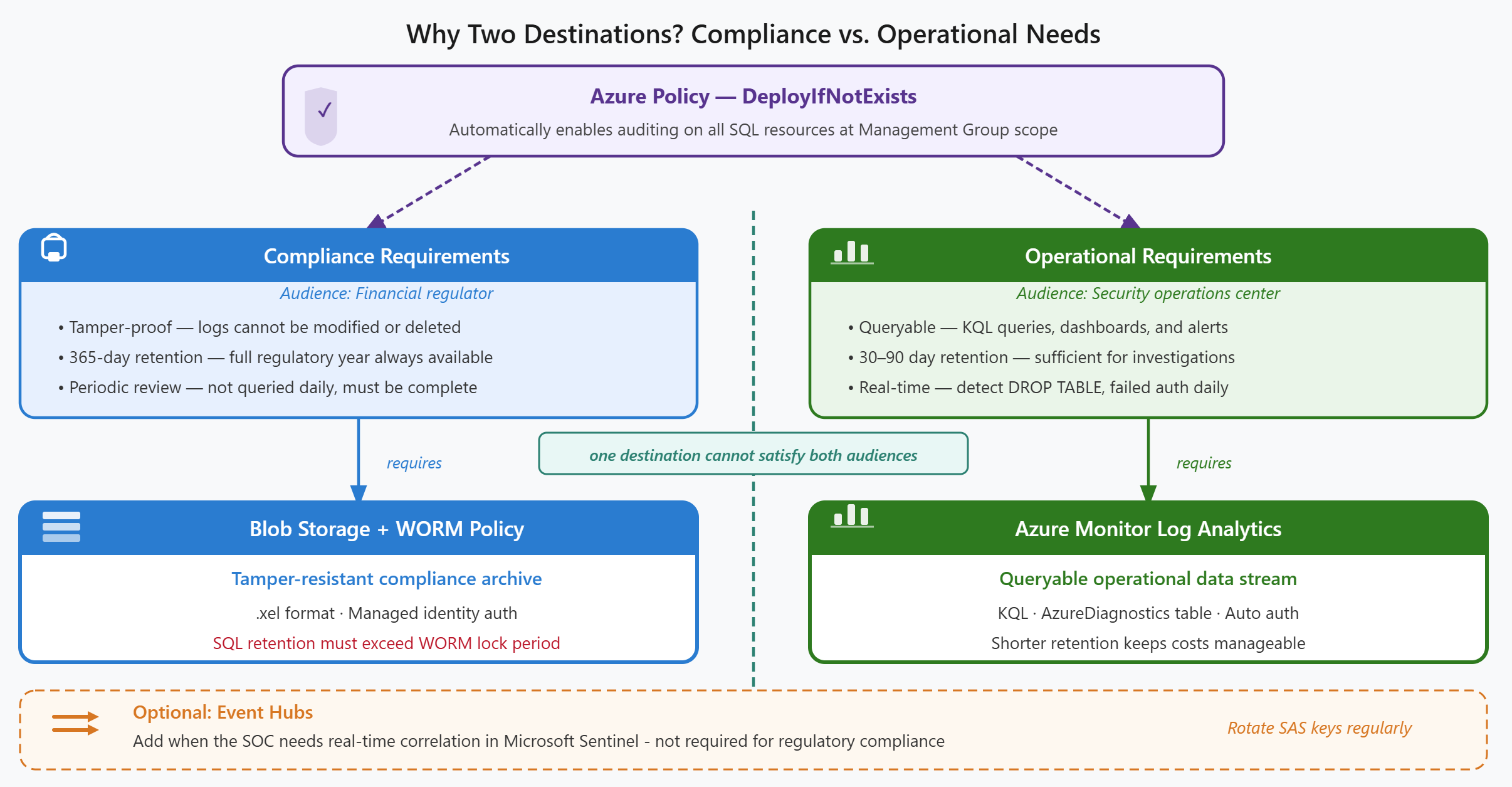
Route audit logs to dual destinations
The recommended pattern for regulated financial workloads routes audit logs to two destinations simultaneously. Each destination serves a different audience with distinct requirements.
With Azure Blob Storage and immutable WORM policies, you create the tamper-resistant compliance record the financial regulator reviews. This destination prioritizes long-term retention, immutability, and availability for audit review. The regulator doesn't query these logs frequently, but when they do, the record must be complete and unaltered.
With Azure Monitor Log Analytics, you create the operational monitoring stream the security team queries daily. This destination prioritizes real-time alerting, correlation with other security signals, and investigative queries. The security operations center monitors failed authentication attempts, unusual query patterns, and permission changes using KQL queries against this workspace.
These dual destinations address fundamentally different needs: compliance archives must be tamper-resistant and retained for the required period, while operational data must be queryable, alertable, and correlatable. A single destination can't satisfy both requirements effectively. The compliance team needs immutability guarantees the operational team can't work within, while the operational team needs query performance the compliance archive can't provide.
Enforce consistent coverage with Azure Policy
Azure Policy ensures auditing remains enabled consistently across all SQL resources, including new databases and SQL servers created after your initial deployment.
The built-in policy "Auditing on SQL server should be enabled" uses the Audit effect to identify SQL servers where auditing isn't configured. This policy surfaces noncompliant resources in the Azure Policy compliance dashboard, making gaps visible to the security team. However, it doesn't automatically remediate the issue. The security team must manually enable auditing on flagged resources.
The built-in policy "Configure SQL servers to have auditing enabled to Log Analytics workspace" uses the DeployIfNotExists effect to automatically enable auditing and route logs to a Log Analytics workspace when new SQL servers are created. This policy creates a remediation task for existing noncompliant resources and prevents new resources from being deployed without auditing.
To assign this policy, navigate to Azure Policy > Definitions > search "SQL auditing" > select the Configure policy > Assign. Assign at management group scope to cover all subscriptions in your organization. The policy creates a managed identity that performs the remediation, so you grant it appropriate permissions during assignment. The security team reviews the compliance dashboard periodically to verify no SQL servers exist without auditing enabled.
Verify AI workload audit coverage
Contoso's AI fraud detection service makes hundreds of queries per minute against the customer transaction database. The security team must verify these queries appear in the audit logs and manage the resulting log volume appropriately.
The BATCH_COMPLETED_GROUP action group captures every query the fraud detection service's managed identity executes. For compliance purposes, financial regulators typically require all data access to be logged—the regulator wants to see who accessed which customer records and when. This means you include BATCH_COMPLETED in your action groups even though it generates high log volume.
To verify the fraud detection service's queries appear in the audit logs, use this Log Analytics query:
AzureDiagnostics
| where Category == "SQLSecurityAuditEvents"
| where action_name_s == "BATCH COMPLETED"
| summarize QueryCount = count() by application_name_s, database_name_s, bin(TimeGenerated, 1h)
| order by TimeGenerated desc
This query shows query volume by application name per hour. You see the fraud detection service in the results with expected query patterns—typically hundreds to thousands of queries per hour during business hours. You also detect unexpected applications accessing the database, which can indicate unauthorized access or a misconfigured service.
To manage audit log volume, you set different retention periods for the two destinations: Log Analytics retains operational data for 30–90 days (sufficient for security investigations), while the blob storage archive holds the long-term compliance record for the full regulatory retention period. This approach balances operational needs with compliance requirements without storing high-volume audit data indefinitely in the more expensive Log Analytics workspace.
With a compliant audit strategy in place, you're ready to add the final layer of protection: active threat detection with Microsoft Defender for Databases.