Apply data masking and row-level security
Protecting sensitive data requires multiple layers of access control. Contoso Financial Services has customer service representatives who need to view account information but must not see full credit card numbers or social security numbers, while finance teams need unmasked values. At the same time, branch banking divisions must only query their own division's transaction data. A Retail Banking representative can't see Commercial Banking transactions.
| Implementation step | Action |
|---|---|
| Autodetect sensitive columns | Use portal to identify candidate fields for masking |
| Apply masking functions | Configure credit card, email, and default masks via T-SQL |
| Grant UNMASK permissions | Assign column-level unmask rights to authorized roles |
| Create security predicate | Define inline table-valued function with division filter logic |
| Apply security policy | Add filter and block predicates to restrict row access |
Mask sensitive columns with dynamic data masking
Dynamic data masking (DDM) obfuscates sensitive column values in query results without encrypting the data at rest. When a customer service representative queries the Customer table, masked columns show transformed values like XXXX-XXXX-XXXX-1234 for credit cards instead of the actual number.
The Azure portal provides an autodetect feature at Database > Security > Dynamic Data Masking that automatically identifies candidate columns based on common patterns—email addresses, credit card numbers, and social security number formats. This detection saves time when configuring masking policies across multiple tables with standard personal data columns.
Azure SQL supports six masking functions that transform data based on column type and security requirements:
| Masking function | Result | Use case |
|---|---|---|
default() |
0 for numbers, XXXX for strings |
General-purpose masking for any data type |
email() |
aXXX@XXXX.com |
Partial email visibility while hiding domain |
creditcard() |
XXXX-XXXX-XXXX-1234 |
Shows last four digits for verification |
random(min, max) |
Random number in range | Obfuscates financial amounts while preserving data type |
custom_text(prefix, padding, suffix) |
prefix[padding]suffix |
Configurable masking pattern for custom formats |
datetime(component) |
Masks Y, M, D, h, m, or s component | Partial date masking (for example, hide year but show month) |
For Contoso's customer service scenario, you apply masking to credit card and SSN columns using T-SQL:
ALTER TABLE [dbo].[Customer]
ALTER COLUMN CreditCardNumber ADD MASKED WITH (FUNCTION = 'creditcard()');

ALTER TABLE [dbo].[Customer]
ALTER COLUMN SSN ADD MASKED WITH (FUNCTION = 'default()');
The finance team needs unmasked access for regulatory reporting and fraud investigation. Azure SQL provides granular UNMASK permissions at four levels—database, schema, table, and column:
-- Grant column-level UNMASK permission
GRANT UNMASK ON dbo.Customer(CreditCardNumber) TO [FinanceRole];

-- Grant table-level UNMASK permission
GRANT UNMASK ON dbo.Customer TO [FinanceRole];
Column-level grants provide the most restrictive access by allowing the finance team to see credit card numbers while keeping SSN values masked. This principle of least privilege ensures each role sees only the unmasked data required for their job function.
Important
Dynamic data masking protects against casual unauthorized viewing but doesn't prevent determined users with direct query access from discovering masked values through inference attacks. For cryptographic protection, use Always Encrypted.
Filter rows with row-level security
Row-level security (RLS) applies predicate logic to filter which rows users can access. Unlike DDM's portal-based configuration, RLS requires T-SQL to define security functions and policies. When a Retail Banking representative queries the Transactions table, RLS silently filters the result set to include only Retail Banking rows—Commercial Banking transactions remain invisible.
RLS uses inline table-valued functions with schema binding to evaluate access predicates. For Contoso's division-based isolation, you create a function that compares the row's Division column to the current user's identity:
CREATE FUNCTION Security.fn_BankingDivisionFilter(@Division AS nvarchar(50))
RETURNS TABLE WITH SCHEMABINDING
AS
    RETURN SELECT 1 AS fn_result
    WHERE @Division = USER_NAME()
       OR IS_ROLEMEMBER('BankingAdmin') = 1;
This function returns a row when the Division value matches the current user name or when the user belongs to the BankingAdmin role. The WITH SCHEMABINDING clause prevents schema changes that would invalidate the function—required for security predicates.
Security policies attach these functions to tables using two predicate types. Filter predicates apply to SELECT, UPDATE, and DELETE operations, making nonmatching rows invisible. Block predicates prevent modifications to row data the user shouldn't access:
CREATE SECURITY POLICY BankingDivisionPolicy
ADD FILTER PREDICATE Security.fn_BankingDivisionFilter(Division)
    ON dbo.Transactions,
ADD BLOCK PREDICATE Security.fn_BankingDivisionFilter(Division)
    ON dbo.Transactions AFTER INSERT
WITH (STATE = ON);
The filter predicate ensures Retail Banking users only see their division's transactions. The block predicate prevents a user from inserting transactions with a Division value they don't have access to—for example, a Retail Banking representative can't insert a Commercial Banking transaction.
For middle-tier applications like AI fraud detection systems, session context provides a more flexible alternative to USER_NAME(). The application sets the user context at the session level:
EXEC sp_set_session_context @key = N'UserId', @value = @CurrentUserId, @read_only = 1;
The @read_only = 1 parameter prevents the session context from being changed during the session—critical for multitenant AI applications where row isolation must remain consistent throughout the transaction.
Note
Block predicates aren't supported in Azure Synapse Analytics or Microsoft Fabric—use filter predicates only in these environments.
Combine masking and filtering for layered protection
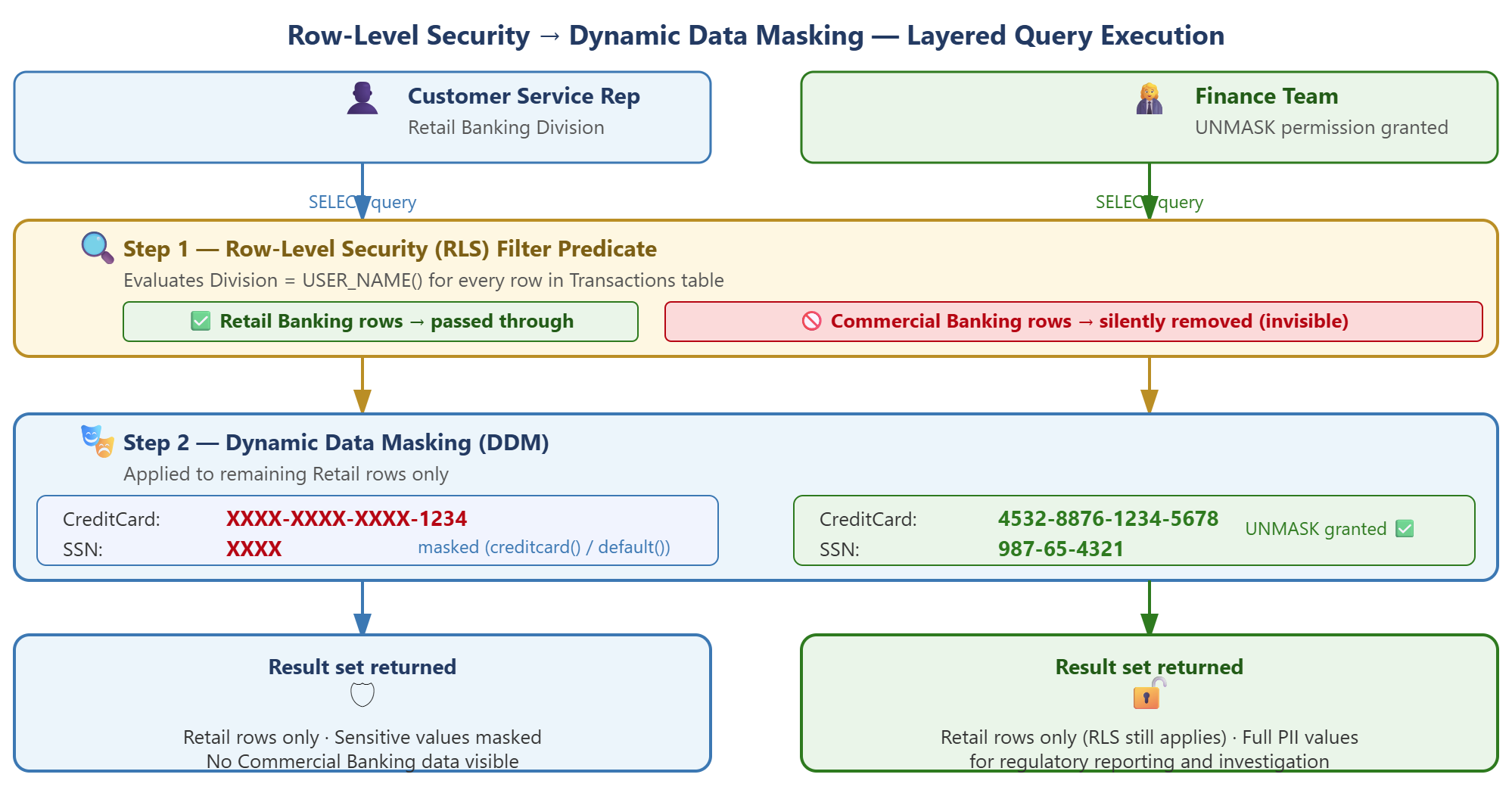
Dynamic data masking and row-level security address different dimensions of the data access problem and work together on the same table. RLS filters the query result to row data the user has permission to see, then DDM masks sensitive column values within those visible rows.
In Contoso's implementation, both features compose to create defense in depth. When a Retail Banking customer service representative queries the Transactions table joined with the Customer table, three protection layers activate:
- RLS filter predicate reduces the Transactions result set to Retail Banking rows only
- DDM creditcard() function masks the CreditCardNumber column in matching Customer rows
- DDM default() function masks the SSN column
A Commercial Banking transaction with Division = 'Commercial Banking' never appears in the result set, even if the representative writes a query targeting all divisions. For the Retail Banking transactions that do appear, credit card numbers show as XXXX-XXXX-XXXX-1234 and SSN values appear as XXXX.
The finance team, granted UNMASK permissions, sees the same RLS-filtered result set but with unmasked credit card and SSN values. The BankingAdmin role, specified in the RLS predicate function, sees all divisions' transactions with unmasked values.
This layered approach follows the principle of defense in depth—multiple independent controls protect data even if one control fails or is misconfigured. RLS ensures users access only authorized rows regardless of column masking. DDM protects column values even if row filtering is bypassed through a privileged account.
With masking and row-level security configured, you're ready to implement automated security monitoring with Microsoft Defender for Azure SQL Database.