Configure access to Azure Key Vault
A Key Vault deployed with purge protection and policy enforcement controls what happens to data if something goes wrong. Access control determines who and what can interact with that data in the first place. Getting access control right means understanding how Key Vault constructs its authorization model—and deliberately applying the smallest set of permissions required for each identity (human, AI agent, or managed identity).
Understand the Key Vault access model
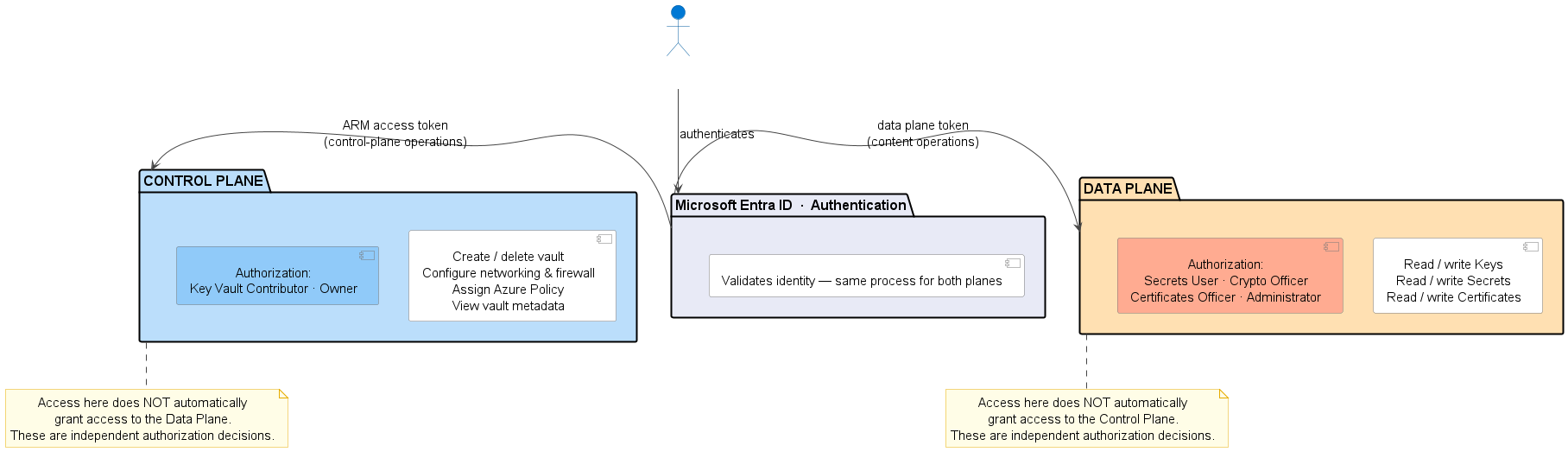
Azure Key Vault separates access into two distinct planes: the control plane and the data plane.
The control plane governs the vault itself. Control-plane operations use Azure Resource Manager (ARM) and include creating or deleting the vault, configuring network rules, and viewing vault metadata. The data plane governs items stored inside the vault—keys, secrets, and certificates. Both planes authenticate through Microsoft Entra ID, but authorization is independent on each plane.
This separation is a deliberate security boundary. An identity with permission to manage the vault's configuration—a Platform Engineer updating network rule, for example—doesn't automatically get access to the secrets the vault holds. Conversely, an application identity that reads connection strings from the data plane doesn't need control-plane permissions. Design your role assignments to respect this boundary: grant control-plane access only to identities managing the vault as infrastructure, and data-plane access only to identities or workloads that need the content.
Use Azure RBAC instead of legacy access policies
Key Vault supports two authorization models for the data plane: Azure role-based access control (RBAC) and legacy vault access policies. Access policies within key vault settings, the original authorization mechanism, are the legacy option—still supported, but not recommended for new workloads—and carry a specific security risk worth understanding.
Any identity with Contributor rights on the Key Vault resource—a role commonly assigned to Platform Engineers and DevOps teams—can create or modify a vault access policy and grant themselves full data-plane access. RBAC breaks this dependency. Managing role assignments requires the explicit Microsoft.Authorization/roleAssignments/write permission, which is separate from Contributor and not implicitly held by most operational roles. With RBAC, the person managing the vault's network settings can't silently grant themselves secrets access.
There's also a functional limitation to access policies: they don't support Privileged Identity Management. If you want to apply just-in-time elevation for Key Vault operations—which you do—access policies can't participate in that model. Use Azure RBAC for all new vaults. Starting with API version 2026-02-01, Azure RBAC is the default permission model for newly created Key Vaults, consistent with the portal experience.
Important
If you operate existing vaults still using access policies, migrating to RBAC is a security hardening action, not just a modernization preference. Legacy access policies expose your data plane to anyone with Contributor on the vault.
Assign the right data plane role for each workload
Azure RBAC provides purpose-built roles for Key Vault operations across both planes. Both planes use the same Azure RBAC system—the difference is what each role governs:
| Role | Plane | What it governs |
|---|---|---|
| Owner, Contributor | Control plane | The vault resource itself—create, configure, and delete via ARM template |
| Key Vault Administrator, Secrets User, Certificates Officer, Purge Operator | Data plane | The vault content—keys, secrets, certificates |
The goal is to assign the most restrictive role that satisfies the workload's requirements—not the most convenient one.
Key Vault Administrator grants full data-plane access to all keys, secrets, and certificates in the vault. Key Vault Administrator is the most powerful role in Key Vault and should never be a permanent assignment for humans. Reserve it for break-glass scenarios activated through a privileged access process, and for automation that genuinely requires cross-object access.
Key Vault Secrets User grants read-only access to secret values. Secrets user is the correct role for application service principals and managed identities that retrieve database connection strings, API keys, or other runtime secrets. The identity can read the secret content but can't list, create, update, or delete secrets. Assign this role to your workload identity, not Key Vault Administrator.
The same applies to AI agent workload identities. If you're deploying agents built on Azure Foundry, Microsoft Copilot Studio, or Agent 365, Microsoft Entra Agent ID (currently in preview) provides a dedicated service principal type for agents. Agent identities support the same Azure RBAC role assignments as any other service principal. However, because agent identities are service principals, they cannot hold eligible PIM assignments—the JIT activation flow requires interactive human steps such as MFA verification and approval requests that an autonomous agent can't perform. To time-bound an agent's Key Vault access, use a time-limited active role assignment with a defined start and end date instead. Assign Key Vault Secrets User—not Key Vault Administrator—regardless of whether the agent authenticates with a managed identity or an agent identity blueprint credential.
Key Vault Certificates Officer allows full lifecycle management of certificates—creating, importing, updating, and deleting—without touching secrets or keys. Assign this role to certificate management automation or the team responsible for certificate renewal workflows.
Key Vault Purge Operator allows permanent deletion of soft-deleted vault objects. This role should be tightly controlled and used only in explicit recovery or decommissioning scenarios, where purging a soft-deleted object is intentional. Don't assign it broadly.
Assign roles at the vault scope rather than at the individual object scope. Per-object role assignments are difficult to audit and manage at scale, and vault-per-application design means the scope boundary is already workload-appropriate.
Eliminate persistent elevated access with Privileged Identity Management
The most significant finding in the Contoso Health audit wasn't that developers had Key Vault Administrator access—it's that they had it permanently. Standing access with no expiration means the only event that removes it's a deliberate deprovisioning action, which can never happen. In that window, any account compromise becomes a full Key Vault compromise.
Microsoft Entra Privileged Identity Management (PIM) replaces permanent role assignments with eligible assignments. An eligible user doesn't hold the role. When they need elevated Key Vault access, they request activation through PIM, which enforces the controls you configure: justification, approval from a designated approver, MFA reverification, and a maximum activation duration. After the window closes, the role is automatically removed and the next request starts the same process. Every activation produces a timestamped audit entry—who requested it, who approved it, when it was active, and when it expired.
Assigning Key Vault Administrator as an eligible PIM role directly closes the Contoso audit gap. Developers still have a path to elevated access when they legitimately need it, but that access is bounded, approved, and auditable.
Beyond PIM, Microsoft Entra Conditional Access lets you apply policy-based controls to Key Vault access. You can require MFA for access from unmanaged or noncompliant devices. Then you can block access from risky sign-in conditions, and limit Key Vault access to requests that originate from locations or network paths you trust. Conditional Access policies apply to agent identities in the same way they apply to human identities, giving you a second enforcement layer that operates independently of role assignments.
Note
If an AI agent needs to access the Key Vault data plane on behalf of (OBO) a human user—the compound identity pattern used in OBO flows—Azure RBAC doesn't support this model for Key Vault data plane operations. Only legacy access policies support compound identity. The recommended architecture for agents that impersonate users is to separate concerns: the agent authenticates to Key Vault using its own application-only identity with the minimum required role. The user's delegated permissions govern what the agent does in other systems; Key Vault access stays in the agent's own identity lane.
Tip
For a detailed walkthrough of configuring PIM for Azure roles, see Privileged Identity Management (PIM) overview.
With access controlled—by role, by eligibility, and by sign-in policy—the remaining exposure is the network path your vault accepts connections from.