Identify Trusted Launch components and VM security types
Boot-level threats represent one of the most difficult security challenges in cloud computing. Malware that compromises the boot process loads before any security software, making it nearly impossible to detect or remove. For Contoso Manufacturing, this risk is especially critical—factory floor systems run 24/7 and often execute with elevated privileges to control industrial equipment. A rootkit infection could go undetected for months while manipulating production data or creating safety hazards.
Trusted Launch addresses this challenge by establishing a hardware-backed chain of trust from the moment a VM powers on. You explore the three security components that work together to verify boot integrity and detect tampering.
| Component | Protection Layer | Key Capability |
|---|---|---|
| Secure Boot | Firmware and boot loader | Blocks unsigned boot code |
| vTPM | Boot measurement | Cryptographically records boot chain |
| Integrity monitoring | Attestation and alerting | Surfaces boot integrity failures |
Compare VM security types
Azure virtual machines support three security types that determine the level of boot and runtime protection. The security type you select dictates which security features are available and how the VM interacts with Azure platform security services.
Standard security represents the traditional VM configuration with no built-in boot integrity protection. Gen1 virtual machines use Standard security by default and can't be upgraded to other security types without first migrating to Gen2. Standard VMs rely entirely on operating system and application-layer security controls—the boot process remains unverified and unmonitored.
Trusted Launch security provides boot integrity verification through Secure Boot, vTPM, and integrity monitoring. This security type is now the default for new Gen2 virtual machines created in the Azure portal. Trusted Launch VMs measure and verify the boot process but don't encrypt memory or provide confidential computing guarantees.
Confidential VM security extends Trusted Launch protections by adding memory encryption and isolation using AMD SEV-SNP or Intel TDX technology. Confidential VMs protect data in use, not just at boot time. This security type requires specific VM sizes and incurs higher compute costs.
For Contoso Manufacturing's factory floor VMs, Trusted Launch provides the necessary boot integrity protection without the cost premium or size restrictions of Confidential VMs. The factory systems process sensitive production data but don't require memory encryption—protecting the boot chain addresses the immediate rootkit and boot kit risks identified in the security audit.
Examine the three Trusted Launch components
Trusted Launch combines three security technologies that work together to establish and verify boot integrity. Each component plays a specific role in the defense-in-depth strategy.
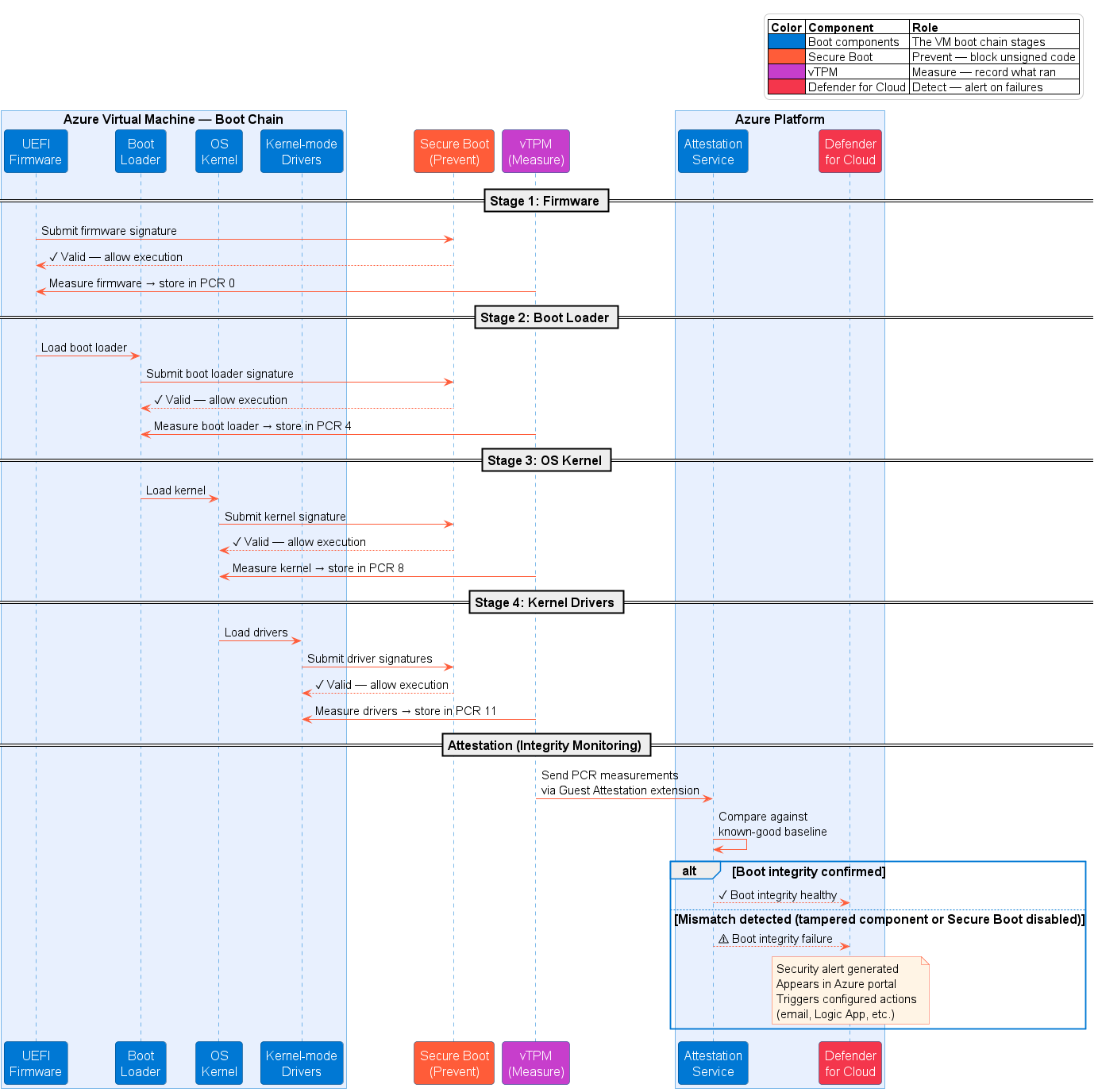
Secure Boot
Secure Boot enforces a signed boot chain by verifying digital signatures at each stage of the boot process. The Unified Extensible Firmware Interface (UEFI) firmware validates the boot loader signature before execution. The boot loader validates the kernel signature. The kernel validates all kernel-mode driver signatures. Any component without a valid signature from a trusted authority can't load.
This protection blocks unsigned or maliciously modified boot components from executing. Rootkits and boot kits that modify the boot loader, kernel, or early-loading drivers fail signature validation and can't compromise the system. Secure Boot establishes trust at the firmware level—the earliest possible enforcement point in the boot sequence.
Virtual Trusted Platform Module (vTPM)
The virtual Trusted Platform Module provides a dedicated, hardware-backed secure vault for each VM. The vTPM is fully compliant with TPM 2.0 specifications and operates independently from the guest operating system. It measures the entire boot chain—from UEFI firmware through the operating system loader, kernel, system drivers, and boot components—by creating cryptographic hashes of each element.
These measurements are stored in Platform Configuration Registers (PCRs) inside the vTPM. Because the vTPM is isolated from the guest OS, malware can't tamper with the measurements. The cryptographic record provides irrefutable evidence of what code executed during boot.
The vTPM enables remote attestation, a process where the VM cryptographically proves to an external verifier that it booted with authorized components. The attestation service compares the vTPM measurements against known-good baselines. If any component differs—even by a single byte—attestation fails.
For Contoso Manufacturing, vTPM measurements provide forensic evidence if a boot integrity failure occurs. Security teams can review the PCR values to identify exactly which component failed attestation and investigate whether the change was authorized or malicious.
Integrity monitoring
Integrity monitoring connects the vTPM measurements to Microsoft Defender for Cloud by installing the Guest Attestation extension on the VM. This extension continuously retrieves boot measurements from the vTPM and sends them to Azure's attestation service for validation.
When boot integrity fails—for example, if Secure Boot is disabled or an unmeasured component loads—the attestation service detects the mismatch between actual and expected measurements. Defender for Cloud generates a security alert that appears in the Azure portal and triggers any configured alert actions such as email notifications or Logic App workflows.
Integrity monitoring transforms the vTPM's local measurements into actionable security intelligence. Without this component, boot integrity failures would remain invisible to security operations teams.
For Contoso Manufacturing, integrity monitoring provides the operational visibility needed to maintain factory floor security at scale. When one of dozens of production VMs experiences a boot integrity failure, Defender for Cloud immediately alerts the security team rather than requiring manual checks on each VM.
Analyze how the components work together
The three Trusted Launch components create a layered defense against boot-level threats. Secure Boot prevents unauthorized code from executing. vTPM measures what executed during boot. Integrity monitoring surfaces failures to security teams.
Consider a scenario where an attacker attempts to install a boot kit on one of Contoso's factory VMs. If the attacker modifies the boot loader, Secure Boot blocks execution because the modified boot loader lacks a valid signature—the attack fails immediately. If the attacker somehow disables Secure Boot to bypass signature verification, the vTPM measures the configuration change. The attestation service detects that Secure Boot is disabled, and integrity monitoring triggers a Defender for Cloud alert. The security team investigates before the attacker can use the compromised boot environment.
Identify default behavior and migration paths
Trusted Launch is now the default security type for new Gen2 virtual machines created through the Azure portal. When you create a Gen2 VM, Secure Boot and vTPM are enabled by default. Integrity monitoring requires explicit enablement during VM creation. You can disable individual components if needed, but enabling all three provides maximum protection.
Gen1 virtual machines use Standard security and require migration to Gen2 before Trusted Launch can be enabled. Azure doesn't support upgrading a Gen1 VM to Trusted Launch while remaining Gen1—you must migrate the VM to Gen2 architecture first.