Explore the Defender for Cloud multicloud connectivity model
Before you connect environments, understand the two distinct security coverage layers that Defender for Cloud delivers across connected environments, and how the authentication architecture makes multicloud connectivity secure without exposing credentials.
Explore two coverage layers
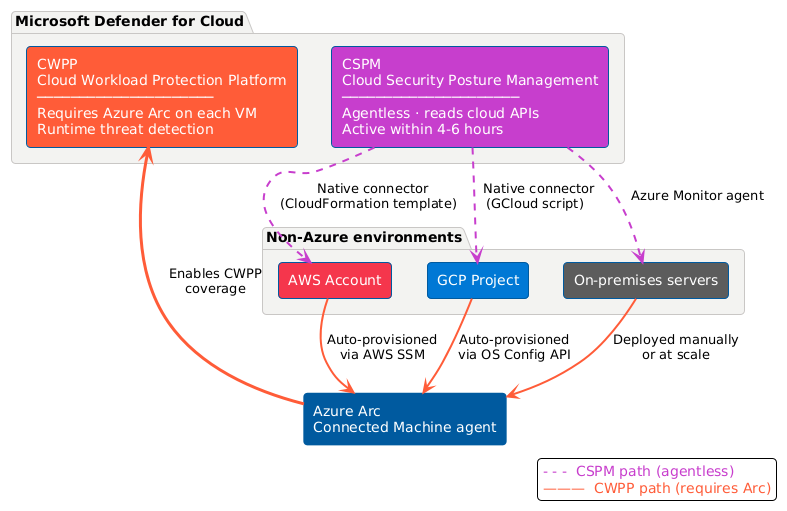
Defender for Cloud provides two layers of coverage for non-Azure environments: Cloud Security Posture Management (CSPM) and Cloud Workload Protection Platform (CWPP). These layers work differently and require different onboarding steps.
CSPM is agentless - When you create a connector for an AWS account or GCP project, Defender for Cloud reads configuration data from those environments through cloud provider APIs. No agent installation is required on individual resources. You get security recommendations, asset inventory, and compliance posture within four to six hours of connector creation—the time required for the first scan cycle to complete.
The Security Posture Management plan that enables CSPM can't be turned off in a connector. It's always active. This design ensures that baseline posture visibility is guaranteed for every connected environment, regardless of which CWPP plans you choose. For Contoso, the moment the AWS and GCP connectors are created, the security team gains visibility into misconfigurations, compliance gaps, and asset inventory. The visibility starts even before Arc agents are deployed on EC2 instances or Compute Engine VMs.
CWPP requires Azure Arc - CWPP plans—such as Defender for Servers, Defender for Containers, and Defender for Databases—provide active threat detection and runtime protection. These plans need access to the machine or workload running in the non-Azure environment. For virtual machines (EC2 instances, GCP Compute Engine VMs, and on-premises servers), this means installing the Azure Connected Machine agent, which Arc-enables the machine and registers it as an Azure resource.
Once a machine is Arc-enabled, it appears in Defender for Cloud's inventory alongside native Azure VMs. Any Defender plan enabled on the Azure subscription extends coverage to that machine. This two-step model—connector for posture, Arc for protection—is the foundation of how Defender for Cloud treats non-Azure workloads.
Review capabilities available after connecting
A successful connector onboarding unlocks several security capabilities for the connected environment:
- Unified asset inventory: AWS and GCP resources appear in Defender for Cloud's Inventory alongside Azure resources, each tagged with their source cloud provider.
- Cross-cloud secure score contribution: Security recommendations from AWS and GCP environments contribute to your Defender for Cloud secure score, giving a unified posture view across all clouds.
- CSPM recommendations per environment: Configuration findings for AWS and GCP resources surface in the Recommendations page, filterable by environment.
- Auto-assigned compliance standards: When you create an AWS connector, the AWS Foundational Security Best Practices standard is automatically assigned to the subscription containing that connector. For GCP, the GCP Default benchmark is assigned. The results of benchmarks appear in the Regulatory Compliance dashboard without any manual configuration.
- CWPP plan availability: Defender plans you select during connector creation—Defender for Servers, Defender for Containers, Defender for Databases—become available for resources in the connected environment. Prerequisites per plan are covered in later units.
- AI workload visibility: If you enable the AI Security Posture Management (AI SPM) feature of Defender CSPM, Defender for Cloud surfaces security recommendations for AI workloads in connected AWS accounts and GCP projects. The protections include Amazon Sage Maker and Google Vertex AI deployments.
AWS authentication architecture: federated trust and no stored secrets
When Defender for Cloud communicates with your AWS account, it never stores long-lived credentials—no access keys, no stored secrets. Instead, it uses federated trust with short-lived credentials through a cross-cloud trust relationship between Microsoft Entra ID and AWS Identity and Access Management (IAM).
During AWS onboarding, the CloudFormation template you download and run in your AWS account creates two authentication resources:
- An OpenID Connect (OIDC) identity provider bound to a Microsoft-managed Microsoft Entra application
- One or more IAM roles that Defender for Cloud is authorized to assume through web identity federation
The authentication flow works as follows. Defender for Cloud requests a token from Microsoft Entra ID. It presents this token to AWS Security Token Service (STS), which validates it against the trust conditions defined in the IAM role. If all conditions are met, AWS STS returns short-lived credentials valid only during that scan operation. Defender for Cloud uses these temporary credentials to read asset configuration data and never stores them.
AWS performs audience, signature, thumbprint, and role-level checks before issuing credentials, ensuring only the specific Microsoft-managed application can assume the connector role.
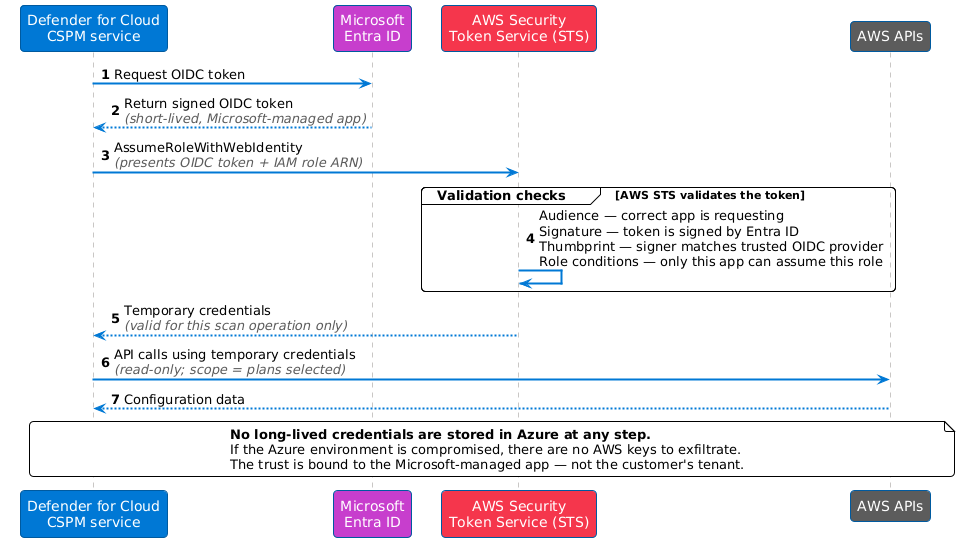
This architecture means that even if an attacker gained access to the Azure environment, there are no stored AWS credentials to exfiltrate. The trust is used by the specific Microsoft-managed application, during a valid authentication transaction.
The IAM permissions granted to these roles depend on which Defender plans you select. CSPM requires read-only permissions across AWS services. Adding CWPP plans such as Defender for Servers adds permissions needed to manage Arc agent deployment and AWS Systems Manager (SSM) access on EC2 instances.
GCP authentication architecture: workload identity federation
For GCP, Defender for Cloud uses workload identity federation and service account impersonation - a GCP-native approach to federated authentication. Like AWS, this model stores no private keys or long-lived credentials in Azure.
During GCP onboarding, the GCloud script you run in your GCP project creates the following resources:
- A workload identity pool: the container for external identity providers
- Workload identity providers (one per enabled Defender plan): each configured to trust tokens from Microsoft Entra ID
- Service accounts with scoped project-level policy bindings: the GCP identities that Defender for Cloud impersonates
When Defender for Cloud scans a GCP project, it exchanges a Microsoft Entra token with Google Cloud Security Token Service (STS). Then STS validates it against the workload identity provider configuration and returns a short-lived Google STS token. Defender for Cloud uses that token to impersonate the service account and read GCP resource configuration—no private keys stored in Azure.
Because the service account's policy bindings are scoped to the connected project (or organization), Defender for Cloud can only access the resources you explicitly onboarded. Individual plans get separate workload identity providers, so the permissions granted to each plan are independently scoped and auditable.