Introduction
Azure IoT Edge allows you to move your workloads from the cloud to the edge. Doing so enables you to run your workloads locally on edge devices closer to where your data is being generated. This approach fits well with scenarios that process large amounts of data, such as computer vision. In this module, a prebuilt Azure AI Custom Vision classification model runs locally in an IoT Edge module, while the Camera Capture module calls Azure Speech text to speech in Foundry Tools at runtime to synthesize audio.
Suppose you work as a data scientist and you're responsible for deploying an IoT Edge image recognition solution for self-checkouts used in supermarkets. The system should include Azure Speech text to speech output to enable visually impaired people to use the self-checkout. In a complete supermarket checkout system, local image classification could feed downstream weighing and pricing processes, but this lab doesn't implement weighing, price lookup, or cost calculation. In this lab, the scanned item image is classified by the prebuilt, exported Azure AI Custom Vision model running in the local Image Classification module. The Camera Capture module calls Azure Speech text to speech to synthesize the detected item label, then plays an audio message to confirm that the item has been scanned. The business logic for image recognition resides on the device.
In a production scenario, existing Azure Custom Vision customers could build and train an Azure AI Custom Vision classification model in the cloud, export it, and package the exported model in an IoT Edge module container that runs on the device. To export an Azure AI Custom Vision model for offline or edge use, the project must use a compact domain. For a replacement fruit classifier in this lab, don't choose regular non-compact domains such as Food or General, because Custom Vision exports only compact-domain projects. Use an exportable compact classification domain such as General (compact) for IoT Edge export; Docker containers, including Linux containers, are one supported export target. In this module, however, you use a prebuilt, exported fruit classification model rather than creating or training one.
Important
Azure AI Custom Vision is planned for retirement on September 25, 2028. Existing Azure Custom Vision customers are supported until then, but new production plans should evaluate Microsoft's Custom Vision migration options or alternatives before relying on Custom Vision model creation or export.
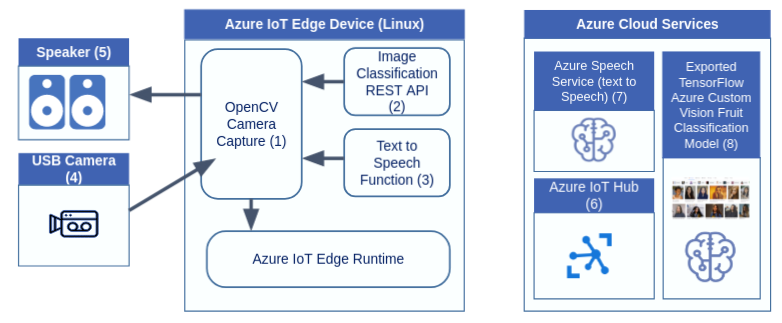
In this module, you'll run an Azure IoT Edge solution that uses an exported Azure AI Custom Vision classification model locally and calls Azure Speech text to speech, then deploy the solution to the Edge device. The application consists of a number of modules that scan the items using a camera, classify the scanned items, and convert the identified items to speech.
Important
This lab requires the supported Azure IoT Edge runtime: IoT Edge 1.5 LTS in the current Microsoft IoT Edge supported releases and version history guidance, or a later supported release if official guidance has superseded 1.5 when you run the lab. IoT Edge 1.4 LTS reached end of life on November 12, 2024, so don't use 1.4 LTS for this lab.
By the end of this module, you'll be able to deploy an IoT Edge solution that runs image classification locally and calls Azure Speech text to speech from the Camera Capture module. The application will tell you (via audio) what items have been scanned.
Note
This lab uses a lab-only Visual Studio Code workflow because the existing lab assets and steps depend on the Azure IoT Edge Tools and Azure IoT Hub extensions. Microsoft's IoT Edge development tools documentation states that the Visual Studio Code IoT Edge extension is in maintenance mode and identifies the Azure IoT Edge Dev Tool CLI (iotedgedev) as the preferred development tool for new IoT Edge module development. The Azure IoT Hub extension documentation also warns that the extension depends on the deprecated Azure Account extension and will be retired in a future update. Before choosing VS Code extensions for production work, review current Microsoft guidance and extension release status. Use supported Azure CLI or Azure portal workflows for IoT Hub and device management, and iotedgedev or other supported automation for IoT Edge module development and deployment, where appropriate.
Learning objectives
Use a prebuilt, exported Azure AI Custom Vision classification model in an IoT Edge solution that also calls Azure Speech
Deploy your solution to IoT Edge by using this lab's Visual Studio Code workflow
Verify that modules are running successfully
Prerequisites
An Azure subscription
Basic knowledge of Azure IoT Edge concepts
Basic awareness of the Azure AI services used in this lab: Azure Speech text to speech and Azure AI Custom Vision model export
A supported Ubuntu Server 24.04 or 22.04 amd64 computer, VM, or IoT Edge device to run the IoT Edge runtime for this lab
A supported development topology. The simplest topology is to use the same Ubuntu host for the IoT Edge device, Moby engine, container builds, and this lab's Visual Studio Code workflow. If that host is Ubuntu Server or otherwise headless, run VS Code on your workstation and connect to the host with Remote-SSH, or use a separate development machine. If you build on a separate development machine, push module images to a container registry that the IoT Edge device can reach, and configure the registry credentials in the deployment/runtime configuration steps that use that registry.
A USB camera and speaker or audio output connected to the Linux computer or IoT Edge device
Visual Studio Code with the Azure IoT Hub extension, the Azure IoT Edge Tools extension (in maintenance mode), and the Container Tools extension (the replacement for the previous Docker extension) installed for this exercise's lab-only Visual Studio Code workflow. VS Code's built-in JSON support is sufficient; the community-maintained JSON Tools extension (
eriklynd.json-tools) is optional if you prefer its formatting features. The Azure IoT Hub extension documentation warns that the extension depends on the deprecated Azure Account extension and will be retired in a future update; if the legacy Azure IoT Hub or Azure IoT Edge VS Code extensions install Azure Account or prompt for it, allow that dependency for this lab only. Before using similar extensions in production, confirm current Microsoft guidance and use supported CLI, portal, oriotedgedevworkflows where appropriate.Docker-compatible container development tooling. Moby engine is installed as part of this lab's IoT Edge runtime setup and is the supported container engine for IoT Edge production scenarios.