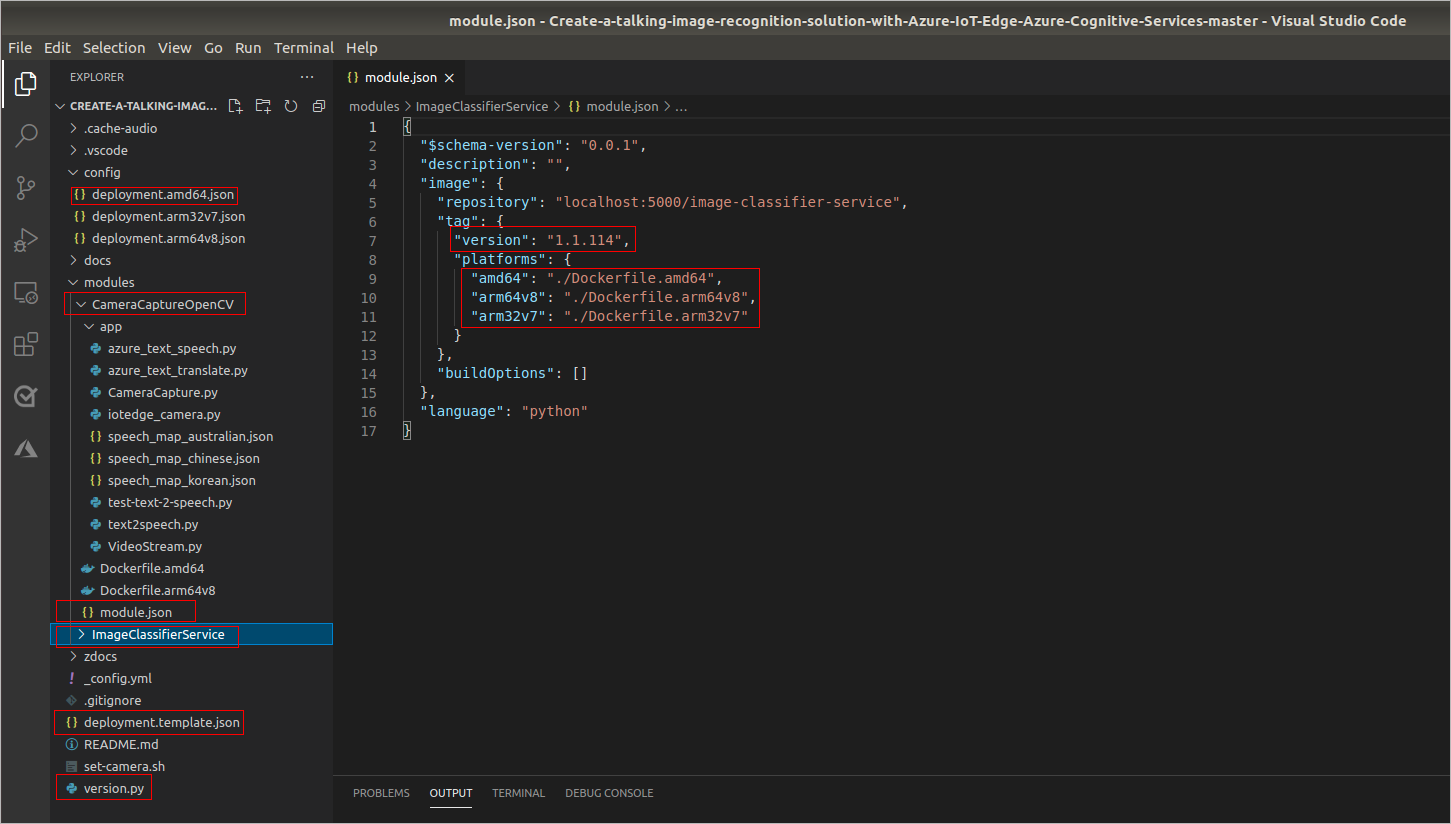
Understand the project structure
The following describes the highlighted sections of the project, which are available at the GitHub repository.
- There are two modules:
- CameraCaptureOpenCV
- ImageClassifierService
- The module.json file defines the Docker build process, the module version, and the container registry/image repository used during build and push. In this lab, the linked sample's module repository values use localhost:5000 because the next exercise starts a lab-only local registry. Those values work only when the IoT Edge runtime can reach that registry as localhost:5000. If your build computer and IoT Edge device are different hosts, use Azure Container Registry or another reachable registry host, update the module repository values before building, and configure device pull credentials. Updating the version number, pushing the updated module image to the registry, and deploying the generated deployment manifest for an edge device trigger the Azure IoT Edge runtime to pull the new module image.
- The deployment.template.json file is the source template for the IoT Edge deployment manifest, not the per-module build metadata. The module.json files provide the Docker build settings and image repository values for each module; the build/deploy workflow combines those values with the deployment template and generates an architecture-specific manifest in the config folder. The deployment template/manifest declares which modules should be deployed, container create options and registry credentials,
$edgeAgentand$edgeHubruntime settings, module desired properties, and message routes. The linked sample template currently contains older IoT Edge 1.1 runtime image tags; before you build or deploy in the next exercise, update the template to supported IoT Edge 1.5 LTS runtime images and set both$edgeAgent.properties.desired.schemaVersionand$edgeHub.properties.desired.schemaVersionto"1.1". - The template defines a route from the
camera-capturemodule'soutput1to IoT Hub through$upstream. Routes don't create messages by themselves: IoT Hub events appear only when module code sends device-to-cloud messages tooutput1. For the unmodified linked sample, local module logs and module health still verify module behavior even if no upstream events appear in IoT Hub. - The architecture-specific deployment manifest is generated from deployment.template.json in the config folder. For this lab, use the amd64 build path that the linked sample demonstrably supports for the exported classifier assets; the generated manifest is config\deployment.amd64.json. Deploy config\deployment.amd64.json, not deployment.template.json, because the template can contain placeholders and pre-build settings. The linked sample's
modules/ImageClassifierService/module.jsonlists three platforms (amd64,arm32v7,arm64v8— note the key isarm64v8, notarm64), whilemodules/CameraCaptureOpenCV/module.jsonlists onlyamd64andarm64v8(noarm32v7platform for the camera module). Beyond the naming gap,modules/ImageClassifierService/Dockerfile.arm64v8usesFROM arm32v7/python:3.7-slimand copies thecv-arm32v7/appassets, so it is functionally an arm32v7 build with no native arm64 classifier export. Don't select an Arm build/deployment path for this lab unless the sample repository is updated and tested for that target. - The version.py in the project root folder is a helper app you can run on your development machine that updates each module's version number. Useful as a change in the version number triggers Azure IoT Edge runtime to pull the updated module, and it is easy to forget to change the module version numbers.
Important
The linked sample repository is a learning sample. Do not build or deploy a generated manifest from the unmodified template. First update deployment.template.json to use the supported Azure IoT Edge 1.5 LTS runtime images, such as mcr.microsoft.com/azureiotedge-agent:1.5 and mcr.microsoft.com/azureiotedge-hub:1.5, instead of older IoT Edge 1.1 runtime image tags, and set both $edgeAgent.properties.desired.schemaVersion and $edgeHub.properties.desired.schemaVersion to "1.1". Before deploying, build the solution for amd64 so config\deployment.amd64.json contains the updated runtime image tags, schema versions, and module image references that the IoT Edge runtime can pull.