Scan for exposed secrets using Defender Cloud Security Posture Management (CSPM)
Secrets that belong in Key Vault but end up somewhere else don't just create compliance exposure—they become a lateral movement accelerant. An attacker who gains initial access to one resource and finds a storage account connection string in a configuration file on disk has everything they need to pivot to another resource entirely. Defender Cloud Security Posture Management (CSPM) secret scanning finds those misplaced credentials before attackers can exploit them.
Identify what agentless scanning detects
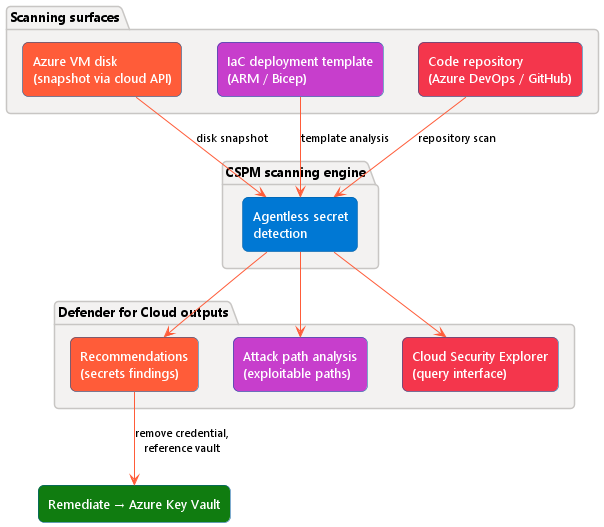
Defender CSPM uses agentless scanning—there's no agent to deploy, no network connection required from the virtual machine (VM), and no performance issues on running workloads. For virtual machines, the scanning engine takes a disk snapshot using cloud APIs, analyzes it for exposed credentials, and sends metadata to Defender for Cloud. The VM continues running normally throughout the process.
The scanning engine searches for a broad range of secret types:
- Azure SQL connection strings
- Storage account connection strings and SAS tokens
- SSH private keys
- Azure Cosmos DB credentials
- AWS access keys
- Microsoft Entra ID client secrets
- API tokens
- Personal access tokens for services like Azure DevOps and GitHub
For SSH keys specifically, the engine goes one step further—it verifies whether a discovered key can actually authenticate to another reachable machine. Keys that can't be verified appear as unverified in the recommendations view; keys with confirmed lateral movement potential appear as exploitable attack paths.
Three scanning types cover the environments where misplaced secrets most commonly appear.
Scan virtual machine disks for exposed secrets
Machine secrets scanning targets Azure VMs and connected AWS and GCP instances. After taking a disk snapshot, the engine scans for plaintext credentials across the file system. Secret scanning is how Contoso Health's developer VM issue gets found—the configuration file containing the storage account connection string appears in the findings automatically, with the file path and secret type shown in the recommendation detail.
This scanning type requires the Defender Cloud Security Posture Management (CSPM) plan or Defender for Servers Plan 2.
Important
Agentless machine secrets scanning requires the Defender Cloud Security Posture Management (CSPM) plan or Defender for Servers Plan 2. Cloud deployment resource scanning and code repository scanning require the Defender CSPM plan. Configuring Defender for Cloud plans is covered in the workload protection content for this course.
SSH keys found on VM disks are verified against reachable machines in your environment. If a key can be used to authenticate to another VM, Defender for Cloud flags it as an exploitable lateral movement path—not just a low-severity finding.
When you receive a machine secrets finding, your first question is whether the exposed credential is still active. An active credential with broad permissions is a priority remediation regardless of the secret type.
Scan cloud deployment resources for hardcoded credentials
Deployment templates are a common hiding place for hardcoded secrets. A developer can include a storage account key directly in an ARM template or Bicep template body. That template is then published to a storage account, a repository, or an artifact store. Anyone with access to the template file can read that secret.
Cloud deployment resource scanning analyzes infrastructure-as-code (IaC) resources for exposed credentials in the same categories supported by machine scanning. This covers scenarios where a secret wasn't on a VM disk but in the template used to deploy infrastructure. This scanning type requires the Defender CSPM plan.
When you receive a deployment resource finding, check whether the template was deployed recently and whether the exposed credential is broadly scoped. A connection string with write access to a production storage account carries higher remediation priority than a narrowly scoped read-only key.
Scan code repositories for leaked secrets
Source code repositories accumulate secrets over time. Some examples are token committed to test a feature, credentials in a configuration file checked in under development pressure. Also you have service principal secrets in a script that was never cleaned up, or an API token hard-coded in an AI agent configuration file. Code repository scanning integrates with Azure DevOps and, through GitHub Advanced Security, with GitHub repositories to surface these exposures.
Note
GitHub Advanced Security is a separate licensing requirement for GitHub repository scanning. Azure DevOps repository scanning is included with the Defender CSPM plan.
When you receive a repository finding, the credential was exposed. Check when the secret was first committed and whether it was rotated since the finding. A long-lived, unrotated credential in version history is a higher-severity finding than one introduced recently.
Review findings in Defender for Cloud
When the scanning engine finds secrets, recommendations are triggered under the Remediate vulnerabilities security control on the Defender for Cloud Recommendations page. The key recommendations to monitor are:
- Machines should have secrets findings resolved - for Azure VMs
- EC2 instances should have secrets findings resolved - for AWS instances
- VM instances should have secrets findings resolved - for GCP instances
To investigate a specific machine, navigate to Defender for Cloud > Recommendations, select the relevant recommendation, and then select a specific VM from the affected resources list. The detail view shows each secret found: the secret type, the file path where it was detected, and the recommended remediation steps. You can also reach the same detail through Defender for Cloud > Inventory - selecting a specific VM shows all security findings for that resource in one view.
Cloud security explorer offers an extra querying interface. Predefined queries return all VMs with secrets that can authenticate to another VM. It also returns all VMs with secrets that can reach a storage account, or all VMs with secrets that can reach a SQL database. These queries are useful for prioritizing remediation when you have many findings across a large environment.
Analyze attack paths from secret exposure
When a secret finding creates a path to a high-value target, Defender for Cloud models it as an exploitable attack path. The attack path view in Defender for Cloud shows the chain of resources involved—for example, a storage account connection string on a VM disk creates a path: compromised VM → storage account containing patient health records. The issue assessment is explicitly visible, which helps security teams prioritize which findings to remediate first.
To view attack paths, navigate to Defender for Cloud > Attack path analysis. Each path shows the starting resource, the exploit step (the secret), and the reachable target. Paths involving sensitive data stores or downstream services with broad permissions are highest priority.
Remediate a secret scanning finding
A secret scanning finding means a credential is in the wrong place. The remediation is always the same regardless of the secret type: remove the credential from the exposed location, store it in Azure Key Vault, and update the application or template to reference the vault at runtime using a managed identity or a direct Key Vault reference. Leaving the old credential in place after creating a vault reference doesn't resolve the finding—the plaintext credential must be removed from the file, VM disk, or template.