Explore Microsoft Defender for Containers
Microsoft Defender for Containers is a cloud-native security solution for containerized applications running on Azure Kubernetes Service (AKS) and storing images in Azure Container Registry (ACR). It covers the full container lifecycle—from image creation through registry storage, deployment, and runtime—providing detection, posture management, and enforcement capabilities that integrate natively with Azure services.
Identify the four protection pillars
Defender for Containers organizes its capabilities into four protection areas, each targeting a distinct phase, or risk in the container lifecycle.
Vulnerability assessment scans container images for known CVEs (Common Vulnerabilities and Exposures). Registry scanning evaluates images stored in ACR at the time of push and on a recurring schedule to catch newly published vulnerabilities. Runtime vulnerability assessment identifies CVEs in images actively running in AKS clusters, connecting registry findings to live workloads. Both scanning paths use the same engine—Microsoft Defender Vulnerability Management—providing consistent findings with Common Vulnerability Scoring System (CVSS) scoring, exploitability data, and remediation guidance.
Runtime threat protection monitors AKS cluster behavior for malicious activity. The Defender sensor collects process, network, and Kubernetes event data from each node using eBPF (extended Berkeley Packet Filter) technology. Kubernetes audit log data feeds control plane threat detection. Alert types include binary drift detection, suspicious process execution, network anomaly detection, and privilege escalation attempts. Binary drift detection can also block unauthorized processes—not just alert on them.
Security posture management evaluates cluster configurations against security benchmarks, including the Center for Internet Security (CIS) Kubernetes Benchmark. Findings appear as prioritized recommendations in Defender for Cloud. This pillar identifies misconfigurations—such as containers running as root, overly permissive network policies, or missing pod security controls—before they contribute to a security incident. The cloud security graph correlates container posture findings with other resource risks producing contextual attack path analysis.
Gated deployment uses Azure Policy for Kubernetes admission controllers to prevent vulnerable or misconfigured workloads from deploying to your clusters. Policies run as Kubernetes admission webhooks, intercepting resource creation requests and evaluating them against defined rules before allowing or blocking deployment. In deny mode, noncompliant workloads are blocked. In audit mode, violations are recorded without blocking. Audit mode is useful during initial rollout.
Describe the architecture components
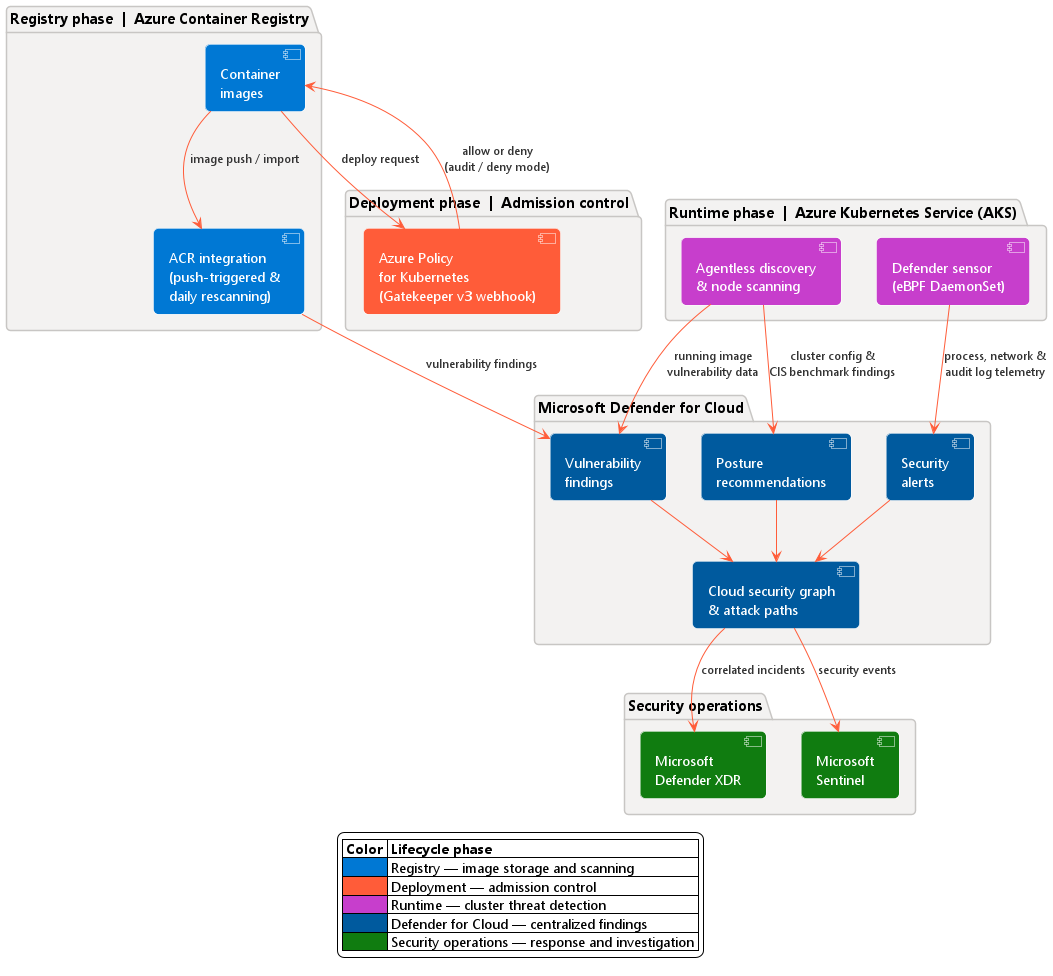
Defender for Containers uses a set of lightweight, Azure-managed components that work together to deliver these four protection areas. For AKS environments, your clusters don't require inbound connections—all communication uses outbound HTTPS on port 443.
The Defender sensor is a DaemonSet deployed on each AKS node. It collects runtime data—Kubernetes events, process data, and network activity—using eBPF technology and transmits it securely to Defender for Cloud. The sensor is deployed as an AKS Security profile, natively integrated in the AKS Resource Provider (RP). This integration means the sensor is managed as part of the cluster's own configuration rather than as a separately installed agent.
Azure Policy for Kubernetes is a pod that extends the open-source Gatekeeper v3 admission controller. Admins Deploy an AKS add-on, it registers as a webhook to Kubernetes admission control. This component enforces configuration rules at deployment time—blocking workloads that don't meet your security baseline before they reach the cluster.
Registry access provides push-triggered and periodic image scanning for images stored in Azure Container Registry. When a new image is pushed to ACR, scanning begins within a few hours. Images that are actively used or recently pushed are rescanned daily to surface newly published CVEs. ACR requires no other agents or configuration—the integration works through Defender for Cloud's direct connection to your registry.
Kubernetes API access provides visibility into your AKS cluster configurations without requiring any agents. When enabled, Defender for Cloud creates a managed identity and assigns the Kubernetes Agentless Operator built-in role at subscription scope. Using AKS Trusted Access, the identity reads cluster configuration data directly through the AKS API server.
Agentless scanning for machines performs periodic disk snapshots of AKS node virtual machines (VMs). The snapshots are analyzed for OS configuration, installed packages, and known vulnerabilities—without installed agents or challenges to cluster performance.
Microsoft XDR integration sends Defender for Containers alerts to the Microsoft Defender XDR (extended detection and response) platform, enabling unified incident investigation. Container alerts correlate with signals from identity, endpoint, and other Microsoft security products, giving your security operations team a single investigation surface.
The following diagram shows how these components map to each phase of the container lifecycle and how data flows into Defender for Cloud.
Describe how Defender for Containers discovers your environment
When you enable Defender for Containers on a subscription, it automatically discovers all AKS clusters and ACR registries in that subscription. Defender for Containers doesn't require manual enrollment of individual clusters or registries.
For AKS clusters, Defender for Cloud uses Azure Resource Manager APIs to enumerate clusters and assess their configuration. Defender for Cloud then autoprovisions the Defender sensor and Azure Policy add on to each discovered cluster based on the plan's autoprovisioning settings.
For ACR registries, Defender for Cloud uses the Registry access component to trigger vulnerability scans on image push events, and schedules periodic rescans for images meeting the criteria for continuous scanning.
As Contoso Retail adds new AKS clusters or ACR registries to its subscription, Defender for Containers automatically includes those resources in its coverage with no more configuration.