Examine the Researcher agent
Microsoft 365 Copilot's prebuilt Researcher agent helps you find and synthesize information for work without doing every search manually. Whether you're preparing a presentation, writing a report, or getting up to speed on a new topic, Researcher helps you gather relevant information and turn it into a structured summary. For example, you can use Researcher to:
- Build a detailed go-to-market strategy based on the context of your work data and broader competitive data from the web.
- Identify whitespace opportunities for a new product based on emerging trends and internal data.
- Create a comprehensive quarterly report for a client review that combines work to date with the latest market analysis.
Researcher works best when it can combine the information already available in your Microsoft 365 environment with approved external sources, where those sources are enabled in your organization.
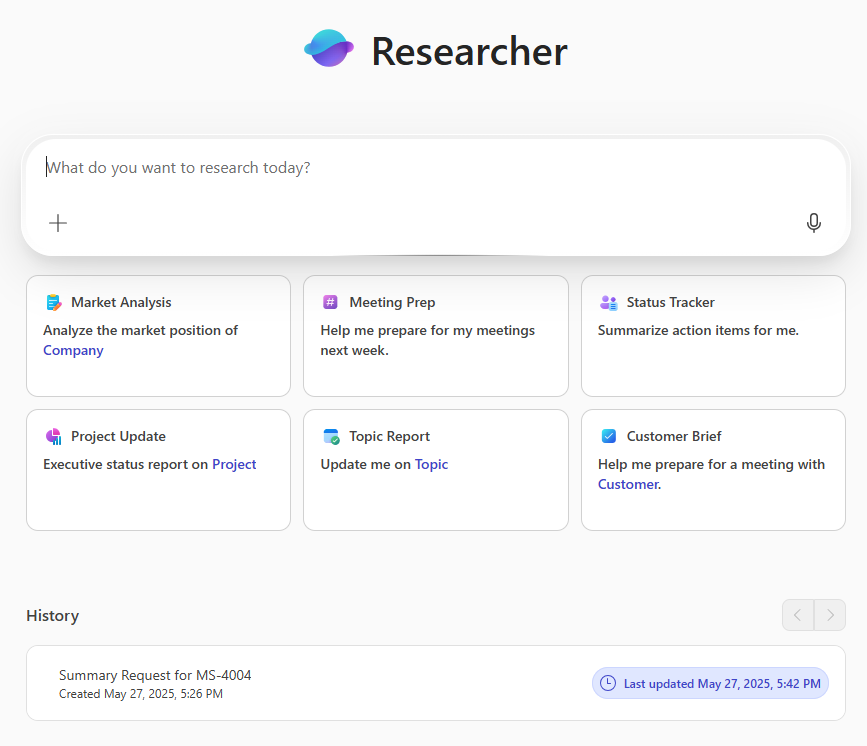
Researcher is optimized for business-relevant research. It can review recent files, summarize long documents, and pull together findings from trusted sources and the web, where web access is enabled. Whether you're preparing a market overview, writing a competitive analysis, or gathering background for a presentation, Researcher can help you locate key facts, trends, and insights. It can also provide citations so you can review the source material yourself.
Researcher is especially useful for everyday business tasks like:
- Creating executive summaries.
- Gathering background for meetings or proposals.
- Comparing industry trends or competitor strategies.
- Drafting reports, whitepapers, or internal briefings.
Even if you're not a professional researcher or writer, you can get clear, well-organized results just by asking in plain language. For example, say: "Give me a summary of the latest sustainability trends in retail" or "Compare top cloud storage providers for security and pricing." Researcher interprets your request, gathers the available context, and returns a structured response.
Researcher can also use the context available from your Microsoft 365 work data, such as files, messages, and meeting content that you already have access to. It respects your organization's data boundaries and file permissions, so it only accesses what you're allowed to see.
By reducing manual research work, Researcher gives you more time to focus on interpretation, storytelling, and decision-making.
Sample prompts when working with Researcher
Here's a list of sample prompts you can try with the prebuilt Researcher agent in Microsoft 365 Copilot Chat:
- Market and competitive research
- "What are the emerging trends in the electric vehicle market for 2025?"
- "Compare our top three competitors' go-to-market strategies."
- "Summarize recent merger and acquisition activity in the cloud computing space."
- "What market risks should we consider before entering Southeast Asia?"
- Background and context building
- "Give me a summary of generative AI applications in healthcare."
- "What's the history and mission of [Company Name]?"
- "Create a briefing on ESG (Environmental, Social, and Governance) regulations in Europe."
- "What are the pros and cons of hybrid work policies?"
- Report and content drafting
- "Draft an executive summary based on this Word document."
- "Generate a bullet-point brief from this 30-page industry report."
- "What key statistics should I include in a Q2 marketing strategy update?"
- "Create a one-slide summary of our competitor analysis for this deck."
- Cross-file information gathering
- "Pull key insights from my recent documents on customer retention."
- "Summarize trends across the spreadsheets and reports that I worked on this week."
- "What patterns are emerging from our latest customer feedback survey responses?"
- Administrative and knowledge support
- "What policies do we have on data privacy?"
- "Summarize the main points from our last four leadership team meetings."
- "Find all recent updates related to employee training and development."
- "Help me prepare a list of talking points for an investor Q&A session."
Limitations of the Researcher agent
While Researcher is a powerful tool, there are a few things to keep in mind when you use it:
- It doesn't replace subject matter experts. Researcher can help you get started or speed up the work, but final interpretation and decision-making should still involve human oversight, especially for critical or sensitive topics.
- Source access may vary. Researcher can use your Microsoft 365 files and, where enabled, trusted web sources. It can't access every external system or subscription source unless your organization has made that source available.
- Be specific when needed. Vague prompts may lead to broad results. If you're looking for something detailed, include specifics like a time frame, region, industry, or document name.
- It respects your file permissions. Researcher can only access content you're authorized to view. If you're missing data in your results, make sure you have access to the relevant files or sources.