Explore CSPM plans and posture visibility
Contoso Healthcare's security team needs visibility across their entire Azure environment—clinical infrastructure, virtual machines, storage accounts, databases, and AI-powered applications including Azure OpenAI services and Azure AI Foundry. Microsoft Defender for Cloud provides Cloud Security Posture Management (CSPM) capabilities that give security engineers comprehensive insight into their cloud security state. Here, you explore the two CSPM plan options. First, learn how to navigate the Cloud Overview dashboard in the Defender portal. Then discover how CSPM inventories cloud and AI workloads, and understand the Cloud Secure Score model that measures security risk.
Understand the two CSPM plans
Defender for Cloud offers two CSPM plans with different capabilities. Foundational CSPM is enabled by default at no cost when you onboard an Azure subscription. This plan provides secure score, security recommendations, asset inventory, Microsoft Cloud Security Benchmark (MCSB) assessments, workflow automation, and remediation tools across Azure, AWS, GCP, and on-premises environments.
Defender CSPM is a paid plan that extends foundational capabilities with advanced features. With Defender CSPM, you gain attack path analysis that identifies potential lateral movement routes. Additionally, you get risk prioritization capabilities that surface the most critical issues, and the cloud security explorer for proactive threat hunting. The plan also includes AI security posture management for Azure OpenAI and AI Foundry workloads. Combine this with data security posture management (DSPM), sensitive data scanning, agentless scanning for VMs and containers, external attack surface management, regulatory compliance assessments beyond MCSB, custom security recommendations, and governance rules for remediation tracking.
| Feature Category | Foundational CSPM | Defender CSPM |
|---|---|---|
| Core capabilities | Secure score, recommendations, asset inventory, MCSB, remediation tools | All foundational features included |
| Risk analysis | Basic recommendations | Attack path analysis, risk prioritization, security explorer |
| Advanced scanning | Not included | Agentless VM/container scanning, secrets scanning |
| Specialized posture | Not included | AI security posture, DSPM with sensitive data discovery |
| Compliance | MCSB only | Regulatory compliance assessments, custom recommendations |
| Governance | Workflow automation | Governance rules, ServiceNow integration |
Understandings which plan is active determine what features you can access. Many high-value capabilities—including risk prioritization, attack path analysis across all workload types, agentless scanning for VMs and containers, and AI security posture management—require the Defender CSPM plan. For an environment like Contoso Healthcare's, where clinical infrastructure, sensitive data stores, and AI workloads all carry different risk profiles, Defender CSPM provides the depth of analysis needed.
Navigate the Cloud Overview dashboard
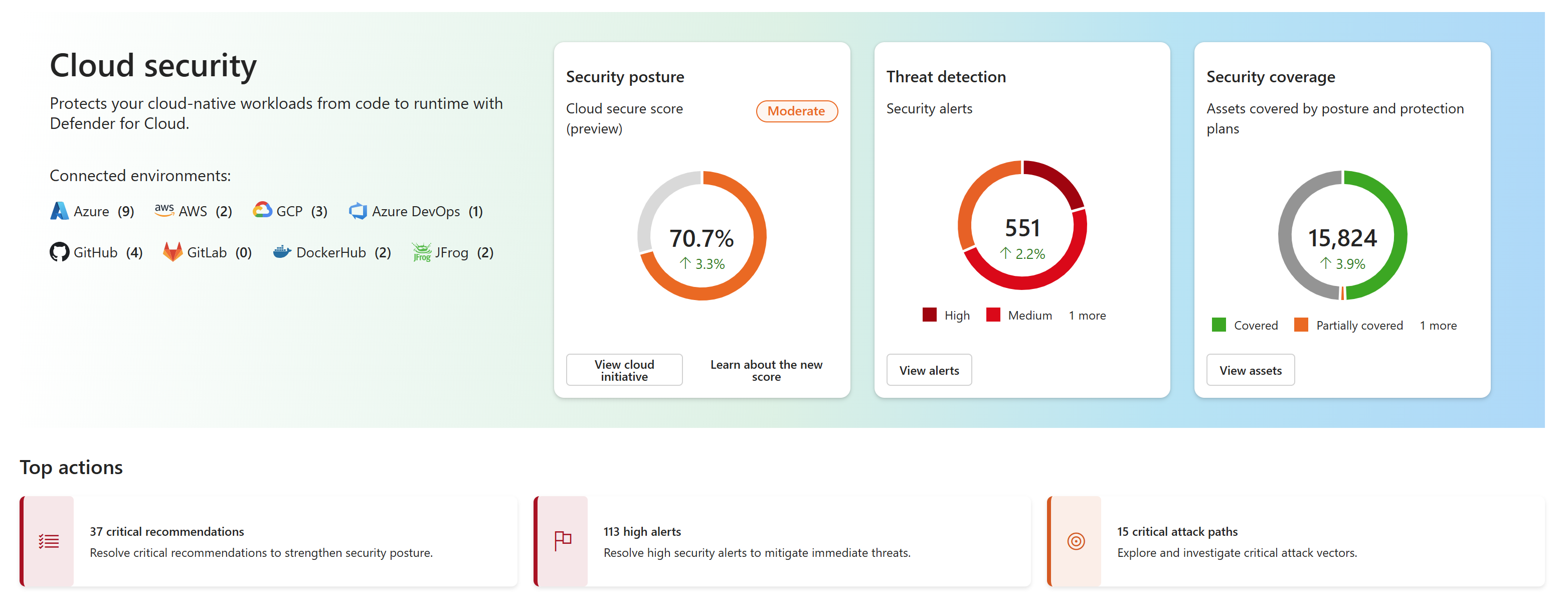
The Cloud Overview dashboard serves as your central command center for cloud security in the Microsoft Defender portal. To access it, sign in to the Defender portal at security.microsoft.com, then navigate to Cloud security > Overview. The dashboard provides scope and environment filters at the top, allowing you to narrow the view to specific Azure subscriptions or pivot between Azure, AWS, and GCP environments.
The Security at a glance section displays your most critical metrics. You see the Cloud Secure Score (preview) with a trend indicator, Threat Protection showing the count of active alerts by severity, and Assets Coverage breaking down how many resources have full protection (both posture and threat protection plans), partial protection (one plan), or no protection. This section immediately tells you where your security posture stands.
Top Actions guides your next steps by highlighting Critical Recommendations, High-Severity Incidents to investigate, and Attack Paths that show potential exploitation routes. This actionable guidance helps you focus remediation efforts on what matters most.
The Trends over time section shows how your security posture and threat detection evolve. It includes a Security Posture graph—Cloud Secure Score history and recommendations by severity—and a Threat Detection graph showing alert trends by severity. Each graph updates daily and reflects your selected time range (30 days, 3 months, or 6 months).
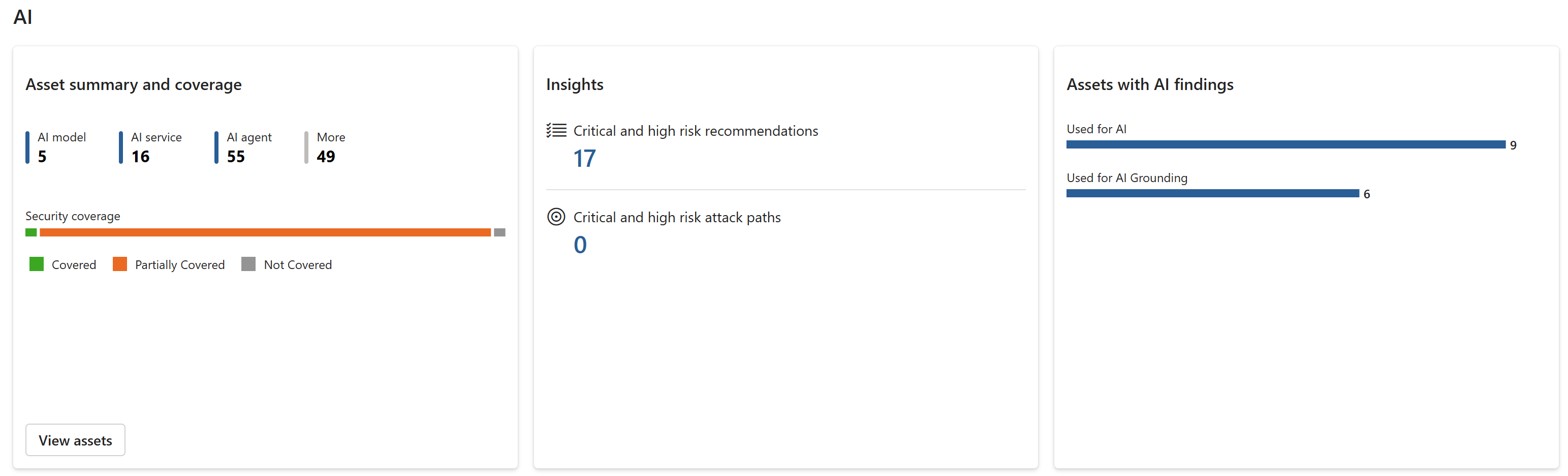
The Workload Insights tiles at the bottom surface specialized intelligence from Microsoft's Cloud-Native Application Protection Platform (CNAPP). Each tile represents a workload category: Compute, Data, Containers, AI, APIs, DevOps, and Cloud Infrastructure Entitlement Management (CIEM). Each tile shows top security issues, protection coverage status, and links to detailed views for that workload. For example, the Compute tile surfaces findings for virtual machines and scale sets, the Data tile highlights storage and database exposures, and the AI tile shows insights for Azure OpenAI, Azure AI Foundry, and AI agent deployments.
Discover AI workloads with AI security posture management
Defender CSPM continuously discovers and inventories resources across your Azure environment—virtual machines, storage accounts, databases, containers, and more—providing the asset coverage foundation for all security recommendations and scoring. Beyond standard resource discovery, Defender CSPM also provides specialized discovery for generative AI workloads. For Contoso Healthcare, this means visibility into Azure OpenAI Service instances, Azure AI Foundry projects, and Azure Machine Learning deployments alongside their clinical and administrative infrastructure, all without requiring manual configuration.
The system builds an AI Bill of Materials (AI BOM)—a comprehensive inventory of all AI application components, data sources, and artifacts spanning from development code through cloud deployment. This inventory captures not just the AI services themselves, but also the identity configurations, data access patterns, internet exposure status, and associated infrastructure components. With the AI BOM, you understand the full attack surface of your generative AI applications.
Defender CSPM also provides AI agent discovery currently in preview. The system automatically identifies AI agents deployed through Azure AI Foundry and Microsoft Copilot Studio, populating the AI inventory with details about agent configurations, capabilities, and connections.
Note
AI agent discovery is currently in preview. Preview features are subject to change and have limited availability.
This visibility into AI workloads becomes the foundation for the AI-specific security recommendations you evaluate in subsequent steps. Contoso Healthcare can now see exactly where their AI applications run and what components require security attention.
Understand the Cloud Secure Score
The Cloud Secure Score in the Defender portal represents a risk-based approach to measuring your security posture. Unlike the classic secure score available in the Azure portal—which uses a control-based model that treats all recommendations with equal weight—the Cloud Secure Score incorporates asset criticality and contextual risk factors into its calculation.
The risk-based model evaluates multiple dimensions: whether an asset has internet exposure, handles sensitive data, sits on potential lateral movement paths, or represents a critical business service. A misconfigured storage account containing customer health records and exposed to the internet receives higher risk weighting than a similarly misconfigured development storage account with no sensitive data. This contextual analysis means your score reflects actual business risk, not just control compliance.
Higher scores indicate lower identified risk. As you remediate higher-risk recommendations, your score reflects the reduced risk across your environment—focus on Critical and High risk findings first, as they carry the most weight in the calculation. To view this score in the Defender portal, navigate to Exposure Management > Initiatives > Cloud Security, then select Open initiative page. The initiative page displays your current score, historical trend over time, and score breakdown by workload category.
Note
Microsoft Defender for Cloud offers two separate Secure Score models. The new Cloud Secure Score (risk-based) is available in the Microsoft Defender portal and incorporates asset criticality for prioritization. The classic Secure Score remains available in the Azure portal and uses a control-based calculation model.
For teams working primarily in the Azure portal, the classic secure score remains available and continues to function as before. However, the Cloud Secure Score in the Defender portal provides more accurate risk assessment by considering context around each security finding.