Core capabilities of Privileged Identity Management (PIM)
Microsoft Entra Privileged Identity Management (PIM) implements just-in-time access through a specific set of controls. Understanding how those controls work gives you the foundation to configure PIM effectively. PIM supports both Microsoft Entra ID roles and Azure resource roles, and the capabilities described in this unit apply to both—the underlying mechanics are consistent regardless of which role type you're managing.
Eligible and active assignments
PIM uses two types of role assignments to give you control over when access is live. An eligible assignment means you hold the entitlement to a role but don't hold the role itself until you explicitly request an activation. Activation is the act of requesting and receiving temporary elevated permissions from that entitlement. This is the just-in-time (JIT) model in practice: permissions exist as potential, not active reality, until you need them. An active assignment grants the role directly, making access immediate without any activation step. PIM can time-bound active assignments, making them suitable for temporary standing access with a defined expiration.
| Item | Eligible | Active |
|---|---|---|
| Access state | Entitlement held; role isn't active | Role assigned; access is live immediately |
| Activation required | Yes | No |
| Expiration | Configurable; assignment expires, or session expires after the activation duration | Configurable; assignment expires at a set time |
| When to use | Default JIT posture for most privileged roles | Scenarios requiring immediate, time-bounded access |
Reserve active assignments for scenarios where the activation step is impractical—break-glass emergency accounts, for example, or tightly scoped temporary roles with a defined end date.
Activation controls
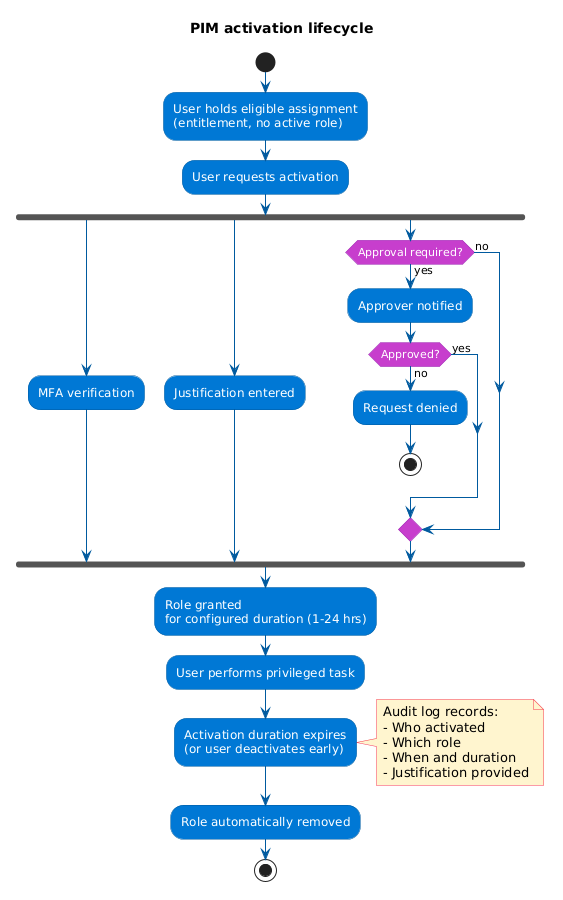
When you activate an eligible assignment, PIM can require you to satisfy one or more conditions before granting the role. These controls create a checkpoint between the entitlement and the live session, raising the cost of unauthorized use and ensuring that a stolen credential alone isn't enough to obtain elevated permissions.
- Multifactor authentication (MFA) verification—confirms your identity before elevation, so stolen credentials alone aren't enough to gain the role.
- Justification—written rationale you must supply before PIM grants the session, creating an auditable record of why access was requested.
- Approval—a delegated approver must confirm the request before PIM activates the role, adding a human checkpoint for sensitive assignments.
- Activation duration—the configured maximum time window, measured in hours (from 1 to 24 hours), after which PIM automatically removes the role, limiting the exposure window for any single session.
These controls are configurable per role—some roles require all four, while others require only MFA verification. Matching the controls to the sensitivity of each role is how you balance security friction with operational practicality.
Visibility and accountability after access
PIM doesn't stop at the activation gate—it continues to provide visibility into what happens after a role is granted. When a user activates a role, PIM sends email notifications to both the activating user and any configured approver, creating immediate awareness that an elevated session is open.
Every activation generates an audit log entry recording who activated the role, which role was activated, when the session started, how long it lasted, and the justification the user provided. These entries accumulate into a durable record of all privileged activity across your tenant.
Note
The audit trail PIM generates supports regulatory requirements for privileged access monitoring. If your organization must demonstrate who held elevated access and when, PIM's logs provide that evidence directly.
PIM also supports access reviews, a periodic process to validate that eligible assignments are still appropriate. At regular intervals, designated reviewers examine each eligible assignment and confirm or deny whether it should continue.