Scaling with PIM for Groups
Protecting that Key Vault with a single eligible assignment is straightforward. Protecting it for an incident response team of 20 engineers—each with their own assignment and their own settings—is where the operational model breaks down.
The scale problem with direct role assignments
When you assign just-in-time (JIT) access directly to one or two users, the model works well. Each assignment is visible, each approval workflow is configured, and auditing is manageable. As team size grows, each new member requires a separate eligible assignment—and each carries its own role settings, its own maximum activation duration, its own approvers list.
The result is configuration drift. When a policy change occurs—say, you reduce the maximum activation window from four hours to one—you must update every individual assignment. If you miss even one, enforcement becomes uneven.
Note
At scale, the risk isn't operational overhead. Nonuniform activation settings across dozens of individual assignments create policy drift that auditors flag and that attackers probe for.
How PIM for Groups works
Privileged Identity Management (PIM) for Groups shifts the eligible resource from a role to a group membership. Instead of making each engineer eligible for the Key Vault Contributor role directly, you create a group, assign that group the Key Vault Contributor role, and make each engineer eligible for membership in that group.
When an engineer activates their membership, they gain all roles the group holds. When the activation expires, membership ends, and access is revoked automatically.
For groups that govern access to sensitive resources, using a role-assignable group is a security best practice. A standard Microsoft Entra ID group is modified by its owners, or by lower-privileged administrators such as a Groups Administrator, without triggering an approval or audit entry in PIM. A role-assignable group raises the privilege bar—membership changes require at least a Privileged Role Administrator—reducing the risk that someone bypasses your PIM workflow by modifying the group directly.
Within PIM for Groups, you make a principal eligible as a Member—granting them the group's assigned roles—or as an Owner, which confers control over the group itself. Most JIT scenarios use Member eligibility.
Why group-based JIT enforces policy more consistently
With direct assignments, every new team member introduces a new configuration surface. With PIM for Groups, you define role settings once at the group level, and every eligible member inherits those settings automatically. A policy change propagates to all members in a single update.
| Dimension | Direct eligible assignment | PIM for Groups |
|---|---|---|
| Policy control | Per assignment | Per group (uniform) |
| Audit surface | N individual assignments | One group + membership history |
| Onboarding new team member | Create new eligible assignment | Add to eligible group membership |
| Policy drift risk | High at scale | Low—single settings source |
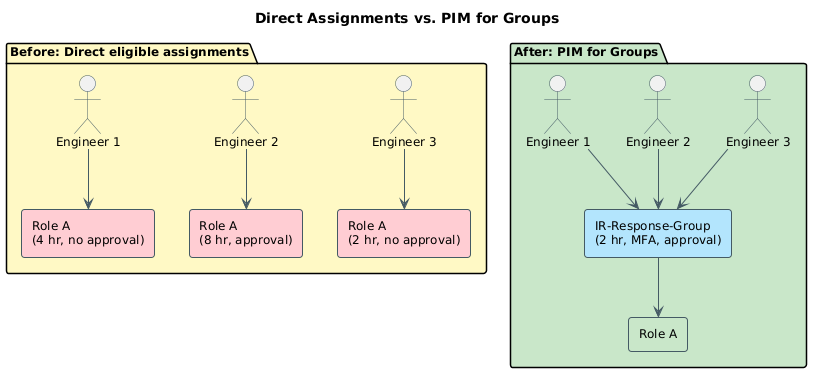
The audit benefit reinforces the policy benefit. Instead of scanning individual assignment histories for each team member, auditors review a single group's membership activation log.
When to choose group-based JIT
Group-based just-in-time access is the right model when two or more of these conditions are true: your team has more than a few users who need the same access pattern, that access recurs regularly, or the required permissions span multiple roles or resources that logically belong together.
A direct eligible assignment remains the right tool for a single user who needs one-time access to one resource. When your security operations team of 15 analysts routinely activates the same combination of roles across several subscriptions, a PIM-managed group representing that access bundle reduces the audit surface and eliminates per-member configuration drift—while preserving every JIT control.
The group-based model scales across teams. In the next unit, you extend the same pattern to a class of principals that can't activate roles interactively at all—AI agents and application identities.