Applying JIT access to AI workloads, agents, and applications
The group-based model you built in the previous unit scales directly to the engineers who manage your AI services. Create a role-assignable group, assign it the AI control-plane roles your platform team needs, and make each engineer eligible for group membership—the same pattern, the same policy control, the same audit trail. That part transfers without modification. The complication surfaces when you look past the humans configuring those services to the identities that run them. Azure OpenAI and Azure Machine Learning aren't accessed only by engineers working through activation workflows. They're also accessed by applications, automation pipelines, and AI agents executing inference at machine speed, none of which can complete an MFA prompt or wait for an approver. That difference in identity type produces two distinct access tracks, and understanding where each applies is what this unit builds toward.
The AI control plane as a privileged attack surface
Azure OpenAI and Azure Machine Learning control planes carry Critical-tier risk—the same tier you applied to production subscriptions and Key Vault when selecting activation controls. A compromised Cognitive Services OpenAI Contributor can enumerate deployed models, redirect endpoint configurations, exfiltrate model weights from connected storage, and inspect fine-tuning datasets, all through standard API calls that might not surface in routine alert rules. The blast radius from that single compromised assignment can reach downstream inference pipelines and expose proprietary training data before your incident response team traces the initial breach vector.
Standing human access to these control planes is unacceptable for the same reason standing Owner access to a production subscription is unacceptable: the exploitation window is unlimited, and the damage from exploitation is disproportionate to the convenience of persistent access.
Applying PIM and groups to AI control-plane roles
The fix is the same one that works for Key Vault and production resource groups. Assign the Cognitive Services OpenAI Contributor role and any Azure Machine Learning workspace roles your platform team requires to a role-assignable group, and make each engineer eligible for membership through Privileged Identity Management (PIM) for Groups.
Engineers who need eligible access to deploy models to endpoints, modify model configurations, initiate fine-tuning runs, or access training datasets directly. The list is typically a small, well-defined set of people. Eligible membership through one role-assignable group enforces one activation policy—one maximum duration, one approvers list, one audit log—across all of them. Adding a new engineer means adding eligible membership to the group. There are no new activation settings to configure, no separate approvers list to maintain, and no new configuration surface to drift out of compliance.
The principal boundary—humans versus workload identities
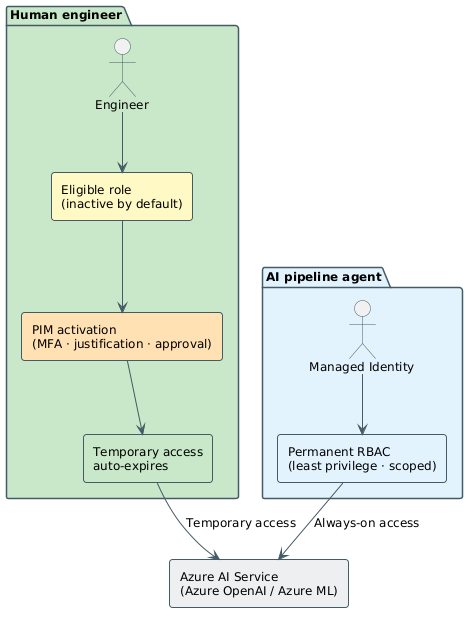
Here, the architecture diverges from everything discussed so far. A human engineer activating an eligible role works through an interactive session—MFA, justification, and approval if policy requires it. PIM can gate that access because there's a session to gate.
A managed identity—the Microsoft Entra ID identity type assigned directly to Azure resources such as container apps, virtual machines, and functions—authenticates non-interactively. It acquires an OAuth 2.0 access token by proving its own identity to Microsoft Entra ID using a platform-managed credential. There's no sign in prompt, no session, no MFA challenge, and no point where an approval workflow can pause execution.
| Managed identity | Service principal | |
|---|---|---|
| What it is | Identity bound to an Azure resource, managed by the platform | App or service identity registered manually in Microsoft Entra ID |
| Credential management | No credentials to manage—platform rotates automatically | Requires managing a secret or certificate |
| Typical use | Azure-hosted workloads (virtual machines, functions, containers) | Applications hosted outside Azure, or tools needing custom auth flows |
| PIM eligible? | No—non-interactive, can't activate eligible roles | No—same limitation; service principals can't complete interactive activation |
| Access model | Permanent, scoped RBAC assignment | Permanent, scoped RBAC assignment |
The key distinction matters here because the two identity types look different in audit logs and RBAC assignment views, but they share the same constraint: neither can perform the interactive activation that PIM requires.
Requiring activation isn't a policy gap—it's a mechanism constraint. PIM requires interactive activation because activation is what temporarily elevates an eligible assignment to an active one. A managed identity can't complete interactive activation, so PIM can't govern its access. There's no PIM configuration that makes a managed identity eligible; that workflow doesn't exist in the platform.
The right model for workload identities is permanent role-based access control (RBAC) assignment, scoped as narrowly as possible to the specific resource and operation, with least privilege enforced by scope rather than time.
Choosing the right access model
Consider this scenario: your AI pipeline agent needs to write inference outputs to Azure Blob Storage. Should its identity be eligible for the Storage Blob Data Contributor role in PIM?
No. The managed identity can't complete PIM's interactive activation flow. Assign it a permanent Storage Blob Data Contributor role scoped to the specific container it writes to. PIM governs the human engineer who configures that RBAC assignment—who holds an eligible role that permits modifying access on that container—not the managed identity performing the writes.
The clean two-track rule: PIM governs the humans who configure, deploy, and manage AI services. RBAC governs the workload identities that run them.
The two-track model is clear in isolation, but applying it consistently across an organization—with mixed teams, shared AI services, and evolving workload patterns—requires explicit design decisions. Unit 8 examines the principles that connect all the patterns covered in this module into a coherent privileged access strategy.