Configure alert routing and validate coverage
Defender for Databases generates security alerts in Microsoft Defender for Cloud, but those alerts don't automatically reach the people who need to respond to them. At Contoso Financial Services, the security team enabled Defender for Azure SQL Databases and Defender for open-source relational databases across production subscriptions. Now you configure where alerts go, create suppression rules for expected behavior patterns, and validate that the detection pipeline works end-to-end.
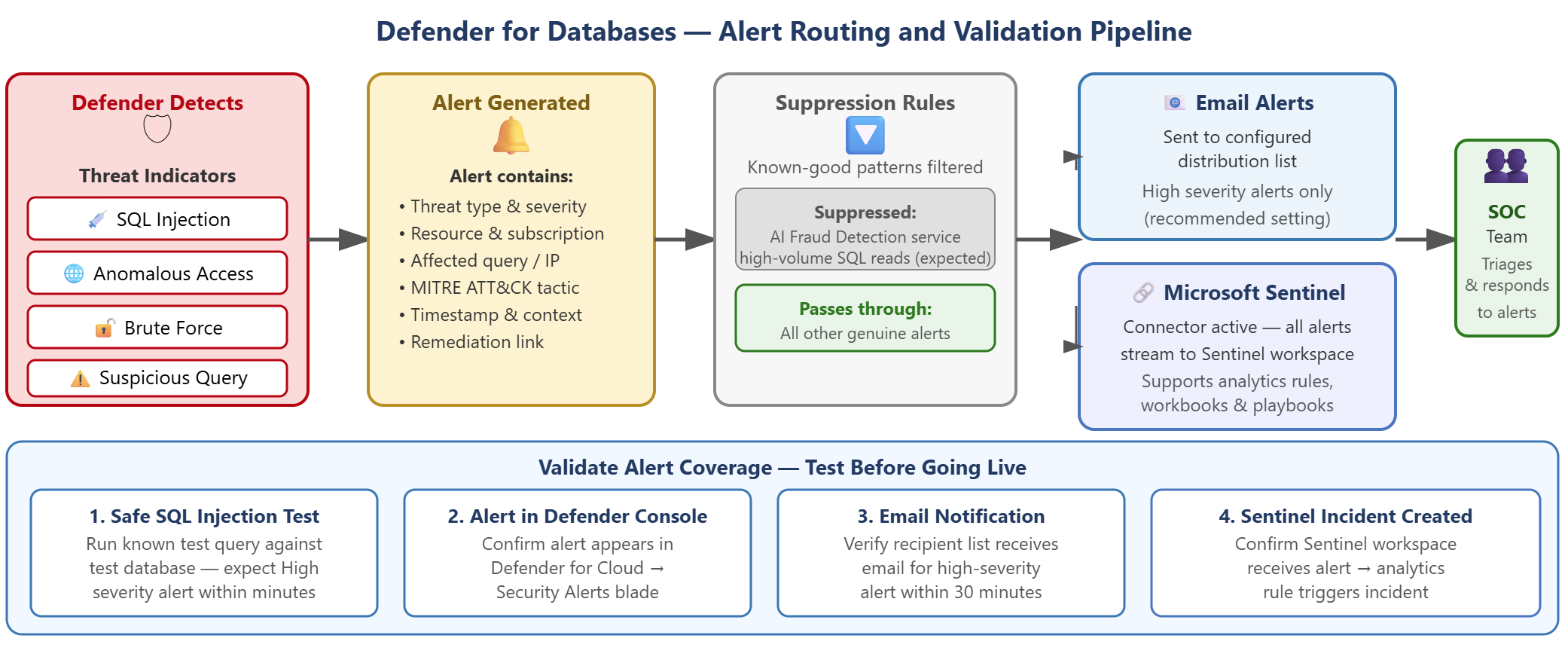
| Destination | Configuration method | Purpose |
|---|---|---|
| Email notifications | Defender for Cloud environment settings | Immediate awareness of high-severity detections |
| Microsoft Sentinel | Defender for Cloud data connector | Centralized incident management for the SOC team |
| Alert suppression rules | Defender for Cloud suppression configuration | Filter known-good patterns before routing |
Configure email notifications for immediate awareness
Email notifications provide the fastest path to awareness when Defender for Databases detects a threat. You configure recipients once at the subscription level, and Defender for Cloud sends notifications for all high-severity alerts.
To configure email notifications, navigate to Microsoft Defender for Cloud > Environment settings > select your subscription > Email notifications. Add the email addresses that should receive alerts—use a distribution list rather than individual inboxes to avoid dependencies on specific people. Configure notification preferences to deliver alerts for high-severity detections only. This approach reduces noise and focuses attention on events that require immediate response.
Each notification email contains the alert title, severity level, affected resource name, event time, and a link to the full alert details in the Azure portal. The security engineer configures the recipients. The SOC team receives and acts on the emails. Your responsibility ends when the email reaches the correct distribution list.
Connect to Microsoft Sentinel for centralized incident management
While email provides immediate awareness, Microsoft Sentinel offers centralized incident management that the SOC team uses to track investigations across multiple alert sources. You connect Defender for Cloud to Microsoft Sentinel using a data connector.
From the Microsoft Sentinel side, navigate to Microsoft Sentinel > Data connectors > search for Microsoft Defender for Cloud > select Connect. Once connected, Defender for Databases alerts flow to Microsoft Sentinel automatically as security incidents. Your responsibility as the implementer is to confirm the connector is active and alerts are flowing. After routing, the SOC team manages the incidents. Investigation, triage, and response are outside the implementer scope.
To validate the Microsoft Sentinel connection, navigate to Microsoft Sentinel > Incidents and filter by data source "Microsoft Defender for Cloud." Verify that Defender for Databases alerts appear in the incident list. This confirmation tells you that alerts reach the central incident management system where the SOC team tracks them.
Create suppression rules for known-good patterns
Defender for Databases uses anomaly detection to identify suspicious behavior. Legitimate application patterns sometimes trigger alerts, particularly applications that make high-volume queries or access data in unusual patterns.
At Contoso, the AI-powered fraud detection service makes high-volume sequential SELECT queries across transaction tables to analyze payment patterns. This behavioral signature resembles data exfiltration, and Defender generates "Potential data exfiltration" alerts for this traffic. The security team knows this pattern is expected behavior from a trusted application.
To create a suppression rule for this scenario:
- Navigate to Microsoft Defender for Cloud > Security alerts
- Select an alert of the type you want to suppress (in this example, "Potential data exfiltration from Azure SQL Database")
- Select Create suppression rule from the alert actions
- Define rule conditions:
- Alert type: "Potential data exfiltration from Azure SQL Database"
- Resource: scoped to the specific SQL server hosting the fraud detection database
- Optionally add conditions like application name or client IP range for the AI service
- Set an expiration date. Suppression rules shouldn't be permanent. Schedule a review date to confirm the pattern remains legitimate.
Important
Suppression rules must be narrow in scope. A suppression rule scoped only to alert type without resource filtering would hide genuine exfiltration attempts against other databases. Always scope suppression rules to specific resources or application identities.
Validate coverage with sample alerts
Before declaring the implementation complete, you generate synthetic alerts to confirm the routing pipeline works. Microsoft Defender for Cloud provides a sample alerts feature for exactly this purpose.
Navigate to Microsoft Defender for Cloud > Security alerts > select Sample alerts > choose Microsoft Defender for Databases > select Generate. Defender for Cloud creates synthetic alerts that flow through the same routing pipeline as real detections.
After generating sample alerts, validate each routing destination:
- Verify sample alerts appear in the Defender for Cloud security alerts list
- Check that email notifications arrive at the configured distribution list
- Confirm that Microsoft Sentinel shows corresponding incidents if you configured the Microsoft Sentinel connector
- Review alert content to confirm it includes expected fields: resource name, severity, and recommended actions
This validation confirms that when a real incident occurs, the right people receive the information they need to respond.
End-to-end coverage checklist
Before handing off the implementation:
- Defender for Azure SQL Databases is enabled on all production subscriptions
- Defender for open-source relational databases is enabled on all subscriptions with PostgreSQL or MySQL
- Email notifications route to the SOC team distribution list
- Microsoft Sentinel data connector is active and Defender for Databases incidents appear in Microsoft Sentinel
- Suppression rules are scoped correctly and have expiration dates set
- Sample alerts are generated and validated end-to-end
With alert routing configured and validated, the security operations team receives Defender for Databases detections in the systems they use for incident management. Your implementation connects detection to response. This foundation enables database security operations at Contoso.