Write an effective prompt
Prompts are your way of communicating with Copilot, asking it to perform tasks in Microsoft 365 Copilot Chat (Basic) such as creating, summarizing, editing, or transforming content. Think of prompting as having a conversation with an assistant, using clear and straightforward language while providing the necessary context.
Include the right prompt ingredients
An effective prompt can significantly enhance Copilot's output, ensuring accurate and contextually appropriate responses. To get the best response, it’s important to focus on four key elements when phrasing your Copilot prompts: the context, goal, source, and expectations, as described in the following list:
Provide context: Why do you need it and who is involved? Provide context and details about your goal, such as preparing for a client meeting or trying to write an all-hands speech. Specify the focus, like a particular client or topic. Unlike traditional search, Copilot responds best to detailed prompts.
Describe a goal: What do you want Copilot to do? Specify the desired output for Copilot, whether bullet points, an essay, an email, or a brainstorming draft. Generative AI excels at imitation, so provide examples to guide its response.
Define a source: Where should Copilot look for information? If you specify the information Copilot should use, you’ll get better results. Upload or reference specific files or reference the types of web sources that Copilot should focus on.
Note
With a Microsoft 365 Copilot (Premium) license, reference your work data such as emails, meetings, and chats.
- Set expectations: How should Copilot deliver the answer? State your expectations for how Copilot should deliver its response. What audience is it aimed at? What kind of tone are you thinking for this assignment? Usually, this involves some explanation about who you are and what you’re trying to achieve.
The following diagram highlights these key elements in action:
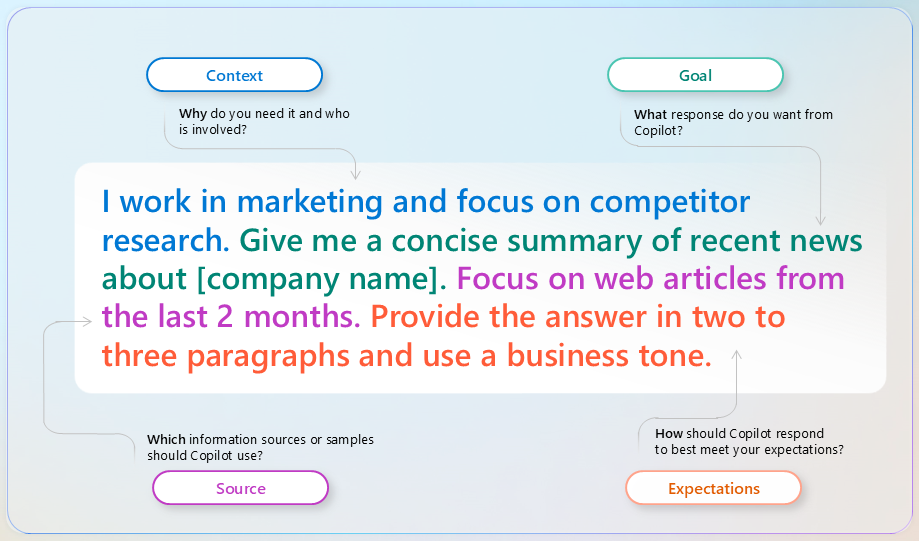
A clear goal is the foundation of any prompt, but adding context, expectations, and sources can make Copilot’s responses more accurate. Just like giving directions at work, relevant details matter. Clear, concise, and specific instructions significantly improve the quality of output—the way you structure your prompt determines the results you get.
Prompt and iterate
To maximize the value of Copilot Chat (Basic), crafting well-thought-out prompts is essential. However, the true power of Copilot often emerges through iteration and conversation. Instead of settling for the first response, refine and experiment with follow-up prompts to achieve the desired outcome. For example, if Copilot isn't providing a certain detail that you want in your response, send a follow-up prompt with this clarification. Copilot thrives in a back-and-forth conversational experience, enabling you to uncover its full potential through collaboration and refinement.
Tip
Once Copilot generates a response to your prompt, select the sources to understand how the response was cited. AI-generated content may be incorrect, so sources are provided for your review when possible.