Note
Access to this page requires authorization. You can try signing in or changing directories.
Access to this page requires authorization. You can try changing directories.
Applies to: ✔️ Front Door Standard ✔️ Front Door Premium
Azure Front Door provides a rich set of features for your internet-facing workloads. Front Door helps you accelerate your application's performance, improves your security, and provides you with tools to inspect and modify your HTTP traffic.
Front Door's billing model includes several components. Front Door charges a base fee for each profile that you deploy. You're also charged for requests and data transfer based on your usage. Billing meters collect information about your Front Door usage. Your monthly Azure bill aggregates the billing information across the month and applies the pricing to determine the amount you need to pay.
This article explains how Front Door pricing works so that you can understand and predict your monthly Azure Front Door bill.
For Azure Front Door pricing information, see Azure Front Door pricing.
Tip
The Azure pricing calculator helps you calculate a pricing estimate for your requirements. Use the pre-created pricing calculator estimate as a starting point, and customize it for your own solution.
Note
This article explains how billing works for Azure Front Door Standard and Premium tiers. For information about Azure Front Door (classic), see Azure Front Door pricing.
Base fees
Each Front Door profile incurs an hourly fee. You're billed for each hour, or partial hour, that your profile is deployed. The rate you pay depends on the Front Door tier that you deploy.
A single Front Door profile can contain multiple endpoints. You're not billed extra for each endpoint.
You don't pay extra fees to use features like traffic acceleration, response caching, response compression, the rules engine, Front Door's inherent DDoS protection, and custom web application firewall (WAF) rules. If you use Front Door Premium, you also don't pay extra fees to use managed WAF rule sets or Private Link origins.
Request processing and traffic fees
Each request that goes through Front Door incurs request processing and traffic fees:
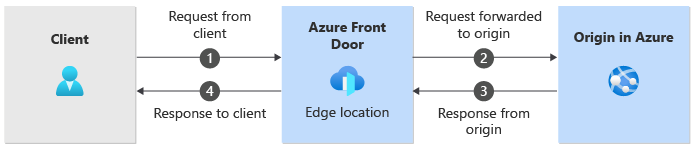
Each part of the request process is billed separately:
- Number of requests from client to Front Door
- Data transfer from Front Door edge to origin
- Data transfer from origin to Front Door (nonbillable)
- Data transfer from Front Door to client
The following sections describe each of these request components in more detail.
Number of requests from client to Front Door
Front Door charges a fee for the number of requests that a Front Door edge location receives for your profile. Front Door identifies requests by using the Host header on the HTTP request. If the Host header matches one from your Front Door profile, it counts as a request to your profile.
The price depends on the geographical region of the Front Door edge location that serves the request. The price also differs for the Standard and Premium tiers.
Data transfer from Front Door edge to origin
Front Door charges for the bytes that are sent from the Front Door edge location to your origin server. The price depends on the geographical region of the Front Door edge location that serves the request. The location of the origin doesn't affect the price.
The price per gigabyte is lower when you have higher volumes of traffic.
If the request can be served from the Front Door edge location's cache, Front Door doesn't send any request to the origin server, and you aren't billed for this component.
Data transfer from origin to Front Door
When your origin server processes a request, it sends data back to Front Door so that it can return the data to the client. Front Door doesn't bill you for this traffic, even if the origin is in a different region from the Front Door edge location for the request.
If your origin is within Azure, you aren't charged for data egress from the Azure origin to Front Door. However, check whether those Azure services might bill you to process your requests.
If your origin is outside of Azure, you might incur charges from other network providers.
Data transfer from Front Door to client
Front Door charges for the bytes that it sends from the Front Door edge location back to the client. The price varies depending on the geographical region of the Front Door edge location that serves the request.
If a response is compressed, Front Door only charges for the compressed data.
Private Link origins
When you use the Premium tier, Front Door can connect to your origin by using Private Link.
Front Door Premium has a higher base fee and request processing fee. You don't pay extra for Private Link traffic compared to traffic that uses an origin's public endpoint.
When you configure a Private Link origin, you select a region for the private endpoint to use. A subset of Azure regions support Private Link traffic for Front Door. If the region you select is different from the region where the origin is deployed, you aren't charged extra for cross-region traffic. However, the request latency likely is greater.
Cross-region traffic
Some of the Front Door billing meters have different rates depending on the location of the Front Door edge location that processes a request. Usually, the Front Door edge location that processes a request is the one that's closest to the client, which helps to reduce latency and maximize performance.
Front Door charges for traffic from the edge location to the origin. Traffic is charged at different rates depending on the location of the Front Door edge location. If your origin is in a different Azure region, you aren't billed extra for inter-region traffic.
Example scenarios
Example 1: Azure origin without caching
Contoso hosts their website on Azure App Service, which runs in the West US region. Contoso deployed Front Door with the standard tier. They disabled caching.
Suppose a request from a client in California is sent to the Contoso website, sending a 1-KB request and receiving a 100-KB response:
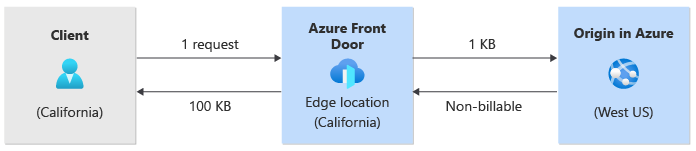
The following billing meters increment:
| Meter | Incremented by | Billing region |
|---|---|---|
| Number of requests from client to Front Door | 1 | North America |
| Data transfer from Front Door edge to origin | 1 KB | North America |
| Data transfer from Front Door to client | 100 KB | North America |
Azure App Service might charge other fees.
Example 2: Azure origin with compression enabled
Suppose Contoso updates their Front Door configuration to enable content compression. Now, the same response as in example 1 might be able to be compressed down to 30 KB:
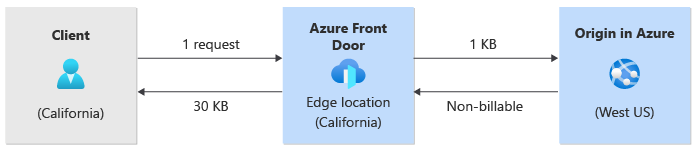
The following billing meters increment:
| Meter | Incremented by | Billing region |
|---|---|---|
| Number of requests from client to Front Door | 1 | North America |
| Data transfer from Front Door edge to origin | 1 KB | North America |
| Data transfer from Front Door to client | 30 KB | North America |
Azure App Service might charge other fees.
Example 3: Request served from cache
Suppose a second request arrives at the same Front Door edge location and a valid cached response is available:
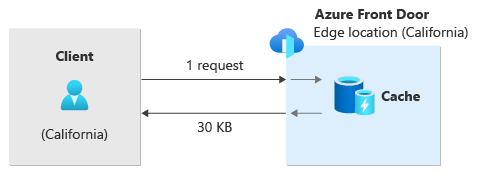
The following billing meters increment:
| Meter | Incremented by | Billing region |
|---|---|---|
| Number of requests from client to Front Door | 1 | North America |
| Data transfer from Front Door edge to origin | none when request is served from cache | |
| Data transfer from Front Door to client | 30 KB | North America |
Example 4: Cross-region traffic
Suppose a request to Contoso's website comes from a client in Australia, and can't be served from cache:
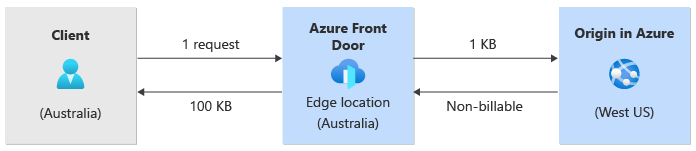
The following billing meters increment:
| Meter | Incremented by | Billing region |
|---|---|---|
| Number of requests from client to Front Door | 1 | Australia |
| Data transfer from Front Door edge to origin | 1 KB | Australia |
| Data transfer from Front Door to client | 30 KB | Australia |
Example 5: Non-Azure origin
Fabrikam runs an eCommerce site on another cloud provider. Their site is hosted in Europe. They configured Azure Front Door to serve the traffic without caching or compression.
Suppose a request from a client is sent to the Fabrikam website from a client in New York. The client sends a 2-KB request and receives a 350-KB response:
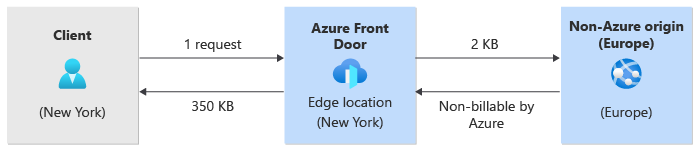
The following billing meters increment:
| Meter | Incremented by | Billing region |
|---|---|---|
| Number of requests from client to Front Door | 1 | North America |
| Data transfer from Front Door edge to origin | 2 KB | North America |
| Data transfer from Front Door to client | 350 KB | North America |
The external cloud provider might charge other fees.
Example 6: Request blocked by web application firewall
When the web application firewall (WAF) blocks a request, it doesn't send the request to the origin. However, Front Door charges for the request and for sending a response.
Suppose a Front Door profile includes a custom WAF rule to block requests from a specific IP address in South America. The WAF is configured with a custom error response page, which is 1 KB in size. If a client from the blocked IP address sends a 1-KB request:
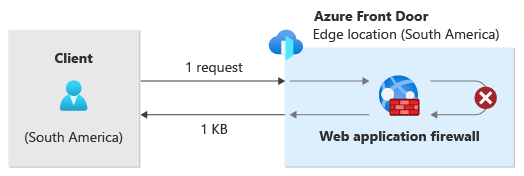
The following billing meters increment:
| Meter | Incremented by | Billing region |
|---|---|---|
| Number of requests from client to Front Door | 1 | South America |
| Data transfer from Front Door edge to origin | none | South America |
| Data transfer from Front Door to client | 1 KB | South America |