Microsoft Security | Microsoft Entra | Microsoft Entra ID
A cloud-based identity and access management service for securing user authentication and resource access

This browser is no longer supported.
Upgrade to Microsoft Edge to take advantage of the latest features, security updates, and technical support.
' cx='32' cy='32' r='32' /%3E%3Ctext x='50%25' y='55%25' dominant-baseline='middle' text-anchor='middle' fill='%23FFF' %3EKG%3C/text%3E%3C/svg%3E)
Hi Team,
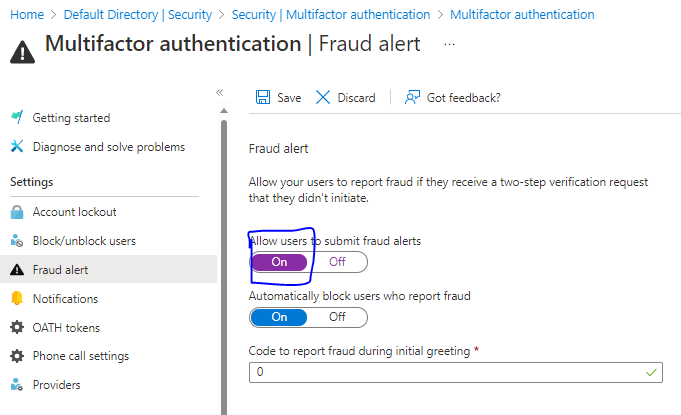
We are trying to automate a feature to allow user to submit fraud alerts in azure via powershell/graph api/azure cli. I couldn't find detailed info on such automation. Kindly help if we any ways to do so.
Security-->Multifactor authentication-->Fraud alert-->Allow users to submit fraud alerts--->on
A cloud-based identity and access management service for securing user authentication and resource access
' cx='32' cy='32' r='32' /%3E%3Ctext x='50%25' y='55%25' dominant-baseline='middle' text-anchor='middle' fill='%23FFF' %3ESG%3C/text%3E%3C/svg%3E)
@Krupa Gundraju (Larsen & Toubro Infotech Limit)
Just checking in to see if the below answer helped. If this answers your query, please don’t forget to click "Accept the answer" and Up-Vote for the same, which might be beneficial to other community members reading this thread.
Answer accepted by question author

There are no API endpoints for that setting.
Is it not possible to automate this either by using power shell/CLI or by graph APIs? Will this be a manual activity from portal?
There is no API for this operation, as simple as that. You can grab the endpoint from a browser trace and try to submit a direct request as a workaround, but that's not really a supported scenario.
Yes, I tried this, but it is giving weird errors.
@Krupa Gundraju (Larsen & Toubro Infotech Limit)
I have checked got to know that there is no API or Multifactor authentication under security.
Under security blade, except "Multifactor authentication" option we have graph API and PowerShell commands for all other options.
For the security blade itself the graph API and PowerShell commands are as below,
Graph API endpoint:
GET https://graph.microsoft.com/beta/identity/continuousAccessEvaluationPolicy
PowerShell command:
Import-Module Microsoft.Graph.Identity.SignIns
Get-MgIdentityContinuouAccessEvaluationPolicy
Currently we do not have any Graph API endpoint or PowerShell for "Multifactor authentication " option under security blade.
In the future this option might be avaialble.
However, you can still submit your feedback on Azure feedback portal to get this implemented sooner,
https://feedback.azure.com/d365community/forum/22920db1-ad25-ec11-b6e6-000d3a4f0789
Let me know if you have any further questions on this.
Please "Accept the answer" if the information helped you. This will help us and others in the community as well.