Azure Key Vault
An Azure service that is used to manage and protect cryptographic keys and other secrets used by cloud apps and services.
This browser is no longer supported.
Upgrade to Microsoft Edge to take advantage of the latest features, security updates, and technical support.

I'm using the keyvault rest api like this: GET {vaultBaseUrl}/secrets/{secret-name}/{secret-version}?api-version=7.1. I always get the latest version even when the ActivationDate is yet to come. Is this by design? How can I use the ActivationDate for secrets?
I would like that is the new version is not active yet it would not be returned as latest version. How can I fetch the latest active version with REST? I needs this because I want to set things ready for future changes.
An Azure service that is used to manage and protect cryptographic keys and other secrets used by cloud apps and services.
Answer accepted by question author

@Gert Vloo
Thank you for your post! This is by design when using the Get Secret API, if the version isn't in the REST call then the latest version of the secret is returned.
If your secret isn't active until a certain date, but you enabled your secret, it'll have a "current version".

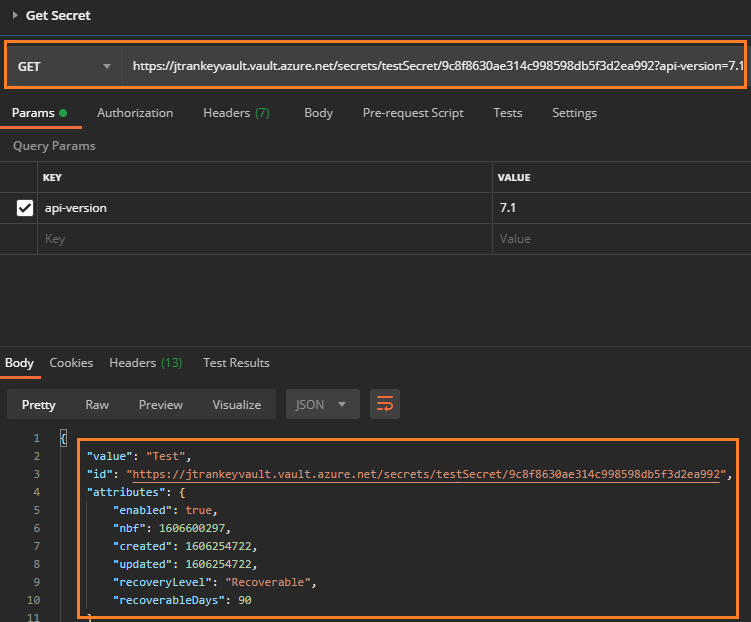
If your secret isn't enabled there won't be a current version since the API won't be able to retrieve the secret.
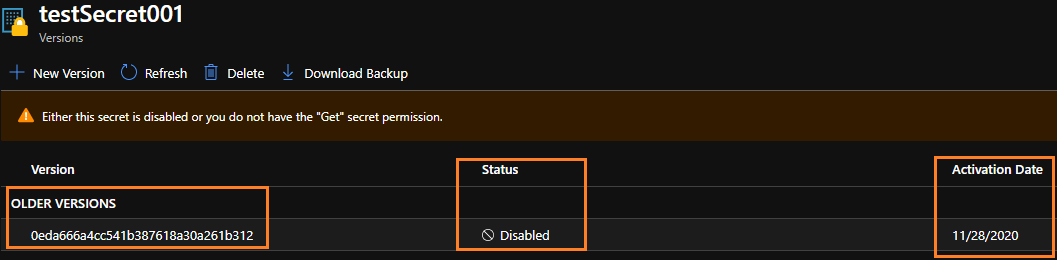
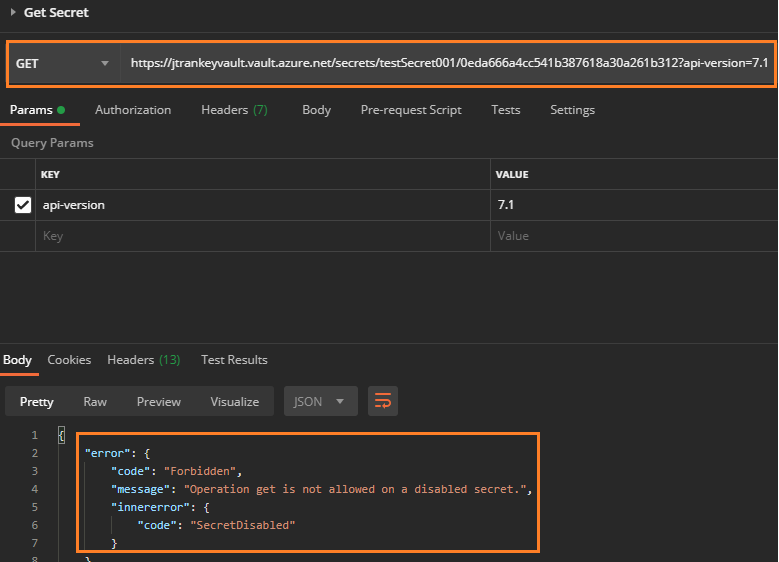
Unfortunately, none of the Secret REST APIs allow you to use the ActivationDate when getting your secrets. If you'd like this feature to be implemented, please feel free to leverage our User Voice forum.
If you have any other questions, please let me know.
Thank you for your time and patience throughout this issue.
Hi @JamesTran-MSFT
Thanks for the answer. My challenge is to use this api request within API-Management. I want to check if a secred sent from the client is valid. This key changes ones per year and this is done by night. of a fixed timestamp.
With by calling the keyvault api using a ActivationDate I thought I found a solution.
Is there another way to call the keyvault from within API-Management that does support ActivationDate somehow? Maybe with c#?
Or maybe you have an other solution/approach for my challenge?
Many thanks
Gert
@Gert Vloo
Thank you for the follow up and additional details. I've reached out to our Key vault team regarding your asks and will update as soon as possible.
Asks:
Is there another way to call the key vault from within API-Management that does support ActivationDate somehow? Maybe with c#?
Or maybe you have an other solution/approach for my challenge?
If you have any other questions, please let me know.
Thank you for your time and patience throughout this issue.
@Gert Vloo
Thank you for your time and patience throughout this issue, I received an update from our Key Vault team and will post their reply below.
Update:
Key Vault doesn't have any kind of query or sorting capability. There is always one "current" version that is the most recently created version, but there is no ordering maintained by the service. Other versions are accessed by the version GUID. You'd have to list all versions and examine the nbf dates to determine which one to use.
If you have any other questions, please let me know.
Thank you!
----------
Please remember to "Accept Answer" if any answer/reply helped, so that others in the community facing similar issues can easily find the solution.
@Gert Vloo
I just wanted to check in and see if you had any other questions?
----------
Please remember to "Accept Answer" if any answer/reply helped, so that others in the community facing similar issues can easily find the solution.
I created this solution. Thanks for the support

Here is the full policy in text:
<policies>
    <inbound>
        <choose>
            <when condition="@(context.Request.Certificate != null  && context.Request.Certificate.Verify())">
                <cache-lookup-value key="ClientThumbprint" variable-name="ClientThumbprint"/>
                <choose>
                    <when condition="@(context.Variables.GetValueOrDefault<string>("ClientThumbprint") != context.Request.Certificate.Thumbprint)">
                        <!-- Retrieve all versions of the secret from Key Vault using a managed identity -->
                        <send-request mode="new" response-variable-name="secretVersions" timeout="20" ignore-error="false">
                            <set-url>{{vaultBaseUrl}}/secrets/ClientThumbprint/versions?api-version=7.1</set-url>
                            <set-method>GET</set-method>
                            <authentication-managed-identity resource="https://vault.azure.net"/>
                        </send-request>
                        <!-- Determine current version of the secret from Key Vault and set Url -->
                        <set-variable name="ClientCurrentVersionUrl" value="@{
                            var epoc = new DateTime(1970, 1, 1, 0, 0, 0, DateTimeKind.Utc);
                            var currentVersionUrl = ((IResponse)context.Variables["secretVersions"]).Body.As<JObject>()["value"].Where(v => v["attributes"]["enabled"].Value<bool>()
                                && (v["attributes"]["nbf"] == null || epoc.AddSeconds(v["attributes"]["nbf"].Value<int>()) < DateTime.UtcNow)
                                && (v["attributes"]["exp"] == null || epoc.AddSeconds(v["attributes"]["exp"].Value<int>()) > DateTime.UtcNow))
                                .OrderByDescending(v => v["attributes"]["created"].Value<int>()).FirstOrDefault()?["id"].Value<string>();
                            return currentVersionUrl;
                        }"/>
                        <choose>
                            <!-- If not null retrieve the secret from Key Vault using the currentVersionUrl -->
                            <when condition="@(context.Variables.GetValueOrDefault<string>("ClientCurrentVersionUrl") != null)">
                                <send-request mode="new" response-variable-name="secretResponse" timeout="20" ignore-error="false">
                                    <set-url>@($"{context.Variables["ClientCurrentVersionUrl"]}?api-version=7.1")</set-url>
                                    <set-method>GET</set-method>
                                    <authentication-managed-identity resource="https://vault.azure.net"/>
                                </send-request>
                                <!-- Place the secret into a local variable -->
                                <set-variable name="ClientThumbprint" value="@(((IResponse)context.Variables["secretResponse"]).Body.As<JObject>()["value"].ToString())"/>
                            </when>
                        </choose>
                    </when>
                </choose>
            </when>
        </choose>
    </inbound>
    <backend>
        <base/>
    </backend>
    <outbound>
        <choose>
            <when condition="@(context.Request.Certificate?.Thumbprint != null &&
                    context.Variables.GetValueOrDefault<string>("ClientThumbprint") == context.Request.Certificate?.Thumbprint)">
                <!--cache 1 day-->
                <cache-store-value key="ClientThumbprint" value="@(context.Request.Certificate?.Thumbprint)" duration="86400"/>
            </when>
        </choose>
        <base/>
    </outbound>
</policies>
@Gert Vloo
Thank you for posting your policy so that others within the community can leverage your solution.
Thank you again for your time and patience throughout this issue and I'm glad that I was able to help!