Microsoft 365 and Office | SharePoint Server | For business
A family of Microsoft on-premises document management and storage systems.

This browser is no longer supported.
Upgrade to Microsoft Edge to take advantage of the latest features, security updates, and technical support.
' cx='32' cy='32' r='32' /%3E%3Ctext x='50%25' y='55%25' dominant-baseline='middle' text-anchor='middle' fill='%23FFF' %3EHK%3C/text%3E%3C/svg%3E)
Hi,
I have some weird occurrences in my SharePoint farm. I have a couple of workflows that run on SharePoint items. Now the workflows do what they are supposed to do and work fine. But, some instances on random items do not finish. However, the workflows complete their job as defined in the designer. And slowly this builds up workflow instances running at any given time which I believe will turn into a problem in the future.
So to fix it, I tried GUI "stop this workflow" with no success. And I have also tried force stopping them through PowerShell to no avail.
Any idea why this might be happening? Not recently but a couple of weeks ago I tried to look for logs, tried to check differences between instances that run normally and ones that get "stuck" but I couldn't make much sense of what I found then. I also did google my problem but couldn't find similar posts on the interwebs.
Any help towards identifying the problem and, hopefully to a solution is much appreciated
A family of Microsoft on-premises document management and storage systems.
A group of Microsoft Products and technologies used for sharing and managing content, knowledge, and applications.

Hi @Harun Kara ,
Can you tell me the details of the issue you faced?
For example: When you tried GUI "stop this workflow", what specific error message will be displayed?
If you can, please attach screenshots.
Thanks,
Echo Du
The weird thing is, it does not throw visible errors. As I click stop this workflow, it shows in a modal "please wait" and then the page reloads but the wf instance is still running. No errors were thrown in powershell method either. That's what's puzzling me seriously.
There really is nothing to add in a screenshot. I would want to add a video capture but there is sensitive information that I need to sensor out and I can't do that easily at the moment.
Answer accepted by question author
Hi @Harun Kara ,
This may be because the workflow is working on an item, and the priority of the running state is higher than the priority of stopping the workflow. Therefore, you cannot enforce stop the workflow.
To fix this issue, please remove the scope which holds that workflow.
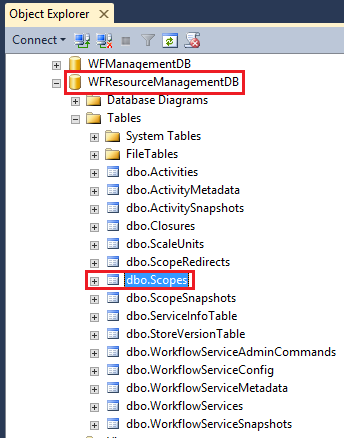
Note: This will cause all running instances of the workflow to fail!
Thanks,
Echo Du
---------------------------------
Updated Answer -------------------------------------
Hi @Harun Kara ,
Before removing the workflow scopes, you should back it up.
Here is the PowerShell script to backup Database from SQL Server:
#Import SQL PowerShell module
Import-Module SQLPS –DisableNameChecking
#Configuration parameters
$SQLInstance="Cre-SQL-001"
$BackupPath="D:\Backup\"
#Array of Database names, Comma separated
$DBName="WFResourceManagementDB"
#Backup Database
Write-host "Backing up the database: $($DBName)"
Backup-SqlDatabase -ServerInstance $SQLInstance -Database $DBName -BackupFile "$($BackupPath)\$($DBName).bak"
Use the "Restore-WFScope" cmdlet to restore a previously backed-up Workflows scope.
Syntax:
Parameter Set: Default
Restore-WFScope -BackupInstanceDBConnectionString <String> -BackupResourceDBConnectionString <String> -BackupSBGatewayDBConnectionString <String> -BackupSBMessageContainerConnectionString <String[]> -InstanceStateSyncTime <DateTime> -LiveInstanceDBConnectionString <String> -LiveResourceDBConnectionString <String> -ScopePath <String> [-AbortOnError] [-LiveSiteEncryptedEncryptionToken <String> ] [-LiveSiteEncryptionCertificate <X509Certificate2> ] [-LiveSiteEncryptionToken <String> ] [ <CommonParameters>]
Run Restore-WFScope to restore a previously backed-up Workflows scope. It provides the ability to help customers recover from unexpected deletions of scopes that need recovery using a backup.
Thanks,
Echo Du
===========
If an Answer is helpful, please click "Accept Answer" and upvote it.
Note: Please follow the steps in our documentation to enable e-mail notifications if you want to receive the related email notification for this thread.
Hi @Echo Du_MSFT ,
How can I create the scope programmatically? I believe I do it through PowerShell? Can you steer me towards the command pages? Thank you.
Hi @Harun Kara ,
I have updated answer under My Answer. Hope this helps you.
Have a nice day!
Thanks,
Echo Du
Hi @Harun Kara ,
Thanks for your reply
Looking forward to working with you again.
Have a nice day!
Thanks,
Echo Du