UPDATE! Almost There!!!
Using the suggestions below, and with a lot of tinkering I now have a working script! This will search the ProfileList Registry key for the file with the .bak extension. It adds an extension to the temporary profile in play, then removes the .bak from the backup extension to restore the proper profile.
However, I did run into a snag. Occasionally, a users computer may have duplicate SSIDs. For example:
S-1-5-21-662528488-348457345-1760376032-283586
S-1-5-21-662528488-348457345-1760376032-283586 (1)
Would someone be willing to help me my working script to search for and rename any duplicates before restoring the .bak profile?
    Get-ChildItem -Path "HKLM:\SOFTWARE\Microsoft\Windows NT\CurrentVersion\ProfileList\"  | foreach {     #Profile List Registry Folder

       "Looking at key {0}" -f $_.name

             if ($_.name.EndsWith('.bak')) {

             $RestoredProfile = $_.PSChildName.Replace('.bak','')

             "RestoredProfile is {0}" -f $RestoredProfile

             $TempProfile = $_.Name.Replace('.bak','')

             "TempProfile is {0}" -f $TempProfile

             $RandomExt = -join ((65..90) + (97..122) | Get-Random -Count 5 | % {[char]$_})

             $DateTime = (Get-Date -Format "MM-dd-yyyy._.HH:mm:sstt")

             if (Test-Path "Registry::$TempProfile"){

                 Get-item  "Registry::$TempProfile" | rename-item -NewName "$RestoredProfile.$DateTime"    #Use RandomExt for a randomly generated 5 charactector extension, or DateTime for the extension

                 $_ | rename-item -NewName "$RestoredProfile"} } }
Hi All...I was wondering if someone could point me in the right direction for a Powershell script. Like the rest of the world, our users are working remote, and with that we have seen a dramatic uptick in users being logged in with a Temporary Profile. I'd like to see if it would be possible to use Powershell to automate the process below. There might be scripts out there already but I haven't been able to find one. I can understand code when I look at it for the most part but really don't know how to write this from scratch. Any assistance would be unbelievable appreciated!
The fix for us is to:
- Remote into the users computer and elevate the session in order to have admin rights.
- Launch the Registry Editor as an admin.
- Navigate to HKLM\SOFTWARE\Microsoft\Windows NT\CurrentVersion\ProfileList
- Find the two registry entries with matching names (one with the .BAK extension, the other without an extension...see below).
- Add .temp to the entry without an extension.
- Remove the .BAK from the entry with that extension.
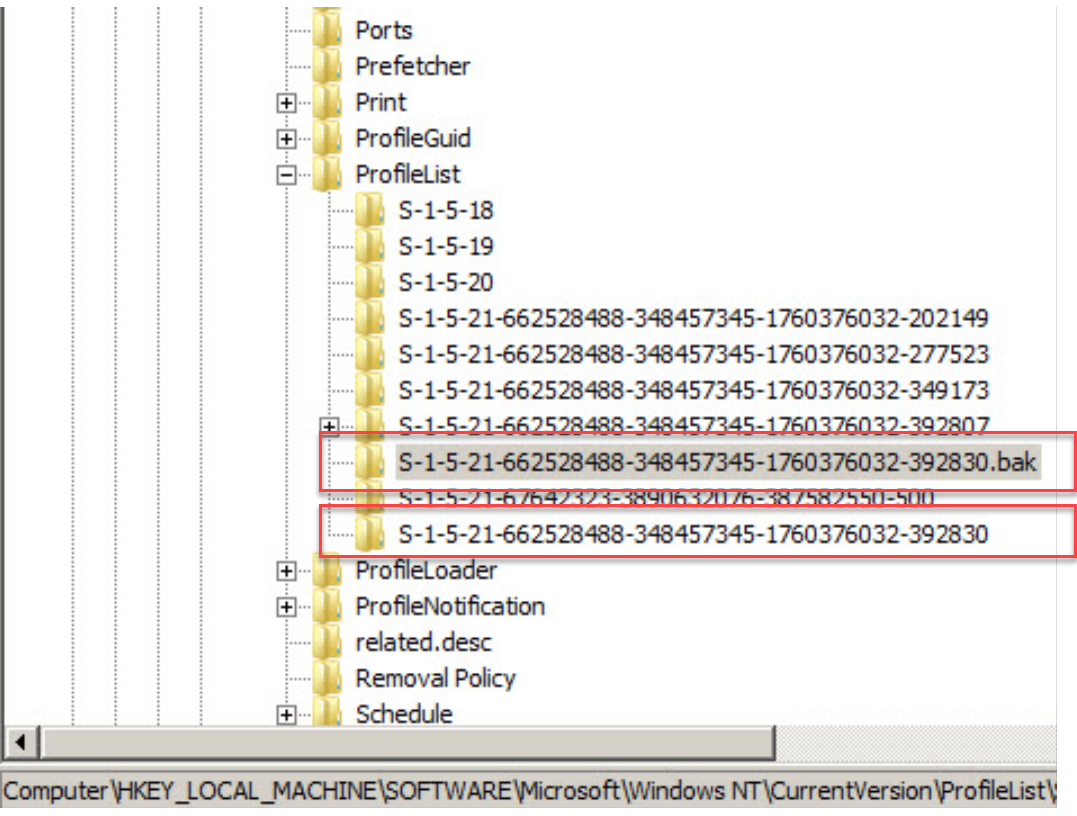
After a reboot, all is well.
Thank you so much for taking the time to look at this with me.
~ Jack
' cx='32' cy='32' r='32' /%3E%3Ctext x='50%25' y='55%25' dominant-baseline='middle' text-anchor='middle' fill='%23FFF' %3EHJ%3C/text%3E%3C/svg%3E)

' cx='32' cy='32' r='32' /%3E%3Ctext x='50%25' y='55%25' dominant-baseline='middle' text-anchor='middle' fill='%23FFF' %3EA%3C/text%3E%3C/svg%3E)
