Microsoft 365 and Office | SharePoint Server | For business
A family of Microsoft on-premises document management and storage systems.

This browser is no longer supported.
Upgrade to Microsoft Edge to take advantage of the latest features, security updates, and technical support.
' cx='32' cy='32' r='32' /%3E%3Ctext x='50%25' y='55%25' dominant-baseline='middle' text-anchor='middle' fill='%23FFF' %3ES%3C/text%3E%3C/svg%3E)
Workflow error after migration.
I would say not exactly migration, but it appears to be having some issue. Please refer below response from end user.
Please find user response in the attached screenshots c1,c2 and c3 ( in order)
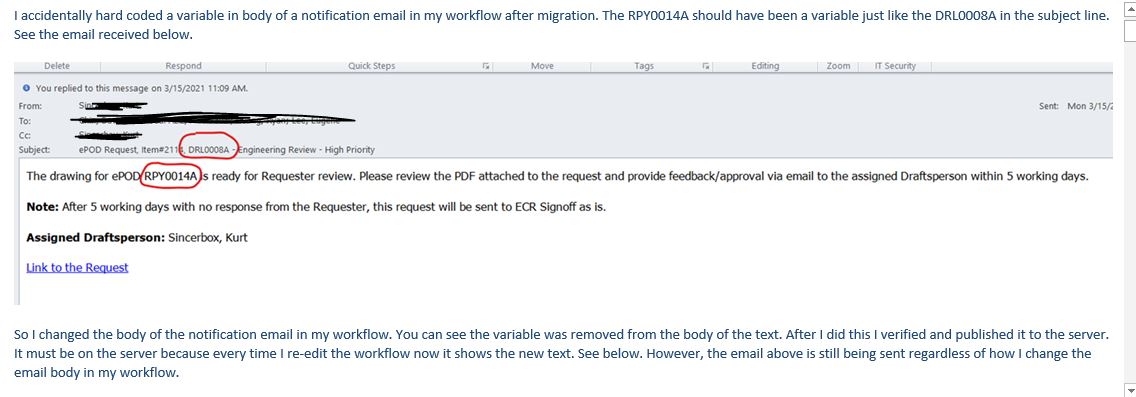
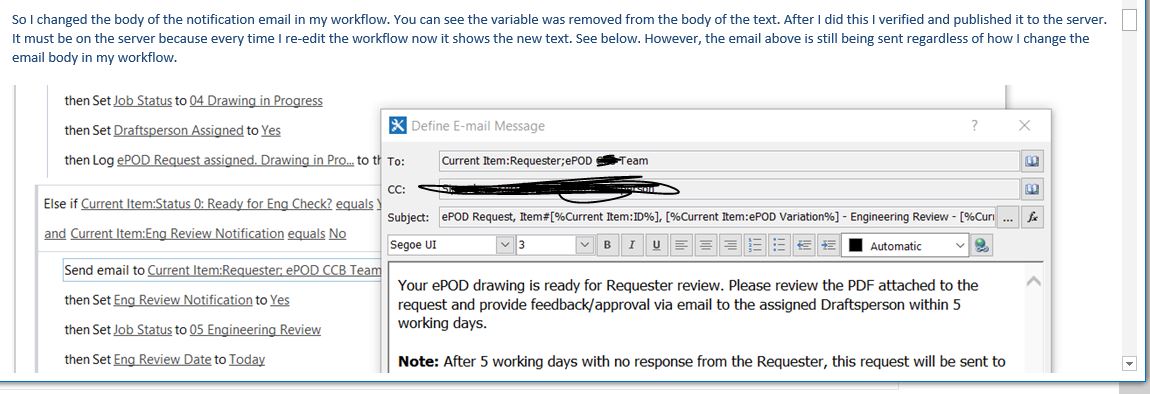
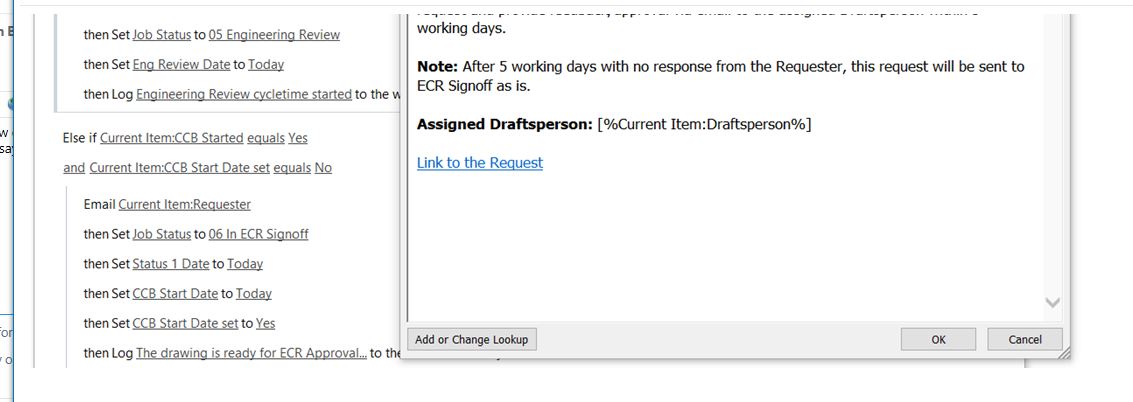
Please suggest what end user exactly trying to say and what he wants.
however I have compared 2010 and 2016 workflows ( before migration and after migration )
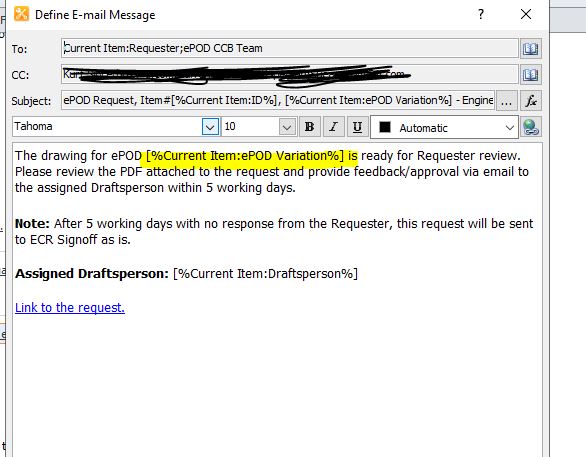
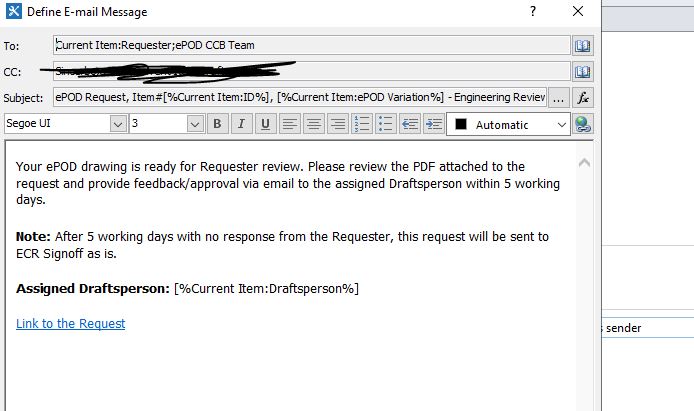
please find attached email body for 2010 workflow and 2016 workflow
highlighted one is missing in 2016, is it causing a problem?
A family of Microsoft on-premises document management and storage systems.
Answer accepted by question author
It is resolved after clearing the cache

@sns ,
Thanks for your contribution!
Hi @sns ,
As per my understanding, the end user is confused about why variable [%Current Item:ePOD Variation%] in the email body is wrongly displayed. In the screenshot given by the end user, variable [%Current Item:ePOD Variation%] is displayed as DRL008A in email subject but as RPY0014A in email body. So the end user decided to delete [%Current Item:ePOD Variation%] in email body and he found that the workflow to workflow didn't apply his changes. Everything goes on like what is in his first screenshot. In short, the user changed the workflow from the screenshot given by you above(2010) to below(2016), but he found changes didn't been applied.
I would suggest you re-create same workflow and re-publish it to your SharePoint. To see if the new workflow works normally in your end.
If an Answer is helpful, please click "Accept Answer" and upvote it.
Note: Please follow the steps in our documentation to enable e-mail notifications if you want to receive the related email notification for this thread.
Hi Allen Xu,
It is same workflow in 2010 and 2016, only highlighted one ([%Current Item:ePOD Variation%]) in 2010 is missing in 2016
it is lengthy workflow, and everything is same in 2010 and 2016.
justing adding [%Current Item:ePOD Variation%] in 2016 as 2010 , will it not fix the issue?
and it is same in 2010 and 2016 again creating workflow it is same right?
what should I suggest to user?
Please explain. THank you
Hi @sns ,
As said in the end user's description:
So I changed the body of the notification email in my workflow. You can see the variable was removed from the body of the text. After I did this I verified and published it to the server.
So, Isn't this variable [%Current Item:ePOD Variation%] deleted by the user himself in SharePoint 2016?
HI ALlen Xu,
Okay. Yes it might have deleted by end user. not sure, I will check with him
so why there is difference in 2010 and 2016 though it is same workflow logic,
why he is facing issue now?
what should I ask to user now? Please help
@sns ,
Many causes may result in the failure like mail servers connectivity, library/list updates, SharePoint Designer issues, migration and so on. It's hard to troubleshoot If there is not any specific error. Is there any error when the user publish the new workflow? Check your ULS logs for more clues. I would firstly suggest the user to re-create same workflow and re-publish it to SharePoint.
HI Alle Xu,
There is no error while publishing workflow
so do we have any workaround other than recreating the workflow?
because workflow is very lengthy .
& I received update from user now, please see below response from end user,
screenshots D1 D2 D3 are in order,


Please help.